Form library · Construction and handover

Temporary works inspection checklist

For people inspecting temporary works against approved information. Record the item and its position, heights or depths measured on site or from a photo, the guardrail height and gaps for edge protection, and the status of the permit to load or use. The form counts checks needing action, checks edge protection against the Schedule 2 minimums and shows a red note not to load or use the item until it is put right. Try the form below, see every question or open a completed example.

Ready to use from the form library, and every question is yours to edit. Try it for a small trial fee, cancel any time.

Try it on your phone

Try it on this phone

Fill in the temporary works inspection on your phone now

See how the temporary works inspection looks on your phone

Scan the code with your phone camera. It opens the real form, no sign-up needed.

Open the live example and fill it in, just as your team would on site. No sign-up needed.

See it on this phone

Every question is editable. Add this form to your account, then change the wording, add or remove questions and options, and make it fit your own jobs.

Or start your trial with this form ready →

One email, and we won't add you to a mailing list.

What is the basis for temporary works inspection?

HSE explains that temporary works require planning and management so they withstand foreseeable loads and are used for their intended purpose. Inspect against the approved design and project control procedure.

Last updated . Facts checked by the SiteSurvey team on 20 October 2026 against The Work at Height Regulations 2005, Schedule 2, HSE temporary works and HSE inspection of work equipment.

Built for inspecting temporary works

Record the item and its position, the height or depth measured on site or from a photo, and for edge protection the guardrail height and gaps by tape. The form checks edge protection against the Schedule 2 minimums, counts checks needing action and shows the permit status, with a red note not to load or use the item until it is put right.

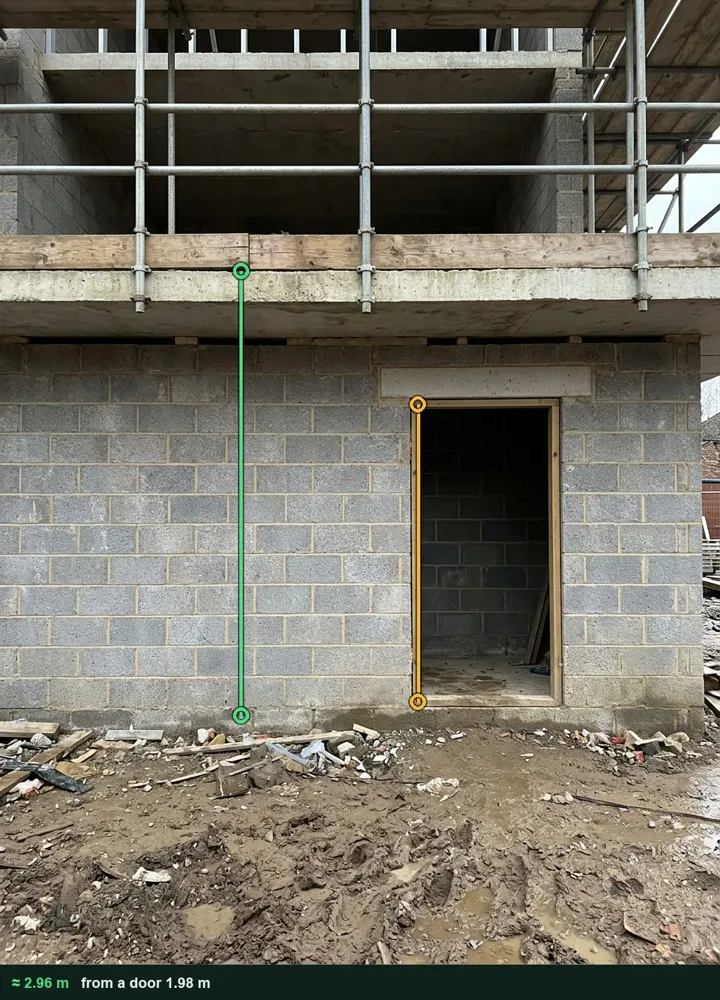
A block of flats under construction marked up in Measure from photo: an amber line on the ground floor door opening and a green line from the ground to the first floor slab edge, about 2.96 m

Fall height from a photo

Photograph the edge with a door in the same plane and tap from the ground to the slab edge. The height goes into the record with the marked-up photo. It works on web forms in any phone browser today, and the app version is on its way.

How measuring from a photo works →
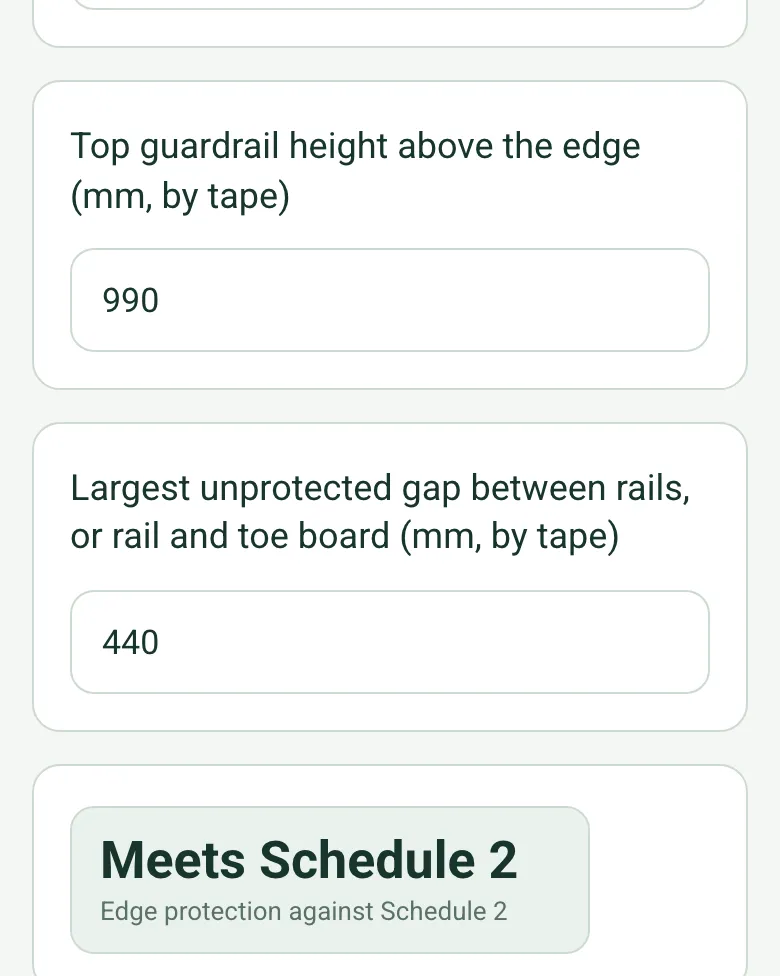
Top guardrail height 990 mm and largest gap 440 mm by tape, with the result Meets Schedule 2

Guardrail checked against Schedule 2

For edge protection, enter the guardrail height and the largest gap measured with a tape. The form compares them with the Work at Height Regulations 2005, Schedule 2: at least 950 mm and no gap over 470 mm.

How calculated fields work →
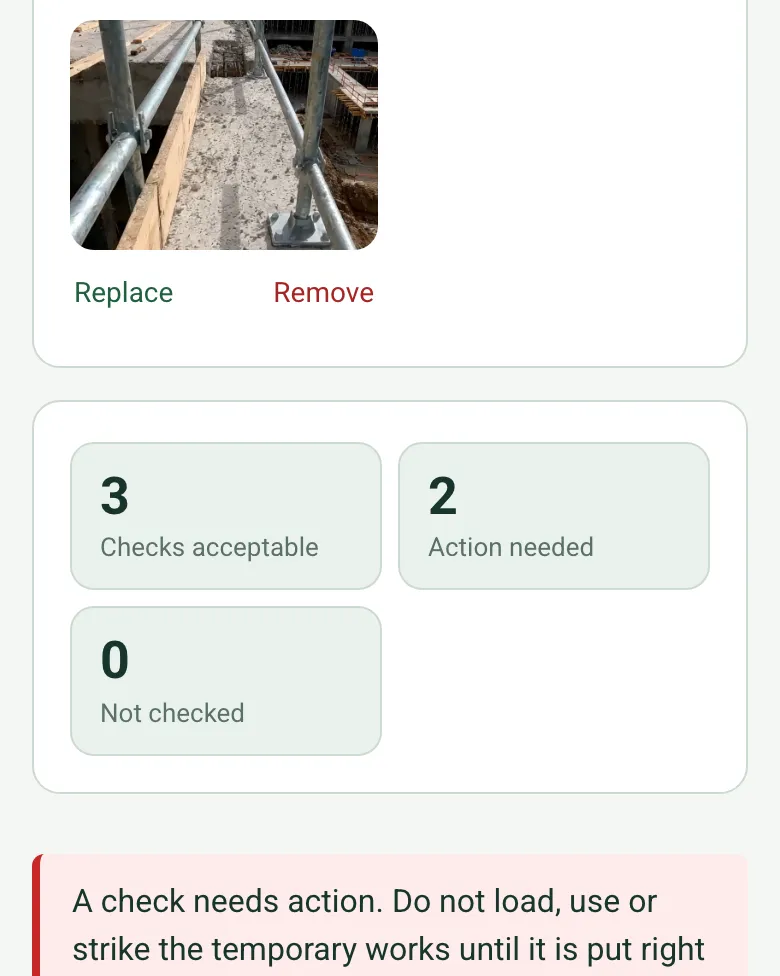
Checks acceptable 3, action needed 2, not checked 0, with a red note not to load, use or strike the temporary works until it is put right

Do not load or use

The form counts the checks needing action and brings up a red note not to load, use or strike the item. The status of the separate permit to load is recorded too.

How calculated fields work →

Film the edge

Record the length of the edge protection as a short video in the same record.

A completed temporary works inspection

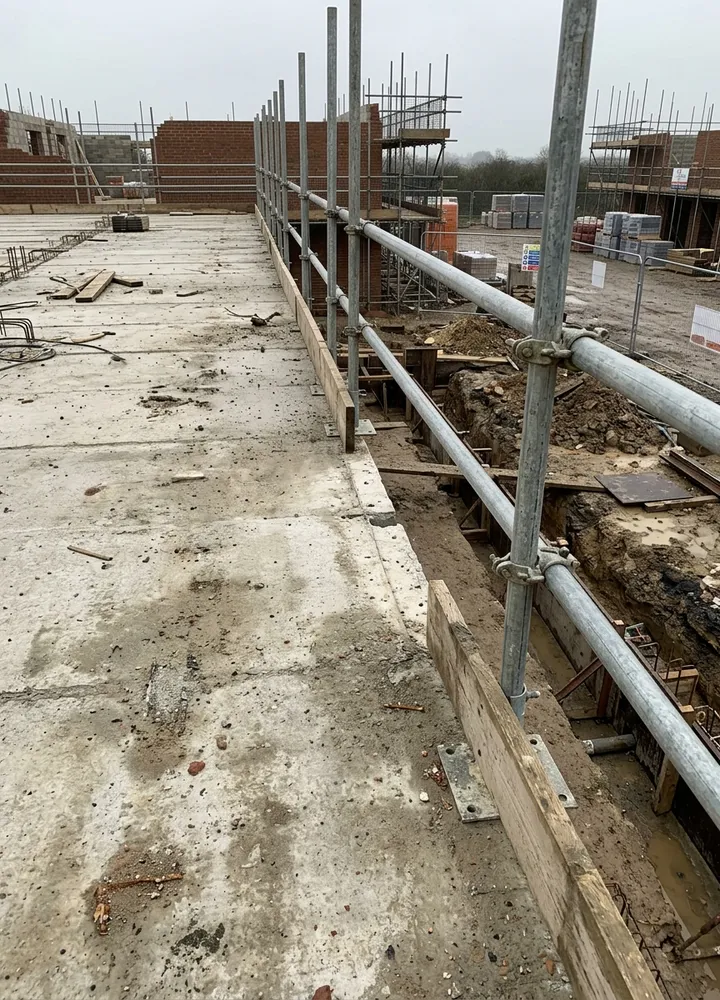
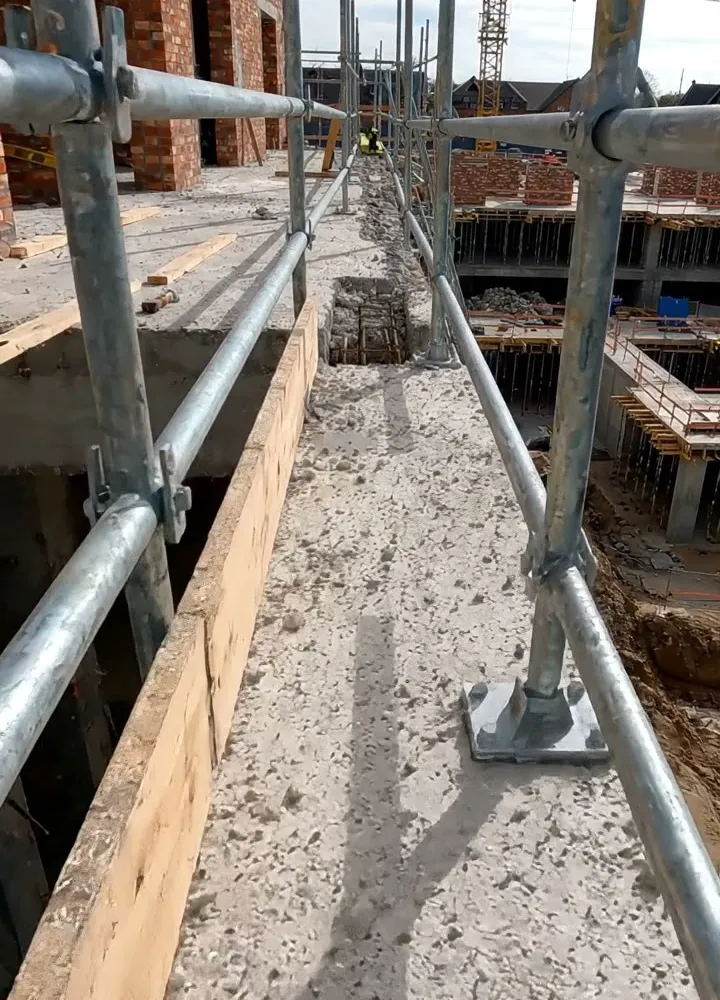
Fictional edge protection on a block of flats after strong winds: a missing toe board beside an open trench and a moved base plate put right, the fall height measured at about 2.96 m from a photo, and the guardrail at 990 mm with a largest gap of 440 mm.

Scaffold tube guardrails along a slab edge with a gap in the timber toe board above an open trench
Grid 4 · toe board missing · replaced
Tube and fitting edge protection along a first floor slab with base plates
TW-C-11 · edge protection after the wind

Try the temporary works inspection form live

Answer a few questions and watch it adapt. Your answers are not saved, and any photos you add are deleted within the hour.

Live form: Temporary Works InspectionOpen full screen ↗
Fill it in right here

This is the real form as your team would use it: questions appear as you answer, scores work themselves out and you can add photos and signatures. No sign-up needed. Or open a completed example to see every answer, photo and score filled in.

Want to see one filled in? See a completed temporary works inspection report (PDF), made by SiteSurvey from a fictional site visit.

For teams

Using the temporary works inspection template across several sites?

Paper or a spreadsheet works for one site. When several sites or managers do the same check, SiteSurvey keeps every result in one place.

  • Each site uses the same form on a phone or tablet, with photos attached to the answer they belong to.
  • Results from every site sit together, so you can compare sites and spot the same problem coming back.
  • Each completed check becomes a branded PDF report you can share or file.

Fill it in on a phone or tablet

Your team completes the temporary works inspection on site in the SiteSurvey app on iPhone, iPad and Android phones and tablets. The project name and address fill in for them, it works without signal, and it syncs when the device is back online with photos kept against the question they answer.

Customers and subcontractors do not need the app: send them a link and they can fill it in from any browser.

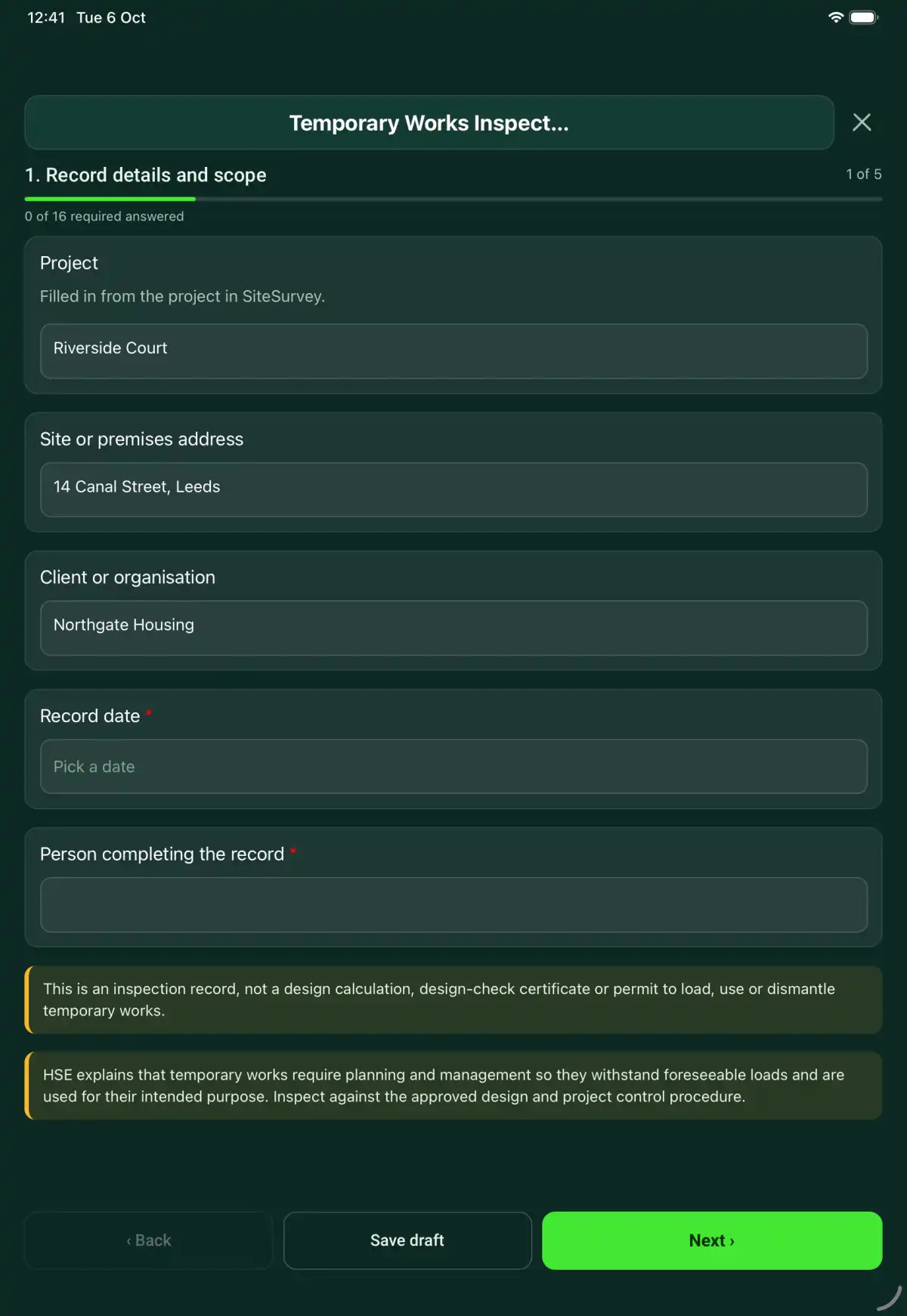
The Temporary Works Inspection form in the SiteSurvey app on a tablet
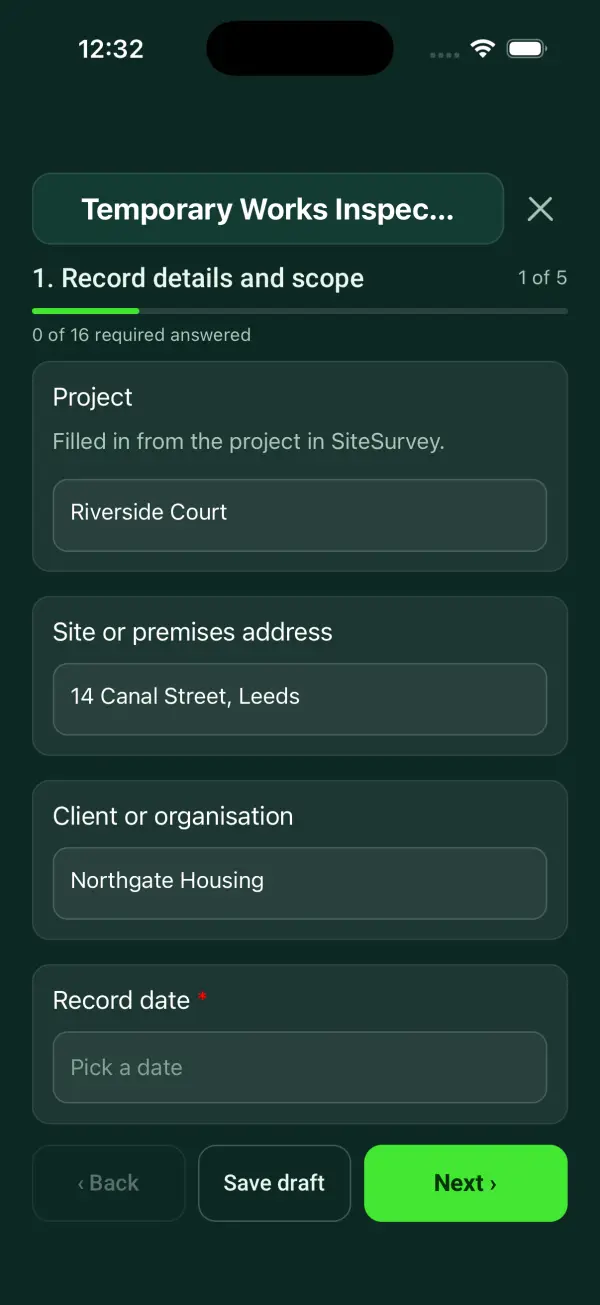
The Temporary Works Inspection form in the SiteSurvey app on a phone

Every question in the temporary works inspection template

A temporary works inspection linking the item, approved drawings, construction observations, changes, restrictions and separate release references. 5 sections and 51 questions. Follow-up questions and guidance appear only when an answer calls for them, so the person on site never sees the ones that do not apply.

Make it your own: every question is editable

This is a starting point, not a fixed form. Once it is in your SiteSurvey account you can reword any question, add or remove questions, sections and answer options, and add your own logo, so it fits the way your team works and the jobs you do.

Details you only enter once

Add this form to a project in SiteSurvey and it fills in what the project already knows, so nobody on site retypes it and every form on the job uses the same names. Anything filled in can still be changed.

  • Project: the project name
  • Site or premises address: the site address, from the space or the project
  • Client or organisation: the project's customer

Record details and scope

  • ProjectShort answer

    Filled in from the project in SiteSurvey.

    Fills in from the project name
  • Site or premises addressShort answer
    Fills in from the site address, from the space or the project
  • Client or organisationShort answer
    Fills in from the project's customer
  • Record date*Date
  • Person completing the record*Short answer
  • CheckThis is an inspection record, not a design calculation, design-check certificate or permit to load, use or dismantle temporary works.
  • CheckTemporary works are managed under BS 5975:2019+A1:2020 (code of practice for temporary works procedures and permissible stress design of falsework), with a temporary works coordinator and supervisor, design checks and permits to load and strike. The Construction (Design and Management) Regulations 2015 require reasonably practicable steps to keep any new or existing structure stable while it is temporary or in a weak state (regulation 19) and excavations to be supported and inspected (regulation 22). Edge protection and working platforms must meet the Work at Height Regulations 2005, Schedules 2 and 3. Inspect against the approved design and the project procedure.
  • Weather on siteAnswer

    Note high wind, heavy rain or frost that affects the item in What you saw on site.

Item and stage

  • Temporary works register item and location*Short answer
  • Type of temporary worksChoose one
    • Edge protection
    • Propping or falsework
    • Excavation support
    • Formwork
    • Scaffold or access platform
    • Hoarding or fencing
    • Other
  • Item position on site (GPS)Short answer

    Optional. Mark where the item is, to match the register.

  • Inspection stage and trigger*Short answer
  • Approved drawing and revision*Short answer
  • Inspector (if not the person completing the record) and competence reference*Short answer

Inspection observations

  • Configuration checked against current drawings*Choose one
    • Acceptable
    • Action needed
    • Not checked
    • Not applicable
  • Action, limitation or reason not applicable*Notes
    Shown only when the answers above make it relevant
  • Supports, connections and visible condition checked*Choose one
    • Acceptable
    • Action needed
    • Not checked
    • Not applicable
  • Action, limitation or reason not applicable*Notes
    Shown only when the answers above make it relevant
  • Ground or foundation conditions reviewed within scope*Choose one
    • Acceptable
    • Action needed
    • Not checked
    • Not applicable
  • Action, limitation or reason not applicable*Notes
    Shown only when the answers above make it relevant
  • Loading and access restrictions checked*Choose one
    • Acceptable
    • Action needed
    • Not checked
    • Not applicable
  • Action, limitation or reason not applicable*Notes
    Shown only when the answers above make it relevant
  • Changes and damage since last inspection recorded*Choose one
    • Acceptable
    • Action needed
    • Not checked
    • Not applicable
  • Action, limitation or reason not applicable*Notes
    Shown only when the answers above make it relevant
  • Height or depth measured on site (m)Number

    Optional. Such as the fall height at an edge, a prop height or an excavation depth. Measure from a photo with a door or a person in the same plane, or use a tape.

  • Height or depth on the drawing (m)Number

    Optional, where the drawing gives one.

  • Measured minus drawing (m)Worked out by the form
    Shown only when the answers above make it relevant
  • Top guardrail height above the edge (mm, by tape)Number
    Shown when “Type of temporary works” is “Edge protection”
  • Largest unprotected gap between rails, or rail and toe board (mm, by tape)Number
    Shown when “Type of temporary works” is “Edge protection”
  • Edge protection against Schedule 2Worked out by the form
    Shown only when the answers above make it relevant
  • WarningThe Work at Height Regulations 2005, Schedule 2, call for the top guard-rail to be at least 950 mm above the edge and no gap over 470 mm. Do not allow work at this edge until it is put right.
    Shown only when the answers above make it relevant
  • Inspection evidencePhotos
  • Checks acceptableWorked out by the form
  • Action neededWorked out by the form
  • Not checkedWorked out by the form
  • WarningA check needs action. Do not load, use or strike the temporary works until it is put right or the temporary works coordinator has agreed it is safe.
    Shown only when the answers above make it relevant

Restrictions and referral

  • Departures and designer/coordinator referral*Notes

    Identify the exact departure, affected item and drawing revision. Record restrictions and the authorised review before closing the finding.

  • Reinspection evidence referenceShort answer
  • Separate release or permit referenceShort answer
  • Status of the separate permit to load or useChoose one
    • Permit to load or use issued
    • Permit suspended
    • Not yet issued
    • No permit needed for this item
  • CheckNo permit is in force. Do not load or use the item until the temporary works coordinator issues or reinstates the permit.
    Shown only when the answers above make it relevant
  • Inspection limits and areas not inspected*Notes
  • CheckWork at Height Regulations 2005, regulation 12 and Schedule 7: a working platform from which a person could fall 2 m or more must be inspected after it is put up, after anything that could affect its safety, and at intervals of not more than 7 days. The report must be given to the person it is done for within 24 hours.
    Shown only when the answers above make it relevant
  • CheckConstruction (Design and Management) Regulations 2015, regulation 22: an excavation must be inspected by a competent person at the start of each shift, after any event likely to affect its strength or stability, and after any accidental fall of rock, earth or other material. Do not let work go on until it is safe.
    Shown when “Type of temporary works” is “Excavation support”
  • Next inspection dueDate

    Scaffolds and working platforms: at most 7 days. Excavations: each shift. Other items: as the temporary works design or coordinator sets.

  • Days to the next inspectionWorked out by the form
    Shown when “Record date” is answered and “Next inspection due” is answered
  • CheckThe next due date is before the date of this visit. Check the date.
    Shown only when the answers above make it relevant

Actions and review

  • Are further actions required?*Choose one
    • Yes
    • No
  • Further action
    Repeat for each further action. Each one asks:
    Shown when “Are further actions required?” is “Yes”
    • Action and evidence reference*Notes
    • PriorityChoose one
      • Urgent
      • High
      • Medium
      • Low
    • Person responsible*Short answer
    • Target dateDate
    • Action status*Choose one
      • Open
      • In progress
      • Completed
    • Completion evidenceNotes
      Shown when “Action status” is “Completed”
  • Outstanding limitations and information to pass onNotes
  • Record status*Choose one
    • Ready for review
    • Further work needed
    • Work or use stopped
  • CheckA check is marked as not checked or needing action. Make sure the actions record what was done before this is marked ready for review.
    Shown only when the answers above make it relevant
  • Reviewed byShort answer
  • Review dateDate
  • Author signature*Signature
  • CheckSigning records the information entered. It does not itself certify legal compliance, remove a limitation or authorise unsafe work.

Scope and responsibility

This is an inspection record, not a design calculation, design-check certificate or permit to load, use or dismantle temporary works.

What a useful entry looks like

Departures and designer/coordinator referral

Identify the exact departure, affected item and drawing revision. Record restrictions and the authorised review before closing the finding.

Item TW-06 differs from detail D-03 revision B at the recorded connection. The departure has been referred to the designated reviewer.

Fictional example of record wording. Use the actual evidence and approved arrangements for your job; this is not a completed report or an instruction to carry out the work.

See it filled in

A completed temporary works inspection report, made by SiteSurvey from a fictional site visit: every answer, the photos, the guidance that applied and the sign-off, ready to send as a PDF.

See completed form (PDF) ↗

Temporary Works Inspection FAQs

Does the form check guardrail heights?

For edge protection, enter the top guardrail height and the largest gap measured with a tape. The form compares them with the Work at Height Regulations 2005, Schedule 2: a top guard-rail at least 950 mm above the edge and no gap over 470 mm. It records the check; it does not approve the design or issue a permit.

How does this differ from the register?

The register tracks items and document references; this records observations from one inspection.

Does signing allow loading?

No. Follow the project release procedure and record the separate authority.

What happens after a design change?

Record the revision, referral and required further inspection before relying on previous findings.

What are the limits of this template?

This is an inspection record, not a design calculation, design-check certificate or permit to load, use or dismantle temporary works.

Can I complete this form on site and share the record?

In the SiteSurvey app the form works offline, with photos and signatures recorded against the questions. Share the completed record as a PDF or a link. Dates and action owners are recorded fields; this form does not send reminders or update other systems.

Related

Hazards this form covers

Who each hazard harms, what the law expects and the control measures to look for, in our hazard library.

Use this temporary works inspection form with your team

Add it from the form library in one click, change any question, and every completed form becomes a branded PDF report.

Start your trial →