Site survey software
Site survey software from the first walk to the signed-off report.
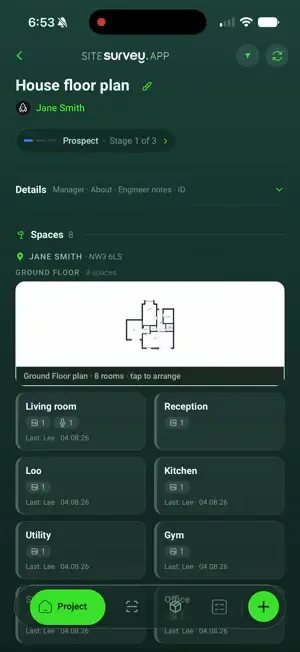
Map every space on the floor plan, complete the right form in each one, and capture the photos, measurements and spoken notes that back it up, offline, on a phone. The report is generated from what the survey already recorded, so nothing is typed up twice.
The Works £25 per user per month when billed annually (Base from £13) · trial from £1, cancel any time
See a sample report ↓Start from the AV site survey template ↓
180 m²
Floor area
4
Display positions
7
Open items
Unit 7 sales floor, the sample report below
What is site survey software?
Site survey software is a mobile app and web portal for recording a site visit. The surveyor completes forms and captures photographs, measurements and notes against each space, and the report is produced from that record, not typed up later. SiteSurvey is site survey software for iOS, Android and web, at £25 per user per month on The Works.
Last updated .
Types of site survey, and where each one starts
Every survey below uses the same record: spaces, a form in each, the evidence and the report. Each starts from a ready-made template in the SiteSurvey form library.
| Survey | What it records | Starting template |
|---|---|---|
| AV site survey | Room size, power and data, ceiling and structure, asbestos information, equipment positions | AV site survey template |
| IT site survey | Asbestos and access, containment routes, comms room rack space, power, cooling and outlets by area | IT site survey checklist |
| Building survey | Limits of inspection, element by element condition ratings, roof space, windows, services and risks | Building inspection checklist |
| Stock condition survey | HHSRS hazards, each element with its lifecycle and renewal year, kitchen, bathroom, heating and alarms | Stock condition survey template |
| Dilapidations survey | Lease clauses, each item's breach, remedy and cost, and a cost summary | Dilapidations survey template |
| Asset register survey | Each asset's tag, make, model, serial, location, install year, expected life, condition and photos | Asset register template |
SiteSurvey for site surveys, at a glance
- What it is
- Site survey software with apps for iOS and Android and a web portal, used to record surveys space by space and produce the report from that record.
- Who it is for
- Contractors, installers, surveyors, and facilities and property teams who visit sites and report on what they find.
- What it records
- Spaces on the floor plan, form answers, photographs marked up and measured, audio notes, and Walk Cam video with voice-to-text.
- Evidence
- Each entry is dated and recorded against who captured it. Capture works fully offline and syncs when back in signal.
- Price
- When billed annually, The Works is £25 per user per month and Base is £13. Paid monthly, they are £30 and £16. Trial from £1, cancel any time.
- What it does not do
- It is not CAD or design software, it does not price or certify the work, and it does not replace the surveyor's judgement.
The survey is finished on site. The paperwork takes another evening.
Most site surveys are captured across a camera roll, a notebook, a measuring app and a spreadsheet, then rebuilt into a report hours later by someone working from memory. The information was all there on site. It just never stayed together long enough to be useful.
Evidence with no location
A folder of photographs tells nobody which room, riser or unit each one came from.
Typed up twice
Notes written on site get rekeyed into a document that evening, and detail is lost in the transfer.
No signal, no capture
Plant rooms, basements and half-built floors rarely have coverage, so capture stops where the signal does.
How does a site survey work, from the first walk to the report?
01 · Plan the site
Add the project and its floor plan, then map the spaces you are going to walk before you get there.02 · Capture in context
Complete the right form in each space and attach the photographs, measurements and spoken notes that evidence it.03 · Review and fill gaps
Check every space has its form, photos and measurements before you leave site, and flag anything to confirm.04 · Report and sign off
Turn the complete record into the survey report, and sign and date it.Walk Cam, point by point
A site survey, point by point.
Walk Cam takes the surveyor round the site point by point, films each area and writes down the measurements and observations as they speak.
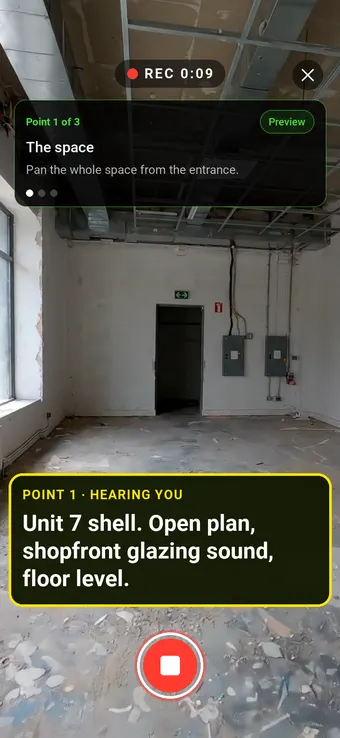
Point 1 of 3
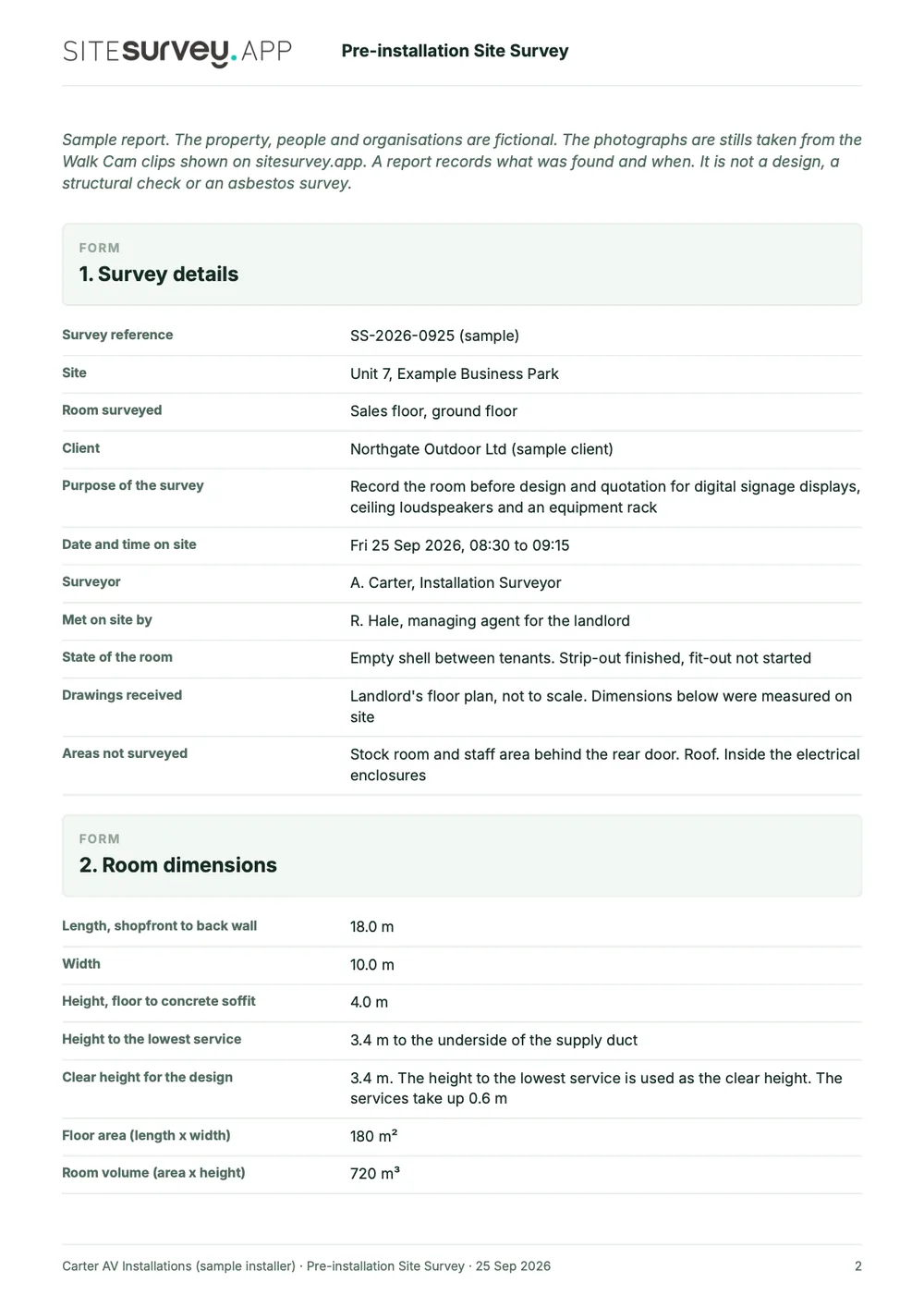
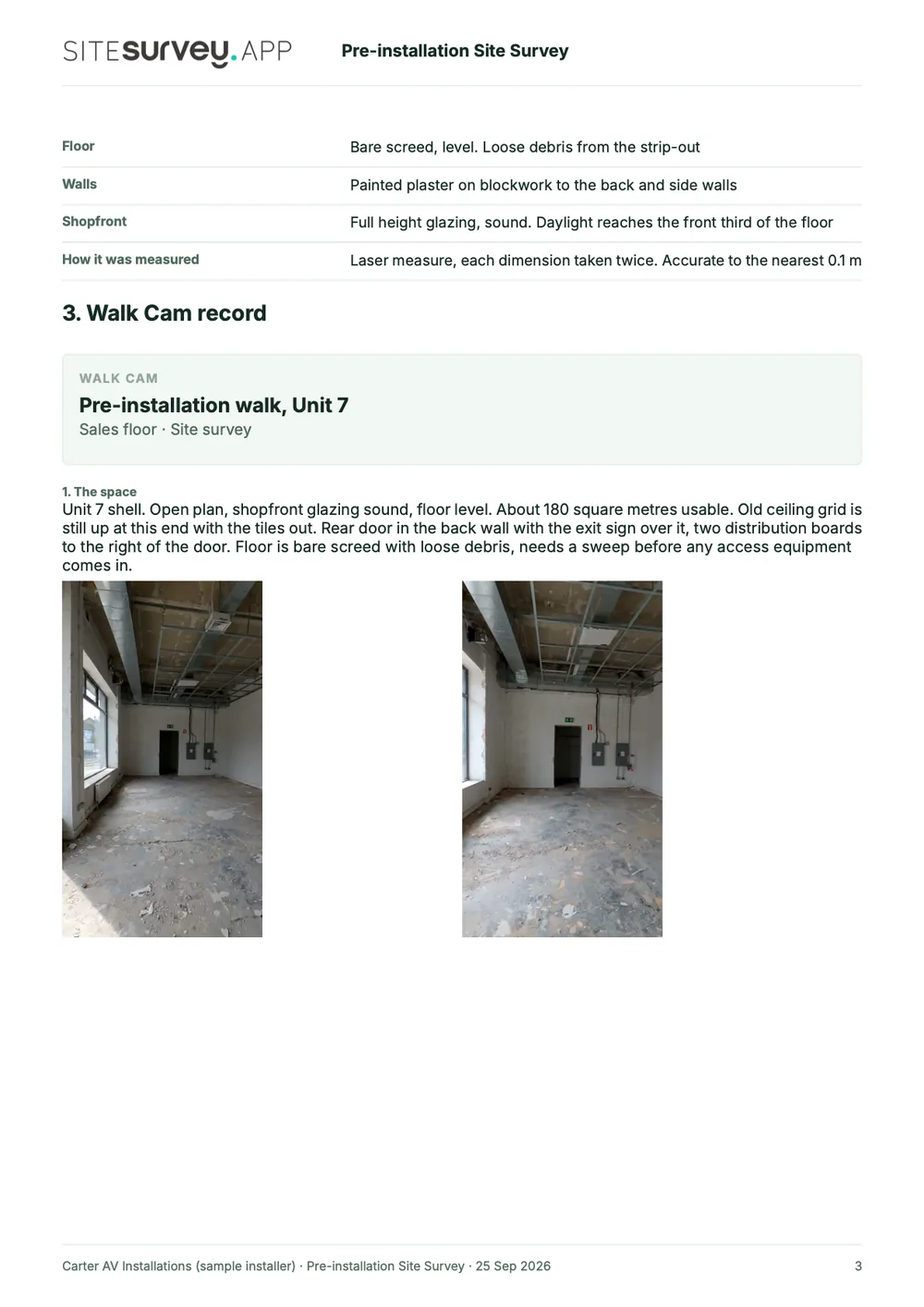
The space
The space filmed and described from the entrance.
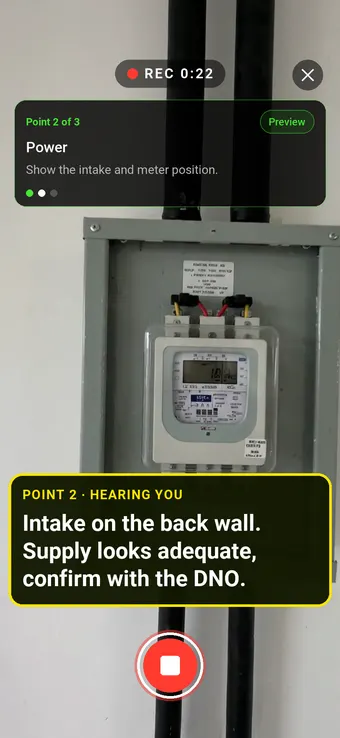
Point 2 of 3
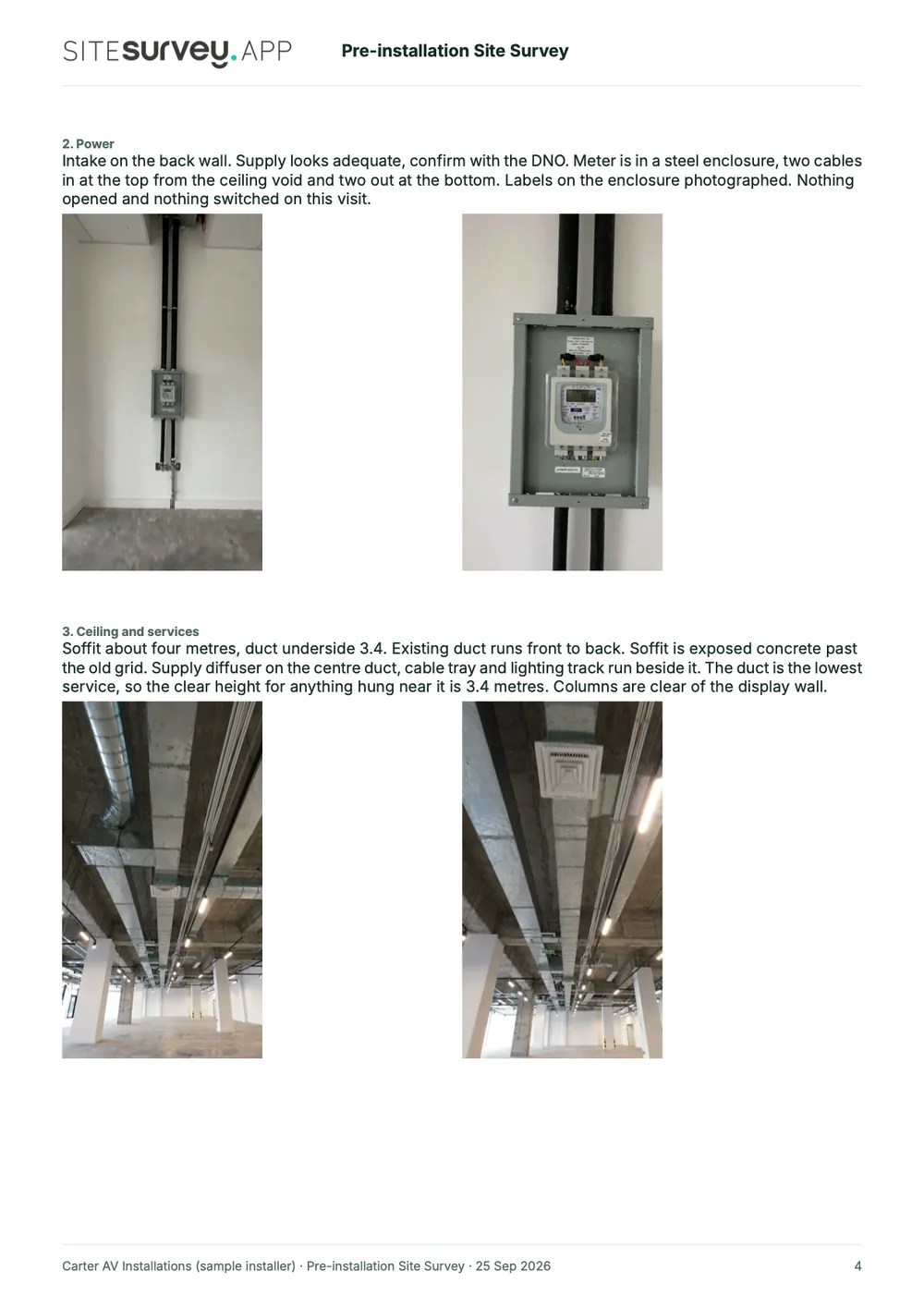
Power
Services located and recorded, with anything to confirm.
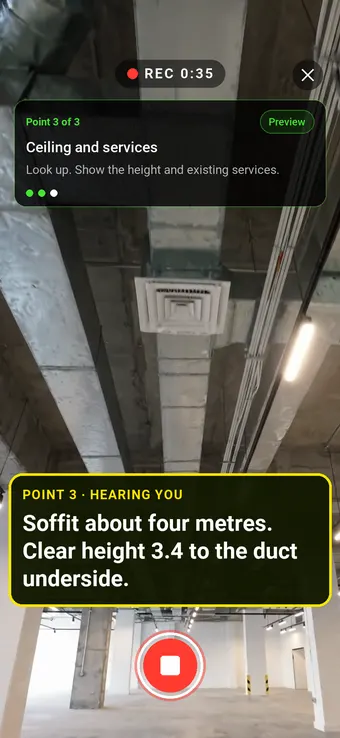
Point 3 of 3
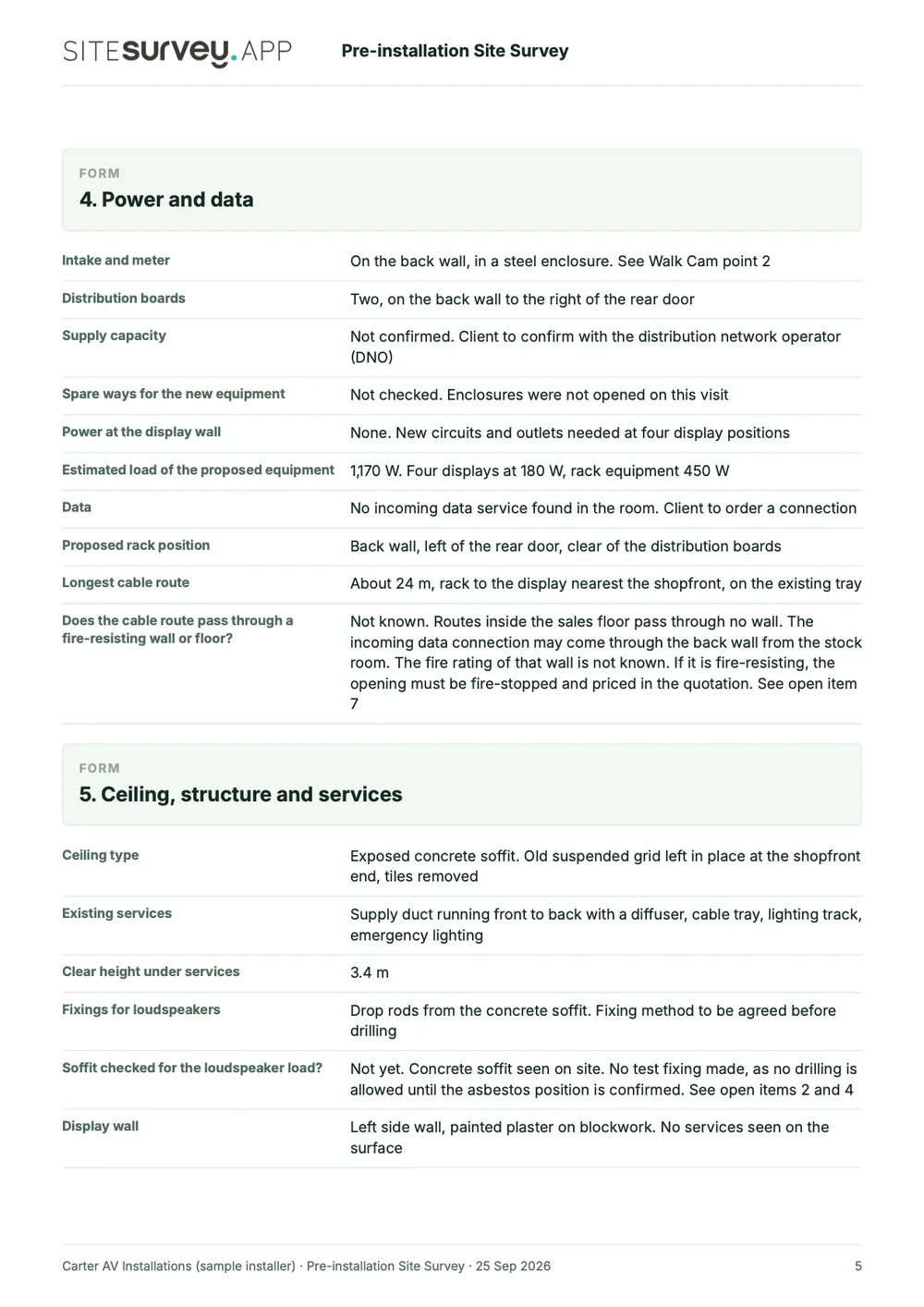
Ceiling and services
Heights and existing services recorded for the design.
What the report looks like
What a site survey report looks like.
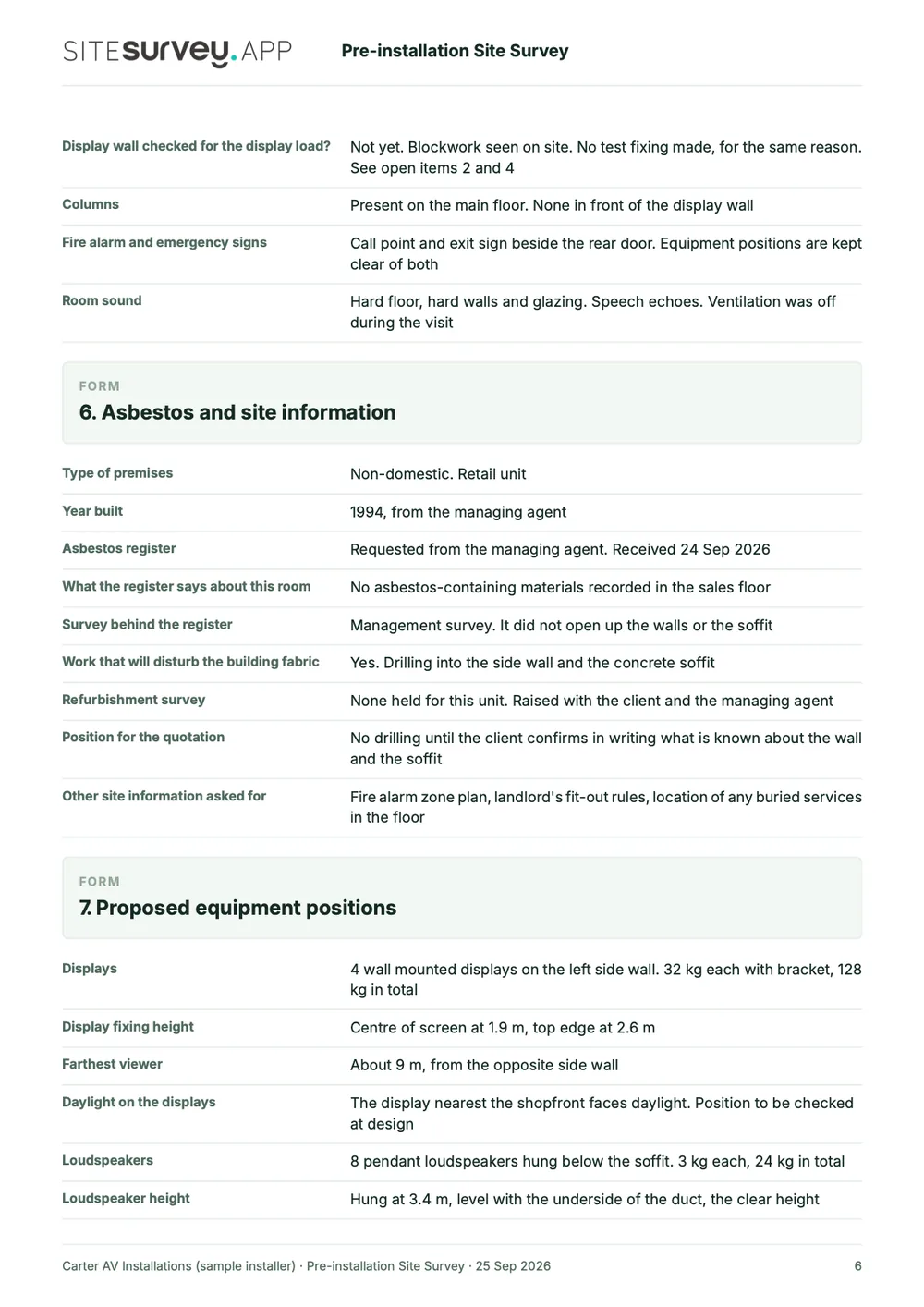
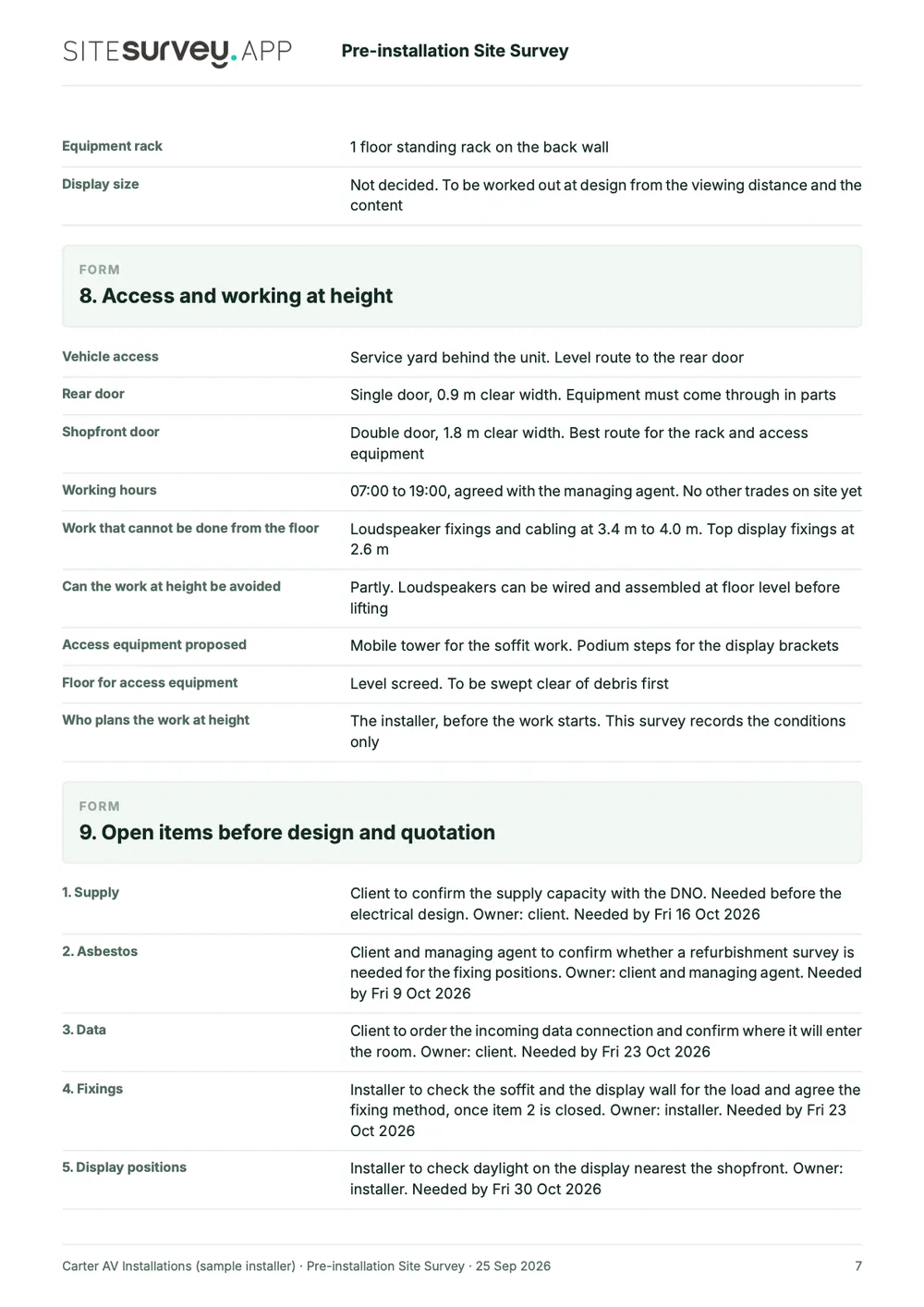
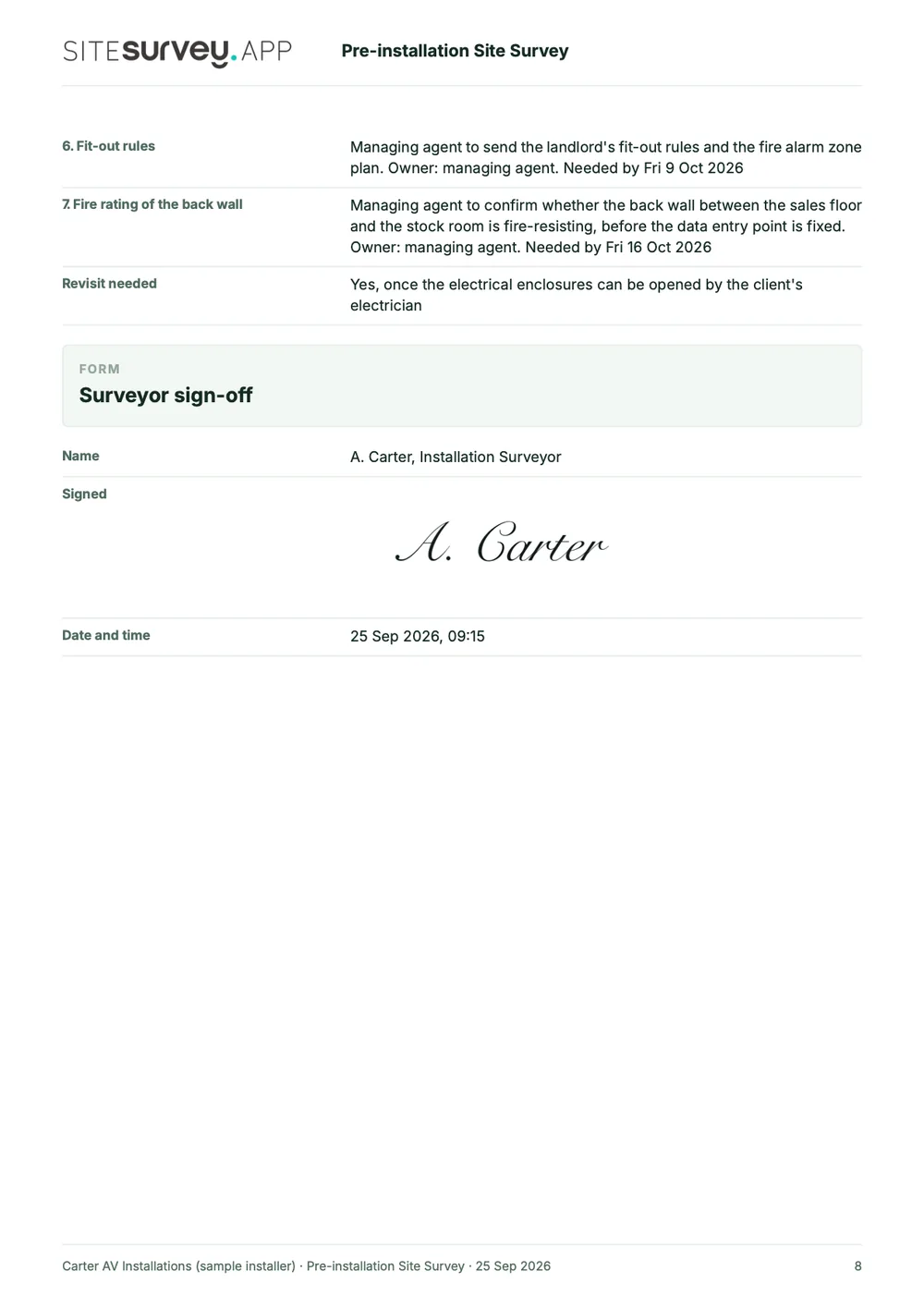
This is a full sample report for a pre-installation survey of a retail unit. Scroll through it here or download the PDF. The photographs are stills from the Walk Cam clips on this page.
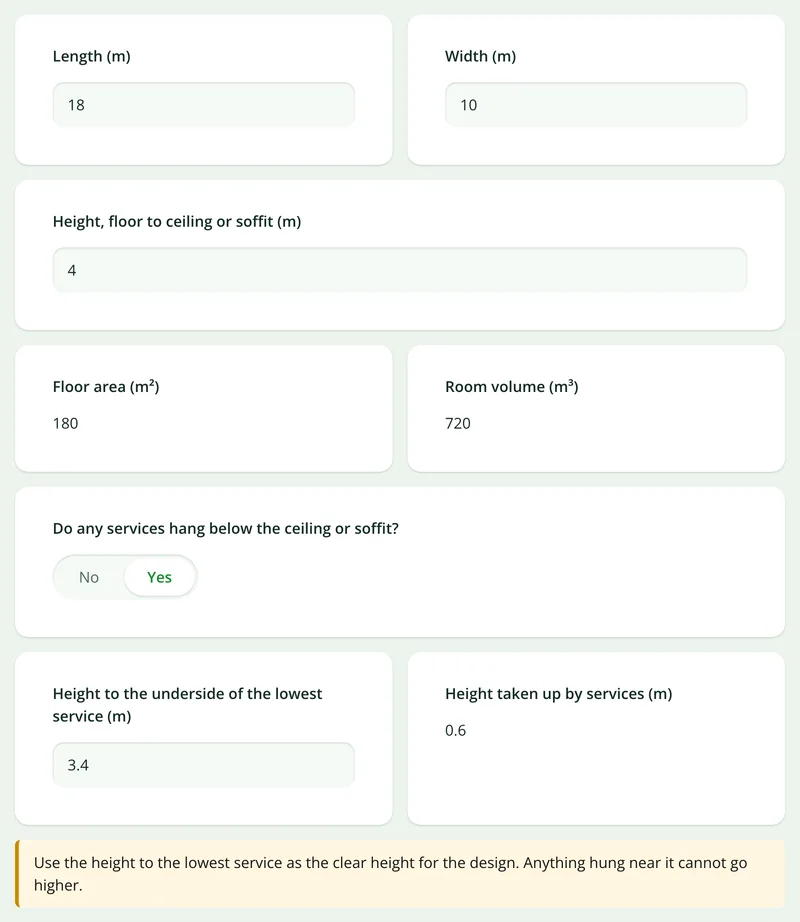
- 1The room, measuredLength, width and height as measured on site, with the floor area, the volume and the clear height under the services.
- 2Point by point, with photosEach Walk Cam point has its stills and the surveyor's spoken notes, written down as they were said.
- 3Power, ceiling and accessWhere the intake is, what is at high level, how equipment gets in and which work cannot be done from the floor.
- 4Open items and sign-offWhat the asbestos register says, what still has to be confirmed before design and quotation, and a dated signature.

Try the form
The form behind the report. Open it and try it.
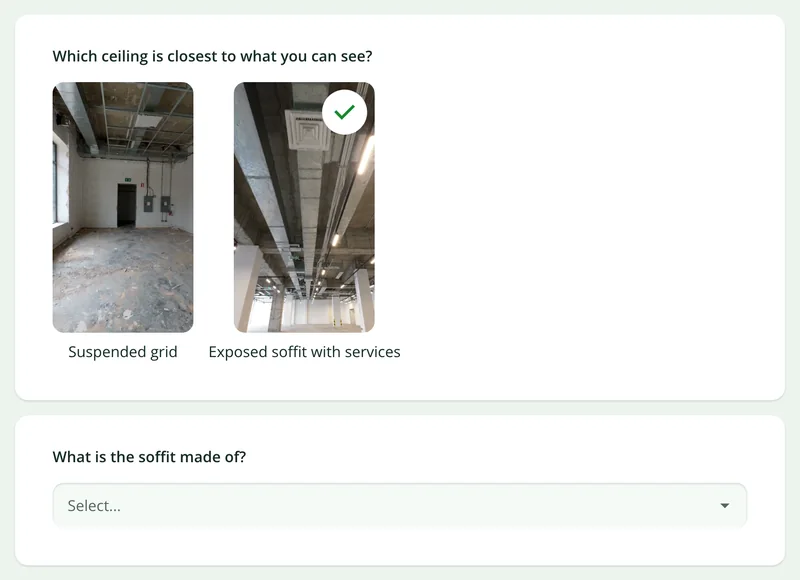
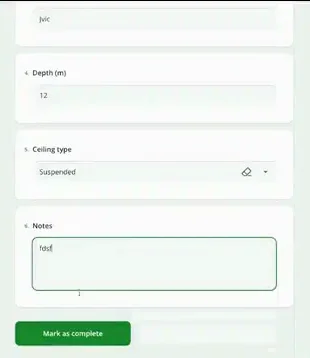
A live site survey form, shared by link with no login. It asks only what applies, works out the area, volume and equipment totals, and takes a separate record for each item of equipment. Answers are cleared every night.
Open the live form →See every question in the AV site survey template →Or see it filled in: the finished record with every answer, and the Walk Cam report with its clips, stills and spoken notes. See the finished record → Watch the Walk Cam report →
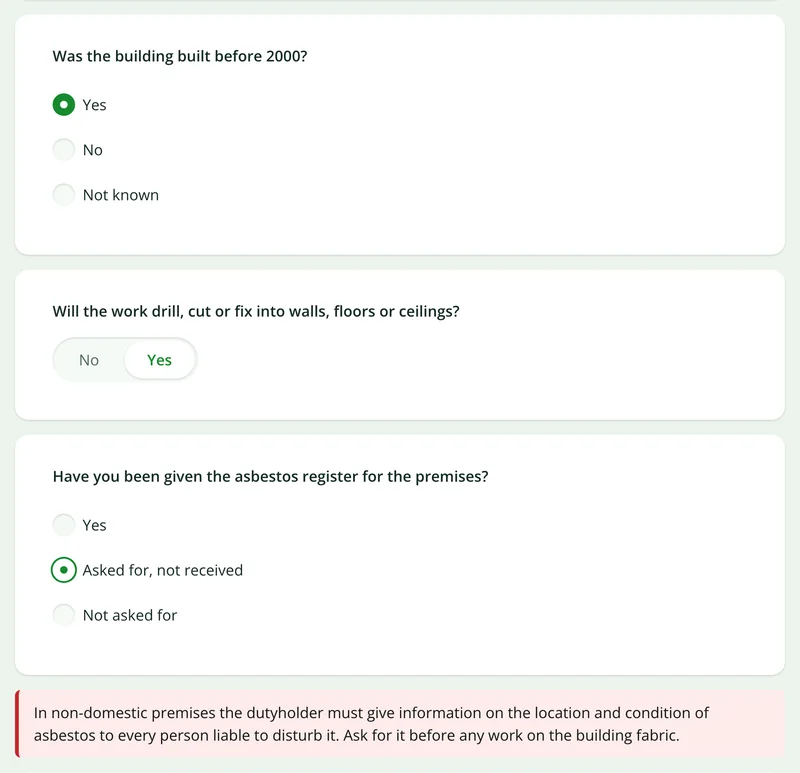
Questions that follow the answers
Say the building dates from before 2000 and the form asks about the asbestos register. If it has not been received, a notice says what to ask for.
More than Walk Cam
Build the form. Share it by link.
Walk Cam films the survey. The survey form behind it is yours to build, and the walk and the form can each be sent to someone outside your team as a link, with no login or app needed.
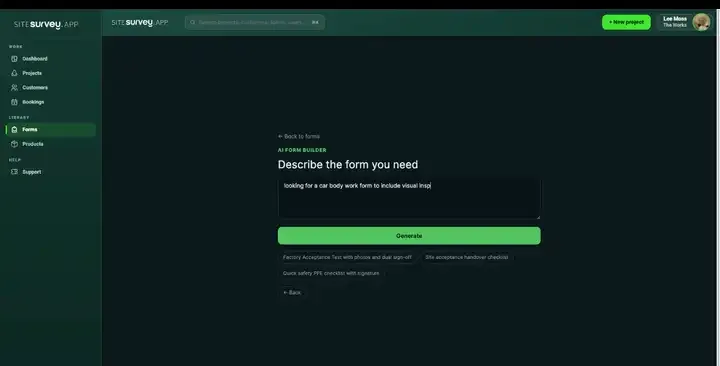
Build your site survey form with AI
Describe what you need to record on site and the AI assistant builds the form: fields, required photos, measurements as numbers and follow-up questions that only appear when they apply. Refine it in chat, edit it visually, or start from a template.
How the form builder works →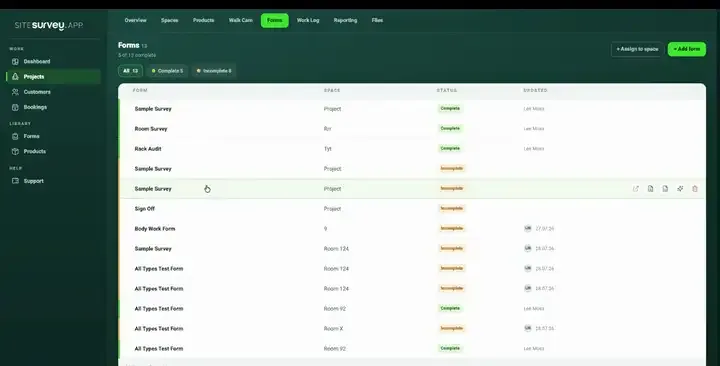
Share by link, no login needed
Make any form shareable and SiteSurvey gives it a unique URL, with an optional password. Customers, tenants or contractors fill it in on their phone’s browser, and their answers land in the same project. Walk Cam recordings and finished reports can be shared the same way, by link or by email.
How Walk Cam sharing works →What should site survey software do?
A survey is only worth capturing if the answer, the place it belongs and the evidence behind it stay together. Everything here is built around that one requirement.
Spaces on the floor plan
Walk the rooms tapping corner to corner, or upload a PDF or CAD plan, and each room becomes a space with its own record.
Forms built for the job
Describe the form you need and it is created, then assign it to the spaces or products it applies to.
Evidence at the source
Photographs, on-image annotations and measurements, scans, signatures and structured answers, captured where they happen.
Spoken notes that write themselves
Record a clip while you talk through what you are looking at and live voice-to-text writes the answer for you.
Offline by default
Capture everything with no coverage at all. It syncs to the project as soon as you are back in range.
Report from the record
The finished record exports as the report, handover pack or client PDF without anything being retyped.
Buyer’s guide
How to choose site survey software
Start with the field workflow, not the longest feature list. Test the software on a real site with poor signal, several rooms and enough photographs to make reporting painful. The right tool should keep the location, answer and evidence together from capture to client report.
01
Works fully offline
Open the project, complete forms and capture photographs, measurements, notes and video without mobile coverage, then sync later.
02
Forms your team can change
You should be able to add required evidence, conditional questions and the fields your own survey needs without paying a developer.
03
Evidence stays with its location
Every answer, photograph and measurement should remain attached to the room, area, asset or product it describes.
04
Gaps are visible before you leave
The surveyor should be able to see which spaces are complete and which required answers or photographs are still missing.
05
The report uses the same record
Look for a PDF or shareable report generated from the captured data, with no evening spent matching camera-roll images to notes.
06
It fits the wider handover
Check how records are reviewed, shared with clients and retained, and whether the tool supports signatures, audit details and customer access.
How much does site survey software cost?
SiteSurvey is priced per user rather than per project or survey. Annual billing gives the lowest monthly equivalent; month-to-month plans are also available.
| Plan | Price per user | What it covers for site surveys |
|---|---|---|
| Base | £13/month annually · £16 monthly | Projects, sites and spaces; floor plans and the space map; reports and project files; mobile capture with photographs, audio, annotations and Walk Cam; offline working. |
| The Works | £25/month annually · £30 monthly | Everything in Base, plus the custom form builder and forms library, products, bookings and form links and reminders for customers. This is the complete site survey workflow shown on this page. |
| Enterprise | Volume pricing | For larger teams that need a tailored rollout, account support or commercial terms. |
The trial is 7 days for £1 or 14 days for £9.99. VAT is included, and the £9.99 trial fee is deducted from the first month when you continue.
Compare every feature and plan →Start from a site survey template.
Open a ready-made site survey form, adjust it to the way your team works and assign it to the spaces you are walking. Every field below is editable, in chat or visually.
Space reference and location on the plan
Condition and observations
Photo evidence, marked up on the image
Measurements taken on site
Products, assets and serial details
Sign-off with date and signature
Try it on your phone
Try it on this phone
Fill in the AV site survey template on your phone now
See how the AV site survey template looks on your phone
Scan the code with your phone camera. It opens the real form, no sign-up needed.
Open the live example and fill it in, just as your team would on site. No sign-up needed.
See it on this phoneEvery question is editable. Add this form to your account, then change the wording, add or remove questions and options, and make it fit your own jobs.
Records for this workflow
Evaluate the whole survey workflow.
Check how information moves from a site visit to a reviewable report. Explore the actual capture tools and a fictional completed report before choosing your workflow.
1. Capture the record in the right place
Use a form for the job and retain photos and observations against the project and space, rather than assembling an unlabelled camera roll later.
Explore field data capture →2. Check the offline working process
Review how to prepare for a visit, work without coverage and sync the captured record when a connection returns.
Read the offline workflow →3. Review the output
Inspect the sample report for the recorded spaces, findings and outstanding items. It is a fictional example, not a customer case study.
Open the sample survey report (PDF) →
What is a site survey?
A site survey is a structured visit to a building or site to record what is actually there, rather than what the drawings say should be. It typically covers the spaces themselves, their condition, the equipment or assets installed, measurements, and photographic evidence of anything notable. The output is a record that other people can act on, such as a report, a schedule of works, an asset register or a handover pack, so the value of a survey depends almost entirely on how completely and how accurately it was captured at the time.
What is site survey software?
Site survey software is the tool a team uses to record a site survey in a structured way and produce the report from it. It replaces the camera roll, notebook and spreadsheet method: each space on the floor plan gets its own record, the forms, photographs, measurements and notes sit against that space, and the report is generated from what was captured. Because the answer, its location and its evidence never separate, the report does not have to be rebuilt from memory afterwards.
What is the best site survey software?
The best site survey software is the one that fits the surveys you actually run. For most field teams the core requirements are a mobile app that works offline, forms you can change yourself, photographs and measurements held against the space they belong to, and a report produced from the record without retyping. If you need design drawings, costing or certification, those are separate tools. SiteSurvey is strong on space-by-space capture, offline working, Walk Cam video and reports from the survey record. It is not CAD software and does not price or certify the work.
How do you do a site survey?
Plan it first: add the project, bring in the floor plan and map the spaces you intend to walk, so you arrive knowing what has to be covered. On site, work space by space, completing the same form in each one and attaching photographs, measurements or spoken notes as you go. Capture the evidence in front of the thing you are describing rather than writing it up later. When the walk is finished the record is already complete, so reporting is an export rather than a writing exercise.
What should a site survey report include?
A site survey report should include the site and the date, who carried out the survey, and for each space the observations, condition, measurements, the equipment or assets found, photographs, and any actions or next steps. It should end with a dated sign-off. If the work means drilling or fixing into a non-domestic building, record the asbestos information first: the dutyholder must assess whether asbestos is or may be present (Control of Asbestos Regulations 2012, regulation 4), and HSE says buildings constructed after 2000 are unlikely to contain it. The sample report page above shows how SiteSurvey lays one out, with stills from the Walk Cam clip, the transcribed notes, the form answers and the sign-off. Asbestos facts checked on 13 October 2026.
Sources: Control of Asbestos Regulations 2012, regulation 4 and HSE: introduction to asbestos.
What is the difference between a site survey app and site survey software?
They are two halves of the same thing. The app is what the field team carries: it captures forms, photographs, measurements and voice notes on a phone or tablet, and works without a signal. The software is the management side in a browser, where projects are set up, floor plans and spaces are prepared, results are reviewed and reports are issued. Work captured in the app appears against the right space in the portal automatically.
Does site survey software work without an internet connection?
SiteSurvey does, and a site survey app needs to. Plant rooms, basements, risers and half-built floors rarely have usable coverage, and a survey that stops when the signal does is not much use. Everything is captured on the device, including forms, photographs, annotations, measurements and video, and syncs to the project automatically once connectivity returns.
Can the report be produced without retyping the survey?
Yes, and that is the point of capturing it this way. Because every answer is already attached to a space, a product or a stage of work, the finished record exports directly as the report, handover pack or client PDF. Nothing is rekeyed from notes, which is where most of the time and most of the errors come from.
What kinds of site survey does it cover?
The same structure (spaces, forms, evidence, report) covers AV and IT surveys, building and stock condition surveys, dilapidations, asset registers, commissioning, safety inspections and snagging. The table above lists the main survey types and the template each one starts from. The forms differ by job; the way the record is built does not.
Is a site survey the same as a site walk or site assessment?
Mostly. In the US a visit to see a site before quoting or designing is often called a site walk, site visit or site assessment, and installers may call it a pre-install survey. Land surveying is a different discipline: SiteSurvey records the condition, rooms, equipment and measurements of a site, not legal boundaries or topographic surveys.
Who is it for?
SiteSurvey is for teams who visit buildings and sites and have to report on what they found: contractors and installers scoping work, surveyors, facilities and property teams, and anyone who hands a client a survey report. It suits a single surveyor as well as a team who need every survey recorded the same way.
How much does it cost?
Pricing is per user, not per survey or project. When billed annually, Base is £13 per user per month and The Works is £25; paid monthly, they are £16 and £30. The Works includes the custom form builder, floor plans and reports used for the complete site survey workflow. The trial is 7 days for £1 or 14 days for £9.99, including VAT, and you can cancel any time.
Go deeper
Guides and tools behind this workflow.
See it on your next job