SiteSurvey AI
AI on every step of the job. You make every call.
It builds your forms, reads labels and receipts, checks inspection clips, drafts the safety wording, finds products when you ask and writes up the results. Every suggestion waits for a person to accept it.
Trial from £1 · full access · cancel any time

What does SiteSurvey AI do?
SiteSurvey AI turns a plain-English description into a structured form, checks Walk Cam clips against a brief (now live), suggests the wording for hazards and controls in risk assessments, finds products from a plain-English question, summarises completed forms, answers questions about a project, lays out report pages, reads receipts and labels, and transcribes voice notes. People review the output before it becomes part of the project record.
Last updated 25 October 2026.
01 · Build
Describe the form. Watch it build itself.
Say what the job needs in plain English: the checks, the evidence, the readings. SiteSurvey AI builds the form with pages, validation and prefill, and you keep shaping it in the chat until it is right.
AI does
- Builds the form from your description
- Adds hazards with a tick list of controls to safety forms
- Refines it by chat or one-tap suggestions
You decide
- Refine it in the chat or with one-tap suggestions
- Preview it before anyone uses it
- Assign it to the spaces that need it
Describe the form
Fire door inspection, schools
DraftOne response per door · works offline
02 · Capture
Point the phone. Skip the typing.
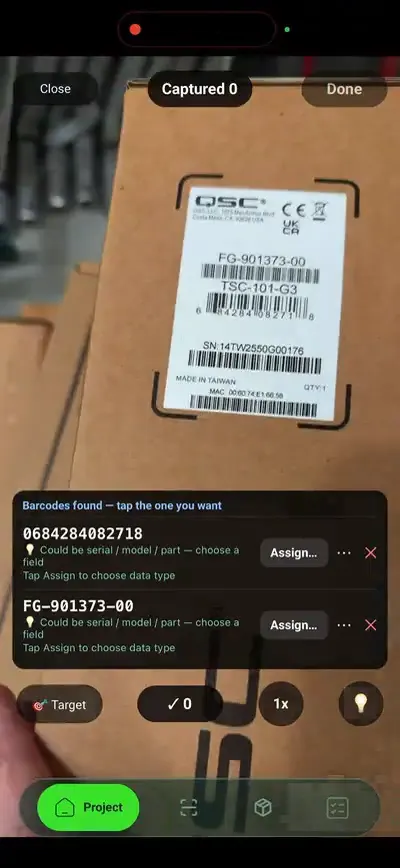
On site, the phone does the reading. Photograph a label or a receipt and the details are filled in for you to check. Speak a note where there is no signal and it is written up once you are back online.
AI does
- Reads make, model, serial, MAC and IP from a label
- Fills in supplier, date, total and each line from a receipt
- Turns voice notes into text, even ones recorded offline
You decide
- Check each value before it is saved
- Choose which reading goes where
- Keep or edit the transcript
LabelsMake, model, serial, MAC, IP
Voice notesQueued offline, transcribed later
ReceiptsSupplier, total, each line
03 · Inspect
Now live
A second pair of eyes on every clip.
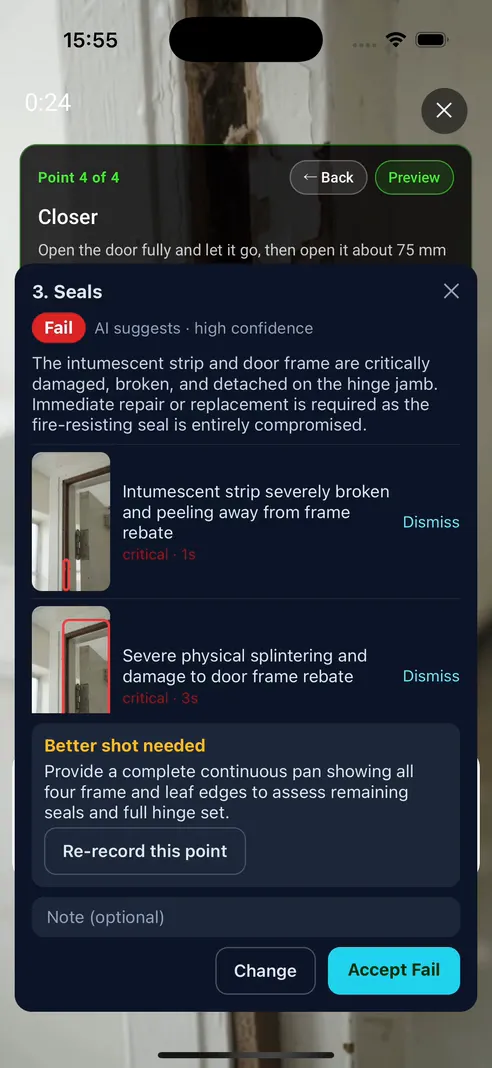
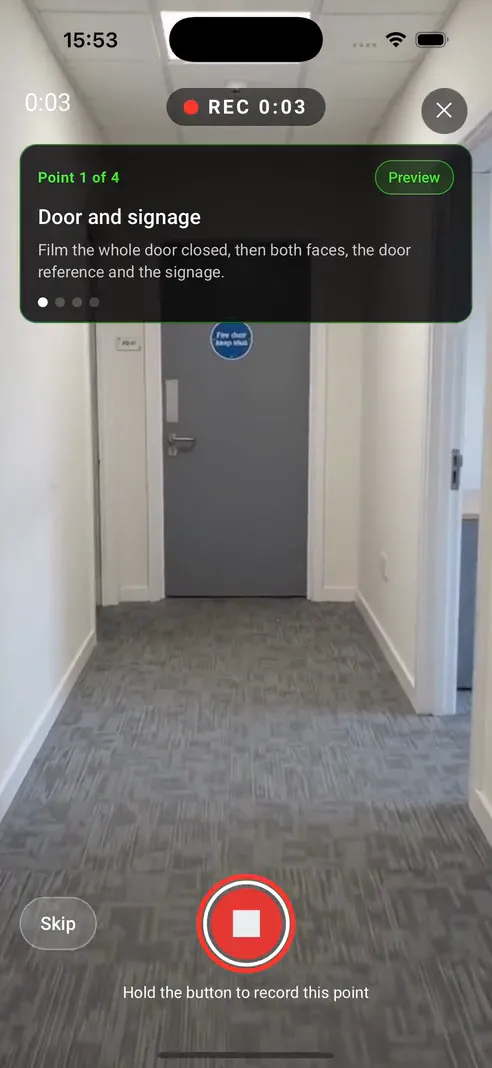
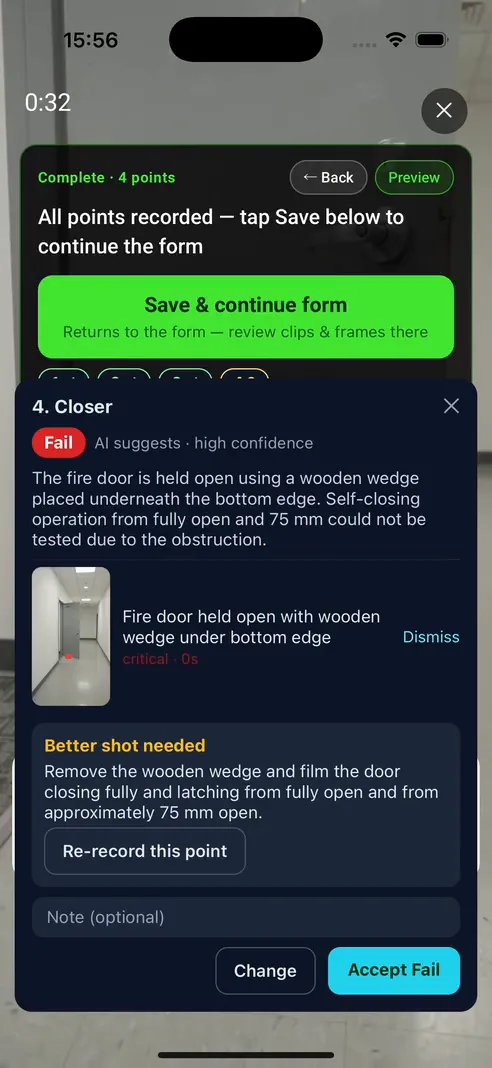
Record a Walk Cam clip for each inspection point and the AI inspector checks it against the form's brief. It suggests pass, fail or cannot assess, explains why, and asks for a better shot when it cannot see enough.
AI does
- Suggests pass, fail or cannot assess for each point
- Lists its findings with a still of any defect
- Asks for a better shot when the clip is not clear
You decide
- Accept, change or dismiss every suggestion
- Re-record a point when asked
- Make the final call on every point
04 · Safety
Risk assessments that start with a first draft.
In a RAMS or risk assessment on the web, the form suggests the hazards likely on this job. Pick one, tick its controls, and AI suggests how those controls apply on this site, from the details you gave. You accept it, rewrite it or ignore it.
AI does
- Suggests the hazards likely from the work and scope
- Drafts the hazard description and how the controls apply
- Stays quiet when the job details are too thin
You decide
- Tick the controls that apply and add your own
- Accept, rewrite or ignore every draft
- Score the risk and sign it off
Hazard 1
Controls in place or planned
How these controls apply on this job
Example draft. Built from the hazard, the ticked controls and the job details; nothing is saved unless you accept it.
05 · Ask
Ask the project a question.
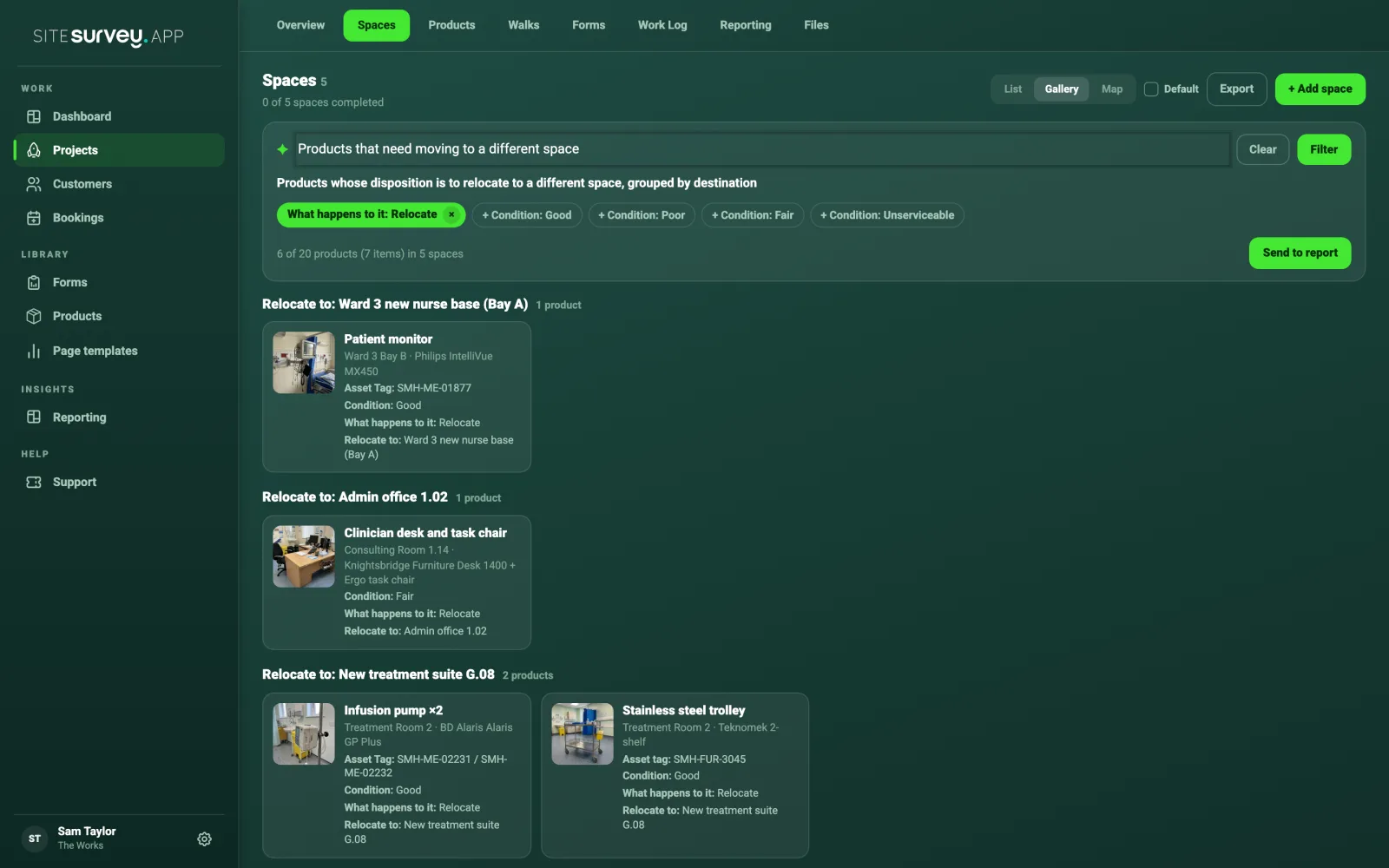
Smart filter turns a plain-English question about a project's products into filter conditions you can see and edit. The project assistant answers from the forms, products and documents on any project or space, and can add spaces and generate forms.
AI does
- Turns your question into visible filter conditions
- Groups the results and can send them to the report
- Answers from what is already in the project
You decide
- See and edit every filter condition
- Check the answer against the record
- Choose what goes in the report
06 · Report
From answers to a report people read.
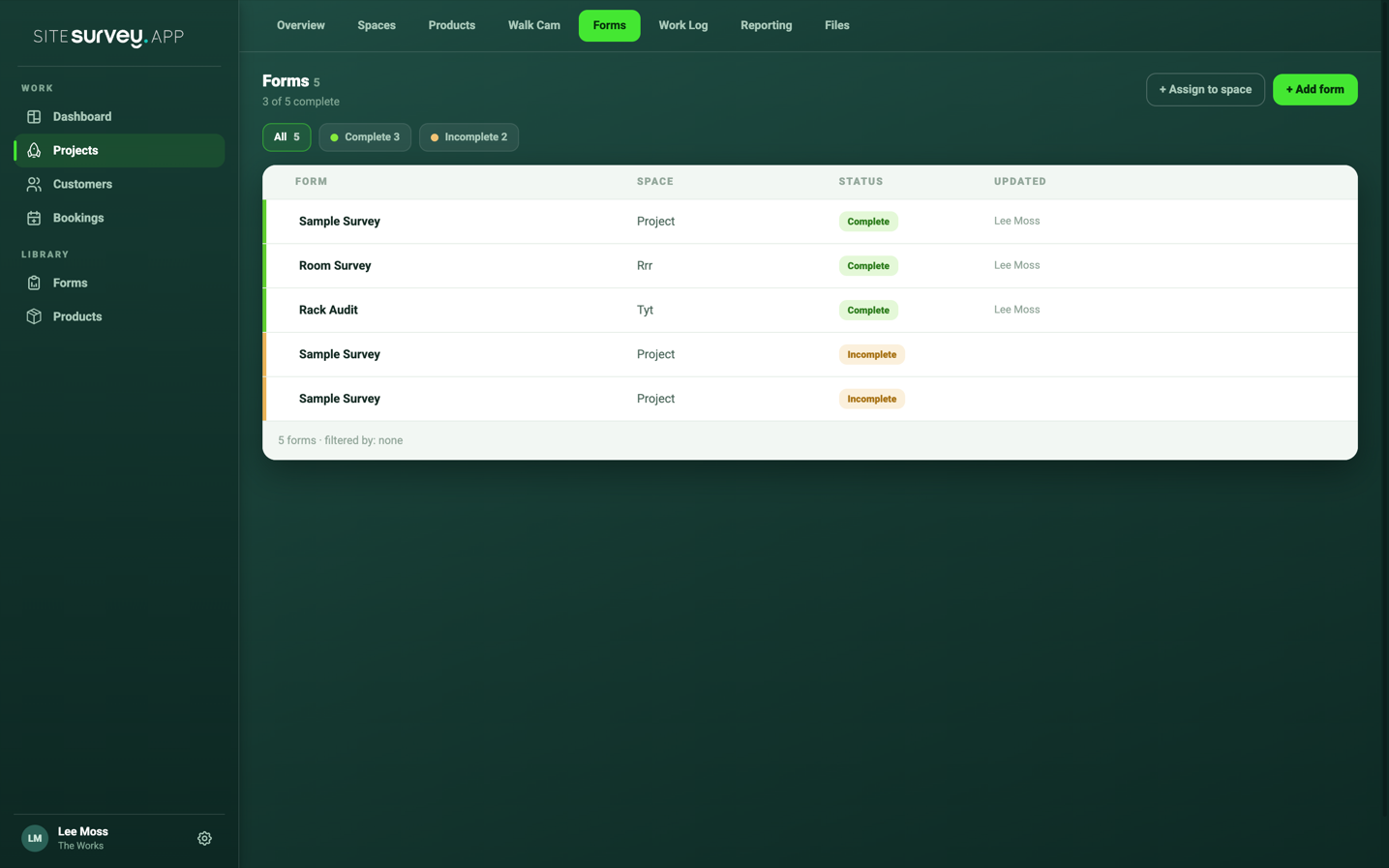
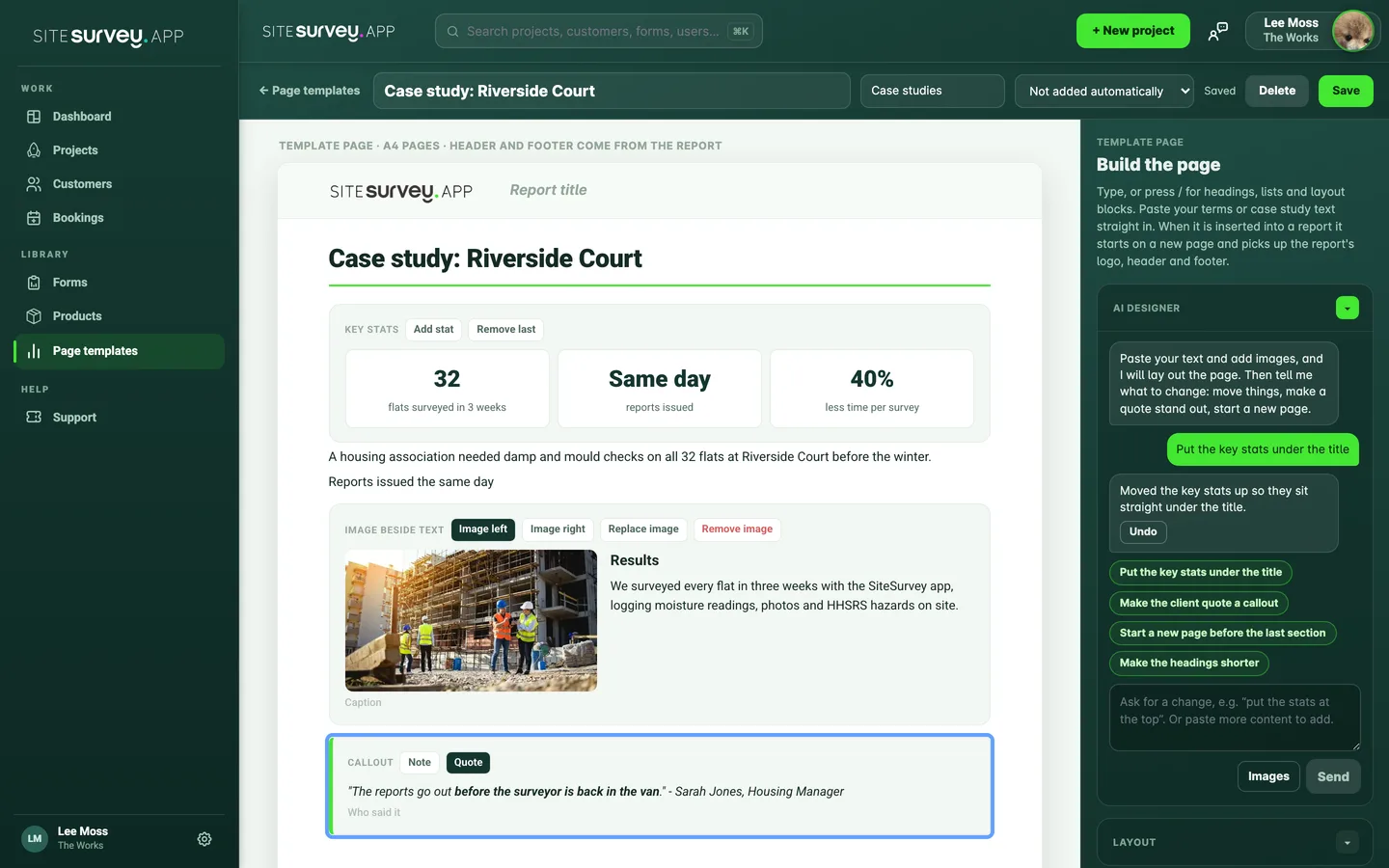
Summarise one form or tick several and summarise them together. Edit the prompt to control what it covers, then save it to the form or as Word or PDF. The report page designer lays out pages like terms or a case study from text and images you paste.
AI does
- Summarises one or several completed forms
- Ignores blank fields
- Lays out reusable report pages from your content
You decide
- Edit the prompt and the summary
- Save it, copy it or export Word or PDF
- Ask for layout changes in the chat
The rule we build by
AI suggests. A person decides. Every time.
Drafts, verdicts and readings wait for you to accept them. Ignore one and nothing is saved.
Smart filter shows its conditions, the inspector shows its findings and a still, summaries show their prompt.
The surveyor, inspector or assessor still signs off. Check AI output before you rely on it.
The models behind it
The right model for each job
- Google Gemini looks at Walk Cam clips for the AI inspector and reads equipment labels.
- Your own Claude or Gemini key can be connected in Integration settings. Summaries and the project assistant then use it.
- People stay in charge. Whichever model runs, a person reviews the output before it reaches a report.
Kestrel AI Early testing
Our UK-built inspection AI
Kestrel finds the parts of a fire door live through the camera, locks onto them with AR, measures them and checks each one, in early testing on Google Gemini models. Next, our own Kestrel models, trained on UK examples and tested by certified inspectors. Customer clips are not used to train them.
See Kestrel working →SiteSurvey AI, at a glance
- What it is
- AI tools inside SiteSurvey for building forms, checking inspection clips, drafting risk assessment wording, filtering products, summarising forms, designing report pages, reading receipts and labels, and transcribing voice notes.
- Which models
- Google Gemini for the AI inspector and label reading. Connect your own Claude or Gemini key for summaries and the project assistant. Kestrel, our inspection AI, is in early testing; our own Kestrel models are in development.
- Who uses it
- Survey, inspection and installation teams, and the office staff who build their forms and write up results.
- What it captures
- Forms from a description, spaces and forms from speech, text from voice notes, and summaries saved or exported as Word or PDF.
- Works offline?
- Voice notes, yes: recorded with no signal and transcribed once connectivity returns.
- Plan
- Audio notes are in Base from £13 per user per month; the form builder is in The Works at £25. Other AI tools are not listed against a plan. Trial from £1.
- What it does not do
- It does not replace the surveyor's judgement, and its output should be checked before it is relied on.
What can SiteSurvey AI do?
SiteSurvey AI builds forms from a plain-English description, adds suggested hazard controls to safety forms, suggests a first draft of the hazard and controls text in a RAMS or risk assessment, checks Walk Cam clips against a brief (now live), filters a project's products from a question, summarises completed forms, answers questions in the project assistant, lays out report pages, reads receipts and equipment labels and transcribes voice notes. Everything it produces is reviewed by a person before it becomes part of the project record.
What is the best AI tool for site surveys?
The best AI tool for site surveys is one that works on the information your team has actually captured, rather than a blank chat window. Look for AI that builds the forms you use, transcribes what surveyors say, summarises completed forms, and leaves a person to review the result. SiteSurvey AI does this inside the project, and its AI inspector (now live) suggests a verdict on Walk Cam clips for the inspector to confirm. It does not replace the surveyor's judgement.
Which AI models does SiteSurvey use?
Different models for different jobs. The AI inspector and label reading use Google Gemini. You can connect your own Anthropic Claude or Google Gemini key in Integration settings, and summaries and the project assistant then use it. Other text features run on a model SiteSurvey chooses and may change. We are also building Kestrel, our own UK-trained vision model for inspections, which is not in use yet.
What is Kestrel?
Kestrel is SiteSurvey's inspection AI for compliance and health and safety defects, starting with fire doors. The Kestrel system is in early testing: live AR detection and LiDAR measurement on iPhone with code-enforced safety rules, using Google's Gemini models for recognition. Our own UK-trained Kestrel models are in development and will be tested against an evaluation set reviewed by certified inspectors before they replace Gemini for any customer. Customer clips are not used to train them.
What does the AI inspector do?
It looks at each Walk Cam clip against the form's brief and suggests pass, fail or cannot assess, with its findings, a still of any defect, or a request for a better shot. The inspector accepts, changes or dismisses every suggestion. In the SiteSurvey app now, on every account. It runs on Walk Cam fields with a brief, such as the library fire door forms.
How do I create a form with AI?
Describe the form in plain English: the type of work, where it will be used, what must be recorded and what evidence is needed. SiteSurvey AI builds it, and you refine it conversationally, with pages, validation, prefill and a live preview, before assigning it to a space.
Can AI set up a project from my voice?
Yes. Speak the site structure into the mobile app and AI generates the spaces and forms skeleton, ready to refine and assign to the team.
Can AI summarise completed forms?
Yes. Summarise a single form or tick several and summarise them together. You can edit the prompt to control what the summary covers, and blank fields are ignored. Save the summary against the form, copy it, or save it as Word or PDF, with a copy added to the project Files tab.
Does voice transcription work without signal?
Yes. Voice notes recorded where there is no signal are queued on the device and transcribed once connectivity returns. Walk Cam's live voice-to-text runs on the device itself, so it works fully offline.
Is AI output checked before it is used?
Yes, by you. AI output is reviewed before it is published or used in a report, and generated forms can be edited like any other form. Treat the AI as a fast first draft, not as the final word.
Can AI find products in a project for me?
Yes, on the web dashboard. Ask smart filter a question in plain English, such as which products still need commissioning on level 2. It turns the question into filter conditions you can see and edit, groups the results and can send them to the report.
Can AI read receipts and equipment labels?
Yes. Photograph a receipt and the supplier, date, total paid, category and each priced line are filled in for you to check. Photograph an equipment label and the make, model, serial number, MAC and IP address are read into the product's data points.
Who uses SiteSurvey AI?
Survey, inspection and installation teams, and the office staff who build their forms and write up their results. It suits teams who want to move from a description or a set of completed forms to something usable quickly.
How much does it cost?
SiteSurvey is priced per user. Audio notes are in the Base plan from £13 per user per month, and the custom form builder is in The Works at £25 per user per month. The pricing page does not list the other AI tools against a plan. Every plan starts with a trial from £1, cancel any time.
See it on your next site