Form library · Facilities and maintenance

Security patrol report template

For people recording security patrols and shift handovers. Record patrol assignment, checkpoint log and shift handover. Try the form below, see every question or open a completed example.

Ready to use from the form library, and every question is yours to edit. Try it for a small trial fee, cancel any time.

Try it on your phone

Try it on this phone

Fill in the security patrol record on your phone now

See how the security patrol record looks on your phone

Scan the code with your phone camera. It opens the real form, no sign-up needed.

Open the live example and fill it in, just as your team would on site. No sign-up needed.

See it on this phone

Every question is editable. Add this form to your account, then change the wording, add or remove questions and options, and make it fit your own jobs.

Or start your trial with this form ready →

One email, and we won't add you to a mailing list.

What should a patrol record demonstrate?

HSE risk-management guidance supports identifying hazards and recording actions. A patrol record can document observations and escalation against site instructions; it does not establish that every area was safe or secure.

Last updated . Facts checked by the SiteSurvey team on 6 October 2026 against HSE managing risks and risk assessment and HSE inspection of work equipment.

Built for logging a patrol as you walk it

Log each checkpoint on a phone as you reach it. Mark the position by GPS, record what you saw and who you told, and let the form count the checkpoints, concerns and areas not accessed against the planned route.

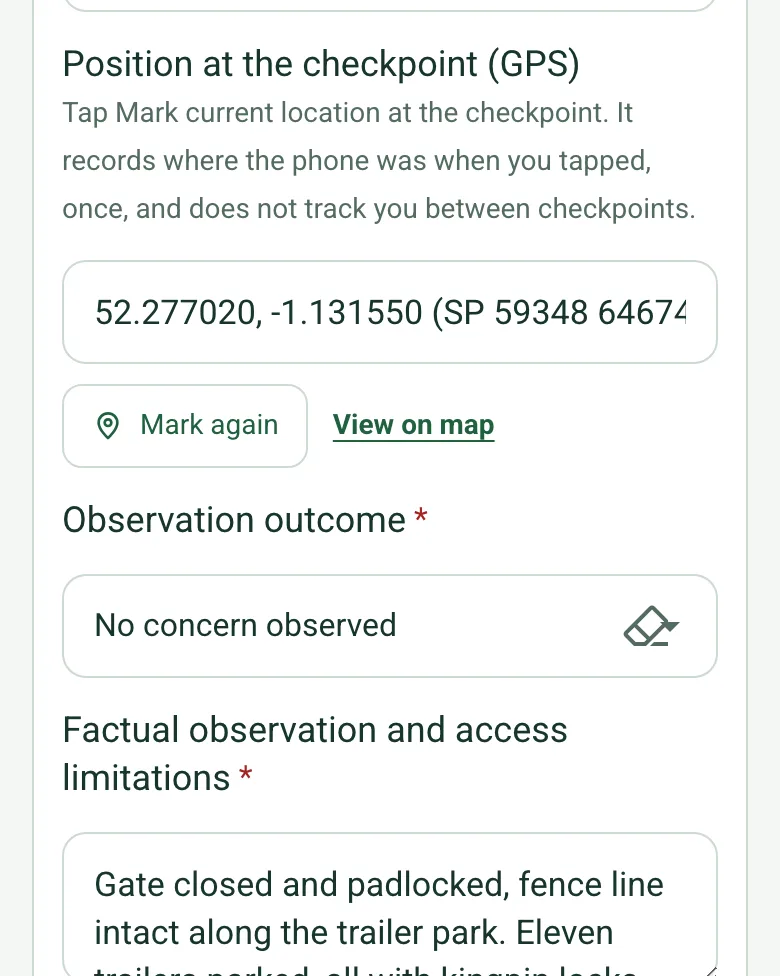
The last checkpoint in the completed patrol record on a phone: Position at the checkpoint (GPS) filled with coordinates and an OS grid reference, with View on map, and No concern observed

A GPS mark at each checkpoint

Tap Mark current location at the checkpoint. It records where the phone was when you tapped, once, and does not track you between checkpoints. Mark current location works on web forms in any phone browser today, and the app version is on its way.

How GPS location works →
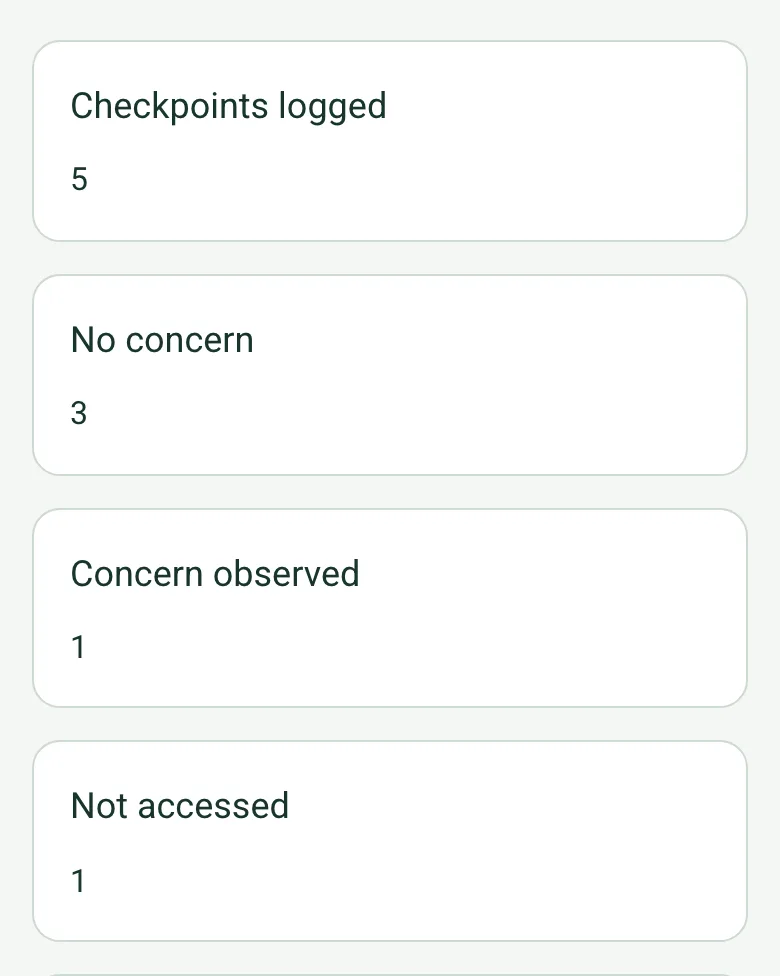
Worked-out counts in the completed patrol record on a phone: checkpoints logged 5, no concern 3, concern observed 1, not accessed 1

The route counted for you

Enter how many checkpoints are on the route and the form counts the ones logged, with no concern, with a concern and not accessed, the share attended and how many have a GPS position. A note reminds you to hand over anything missed.

How calculated fields work →

Film what you find

Walk Cam records the checkpoint with your spoken note typed in as you talk, for the occurrence book and the next shift.

How Walk Cam works →

A completed security patrol record

A fictional distribution centre's night patrol: five checkpoints each pinned by GPS, a dock shutter found open and closed, the plant room corridor not accessed (80% of the route attended), the handover to the day shift and the follow-up actions.

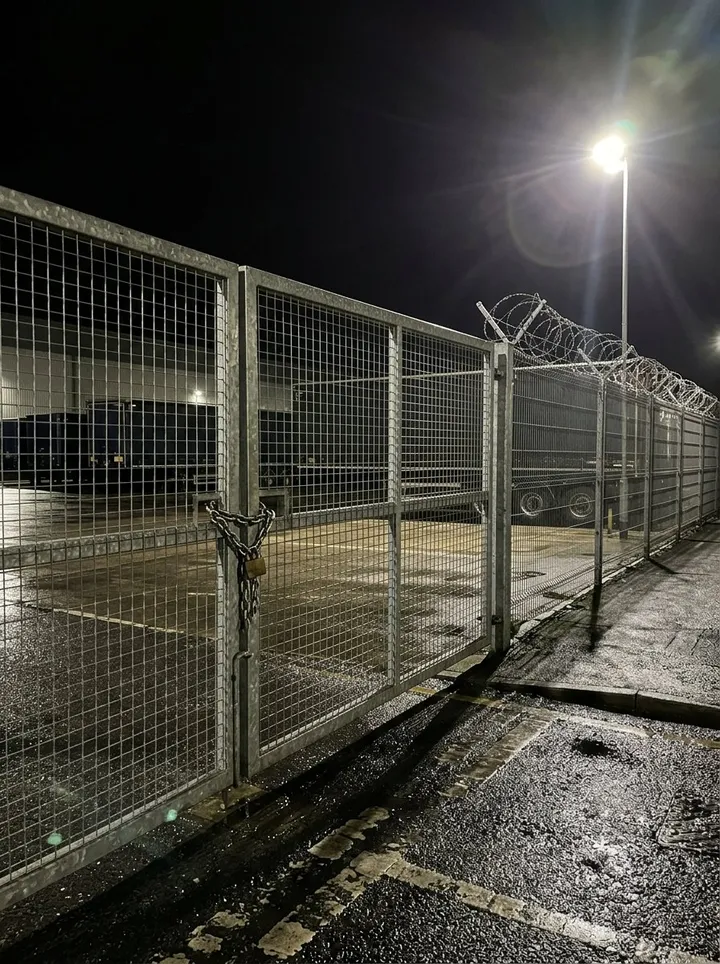
A closed galvanised mesh gate with a padlock and chain at night under a floodlight, with lorry trailers behind the fence
Trailer park gate · 00:40 · closed and padlocked · GPS marked
A warehouse aisle between pallet racking leading to red fire exit doors
Aisle 4 fire exit · 23:50 · clear, exit signs lit

Try the security patrol record form live

Answer a few questions and watch it adapt. Your answers are not saved, and any photos you add are deleted within the hour.

Live form: Security Patrol RecordOpen full screen ↗
Fill it in right here

This is the real form as your team would use it: questions appear as you answer, scores work themselves out and you can add photos and signatures. No sign-up needed. Or open a completed example to see every answer, photo and score filled in.

Want to see one filled in? See a completed security patrol record report (PDF), made by SiteSurvey from a fictional site visit.

For teams

Using the security patrol record template for client work?

Paper or a spreadsheet works for the odd job. When your team does this every week, SiteSurvey keeps every visit in one place and turns each one into a report you can send.

  • Everyone fills in the same form on their phone, with photos attached to the answer they belong to.
  • Each visit becomes a branded PDF report for the client, with no retyping.
  • Every site, visit and report is kept together in one account, not scattered across email and shared drives.

Fill it in on a phone or tablet

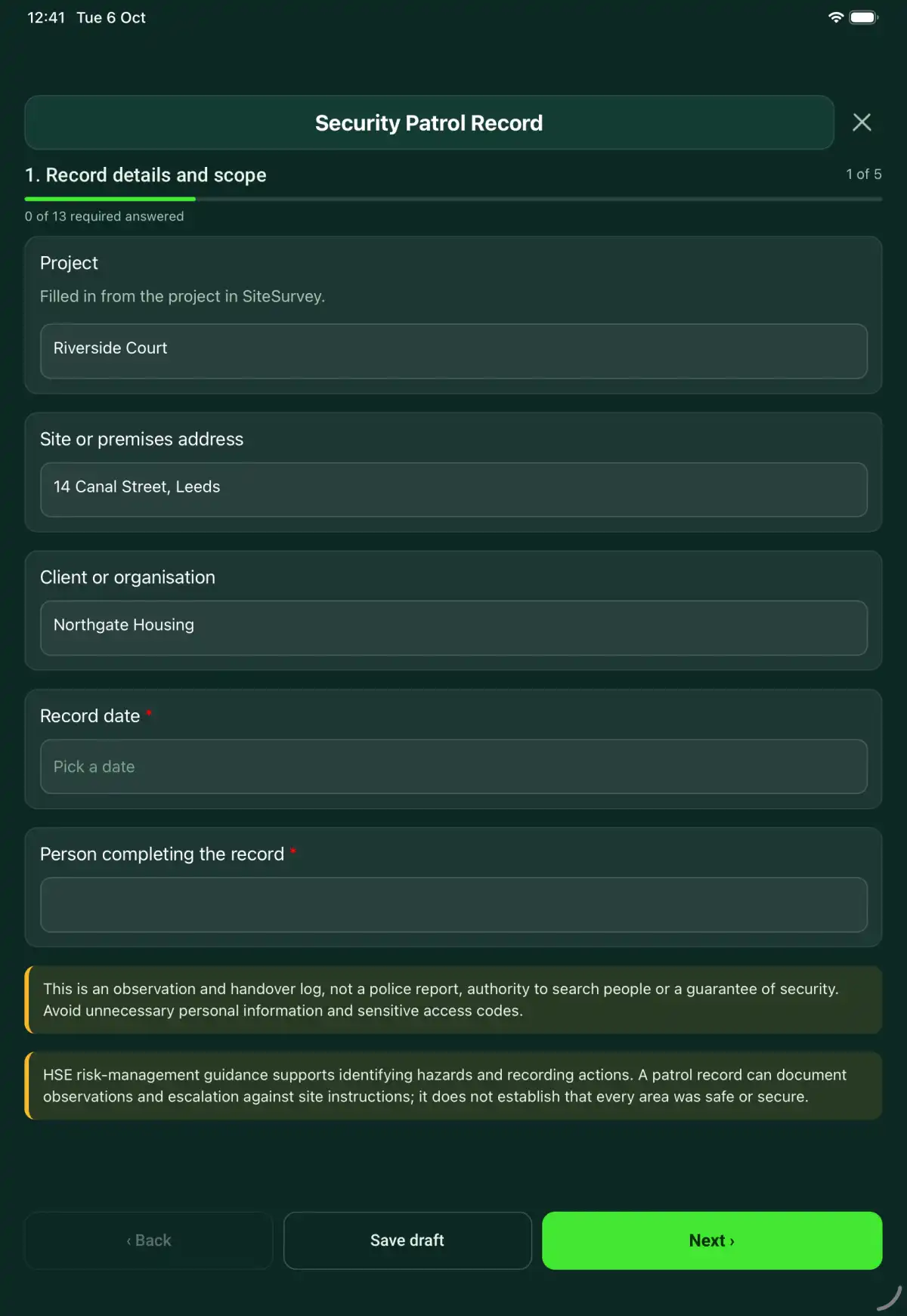
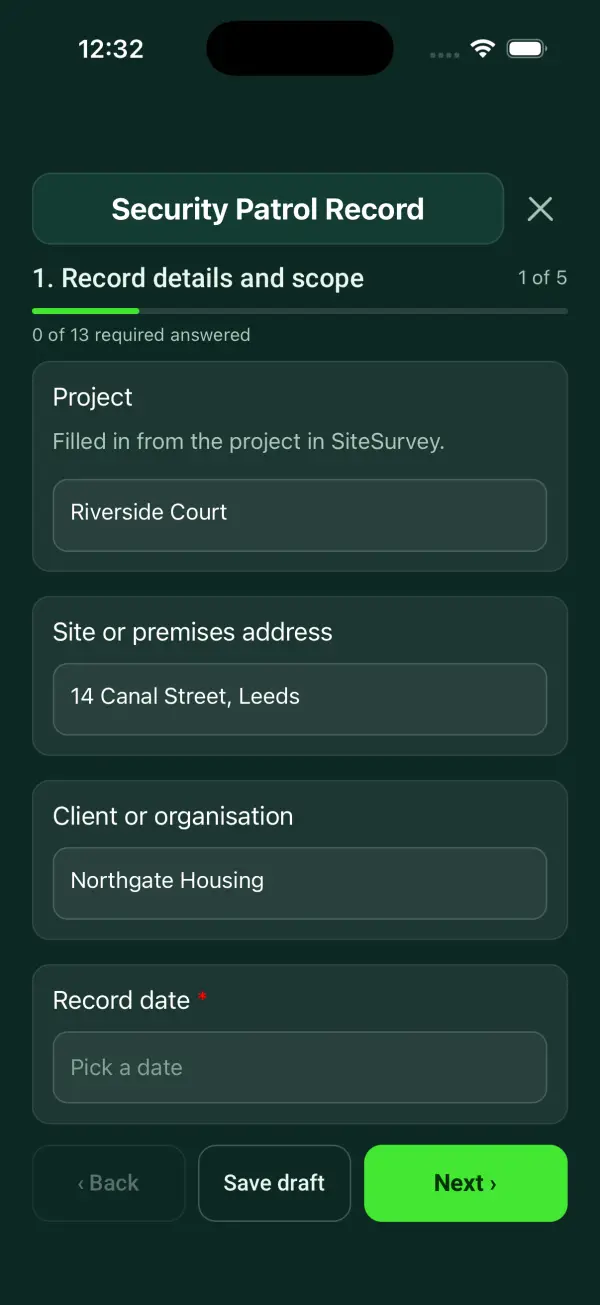
Your team completes the security patrol record on site in the SiteSurvey app on iPhone, iPad and Android phones and tablets. The project name and address fill in for them, it works without signal, and it syncs when the device is back online with photos kept against the question they answer.

Customers and subcontractors do not need the app: send them a link and they can fill it in from any browser.

The Security Patrol Record form in the SiteSurvey app on a tablet
The Security Patrol Record form in the SiteSurvey app on a phone

Every question in the security patrol record template

A security patrol record covering the assigned route, timed checkpoint observations, access restrictions, incidents, escalation and shift handover. 5 sections and 40 questions. Follow-up questions and guidance appear only when an answer calls for them, so the person on site never sees the ones that do not apply.

Make it your own: every question is editable

This is a starting point, not a fixed form. Once it is in your SiteSurvey account you can reword any question, add or remove questions, sections and answer options, and add your own logo, so it fits the way your team works and the jobs you do.

Details you only enter once

Add this form to a project in SiteSurvey and it fills in what the project already knows, so nobody on site retypes it and every form on the job uses the same names. Anything filled in can still be changed.

  • Project: the project name
  • Site or premises address: the site address, from the space or the project
  • Client or organisation: the project's customer

Record details and scope

  • ProjectShort answer

    Filled in from the project in SiteSurvey.

    Fills in from the project name
  • Site or premises addressShort answer
    Fills in from the site address, from the space or the project
  • Client or organisationShort answer
    Fills in from the project's customer
  • Record date*Date
  • Person completing the record*Short answer
  • CheckThis is an observation and handover log, not a police report, authority to search people or a guarantee of security. Avoid unnecessary personal information and sensitive access codes.
  • CheckSources. BS 7499:2020, Provision of static guarding security services, Code of practice, covers static site guarding; mobile patrol services are covered by BS 7984-3:2020. Under the Private Security Industry Act 2001, anyone doing licensable security work under contract, such as manned guarding, must hold a valid Security Industry Authority (SIA) licence. Follow the assignment instructions for the site. A patrol record documents observations and escalation; it does not establish that every area was safe or secure.

Patrol assignment

  • Site and assignment instruction reference*Short answer
  • Patrol officer, if not the author, and shift*Short answer
  • SIA licence numberShort answer
  • Authorised route and checkpoints*Short answer
  • How many checkpoints are on the route?Number
  • Check-in and emergency contact arrangementShort answer

Checkpoint log

  • Checkpoint
    Repeat for each checkpoint. Each one asks:
    • Checkpoint or area*Short answer
    • Date and time attended*Short answer
    • Position at the checkpoint (GPS)Short answer

      Tap Mark current location at the checkpoint. It records where the phone was when you tapped, once, and does not track you between checkpoints.

    • Observation outcome*Choose one
      • No concern observed
      • Concern observed
      • Not accessed
    • Factual observation and access limitationsNotes
    • Action and person notified*Notes
      Shown only when the answers above make it relevant
    • Authorised evidence photosPhotos
  • Checkpoints loggedWorked out by the form
  • No concernWorked out by the form
  • Concern observedWorked out by the form
  • Not accessedWorked out by the form
  • Planned checkpoints attended (%)Worked out by the form
    Shown only when the answers above make it relevant
  • Checkpoints with a GPS positionWorked out by the form
  • CheckNot every planned checkpoint was attended. Say which and why under Unvisited areas in the handover, and tell the next shift.
    Shown only when the answers above make it relevant

Shift handover

  • Separate incident record referencesShort answer
  • Unvisited areas and outstanding concernsNotes

    Identify the checkpoint not visited, the reason and who was informed. Do not mark an inaccessible checkpoint as checked.

  • Handover recipientShort answer
  • Handover timeShort answer

Actions and review

  • Are further actions required?*Choose one
    • Yes
    • No
  • Further action
    Repeat for each further action. Each one asks:
    Shown when “Are further actions required?” is “Yes”
    • Action and evidence reference*Notes
    • PriorityChoose one
      • Urgent
      • High
      • Medium
      • Low
    • Person responsible*Short answer
    • Target dateDate
    • Action status*Choose one
      • Open
      • In progress
      • Completed
    • Completion evidence*Notes
      Shown when “Action status” is “Completed”
  • Outstanding limitations and information to pass onNotes
  • Record status*Choose one
    • Ready for review
    • Further work needed
    • Work or use stopped
  • Reviewed byShort answer
  • Review dateDate
  • Author signature*Signature
  • CheckSigning records the information entered. It does not itself certify legal compliance, remove a limitation or authorise unsafe work.

Scope and responsibility

This is an observation and handover log, not a police report, authority to search people or a guarantee of security. Avoid unnecessary personal information and sensitive access codes.

What a useful entry looks like

Unvisited areas and outstanding concerns

Identify the checkpoint not visited, the reason and who was informed. Do not mark an inaccessible checkpoint as checked.

Checkpoint CP-07 not accessed because the agreed route was blocked. Control informed at the recorded time and the limitation passed to the next shift.

Fictional example of record wording. Use the actual evidence and approved arrangements for your job; this is not a completed report or an instruction to carry out the work.

See it filled in

A completed security patrol record report, made by SiteSurvey from a fictional site visit: every answer, the photos, the guidance that applied and the sign-off, ready to send as a PDF.

See completed form (PDF) ↗

Security Patrol Record FAQs

How should I record “Unvisited areas and outstanding concerns”?

Identify the checkpoint not visited, the reason and who was informed. Do not mark an inaccessible checkpoint as checked.

Can this prove every checkpoint was visited?

It records entered information; it provides no automatic location verification.

Should keys or alarm codes be written here?

No. Use controlled references and follow the site information-security procedure.

How is a blocked route recorded?

Select Not accessed and record the reason, notification and follow-up arrangement.

What are the limits of this template?

This is an observation and handover log, not a police report, authority to search people or a guarantee of security. Avoid unnecessary personal information and sensitive access codes.

Can I complete this form on site and share the record?

In the SiteSurvey app the form works offline, with photos and signatures recorded against the questions. Share the completed record as a PDF or a link. Dates and action owners are recorded fields; this form does not send reminders or update other systems.

Related

Hazards this form covers

Who each hazard harms, what the law expects and the control measures to look for, in our hazard library.

Use this security patrol record form with your team

Add it from the form library in one click, change any question, and every completed form becomes a branded PDF report.

Start your trial →