Form library · Facilities and maintenance

Intruder alarm maintenance checklist

For people servicing intruder alarms within an agreed test window. Record equipment and scope, service authority and authorised checks. Try the form below, see every question or open a completed example.

Ready to use from the form library, and every question is yours to edit. Try it for a small trial fee, cancel any time.

Try it on your phone

Try it on this phone

Fill in the intruder alarm service record on your phone now

See how the intruder alarm service record looks on your phone

Scan the code with your phone camera. It opens the real form, no sign-up needed.

Open the live example and fill it in, just as your team would on site. No sign-up needed.

See it on this phone

Every question is editable. Add this form to your account, then change the wording, add or remove questions and options, and make it fit your own jobs.

Or start your trial with this form ready →

One email, and we won't add you to a mailing list.

What is the safe basis for alarm servicing?

HSE guidance supports competent maintenance with safe electrical arrangements and equipment instructions. Agree the service scope and notification process before testing so the record reflects authorised work.

Last updated . Facts checked by the SiteSurvey team on 6 October 2026 against HSE maintenance of work equipment and HSE electrical maintenance safety.

Built for servicing an intruder alarm

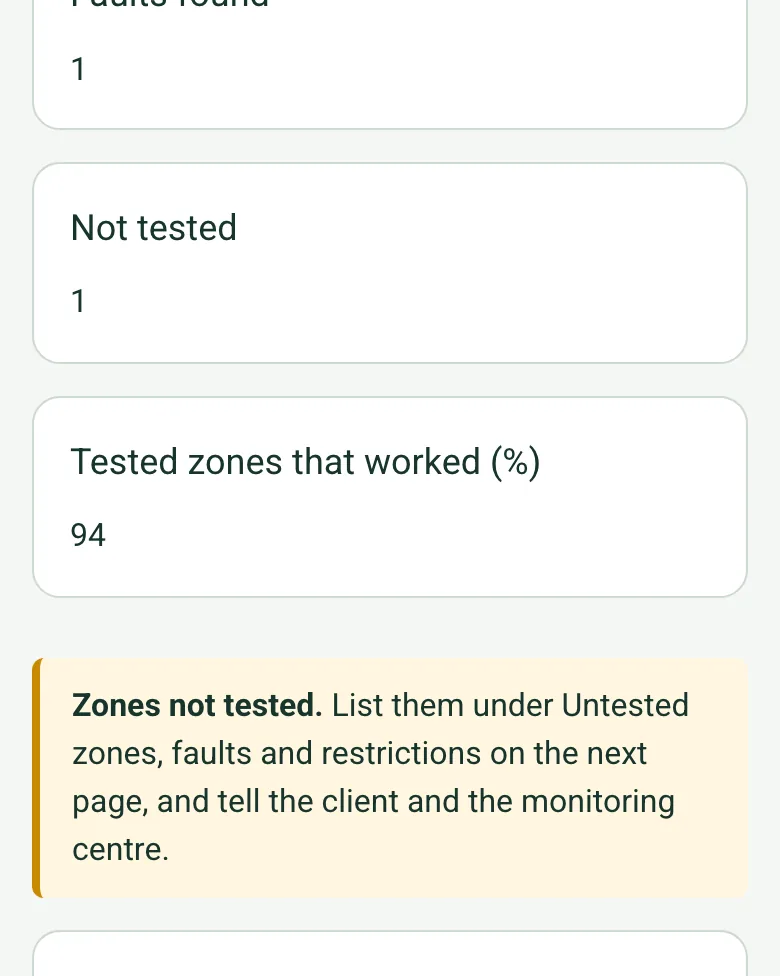
Record each zone and device as you walk test it. The form counts what worked, the faults and the zones not tested, works out the pass rate, tallies the checks that need action, and pins external devices on a large site.

Worked-out totals in the completed intruder alarm service record on a phone: faults found 1, not tested 1, tested zones that worked 94%, and an amber note about zones not tested

Zones tested, counted for you

Each zone's result adds up as you go: tested and worked, faults found, not tested, and the share of tested zones that worked. A zone not tested brings up a reminder to list it and tell the client and the monitoring centre.

How calculated fields work →
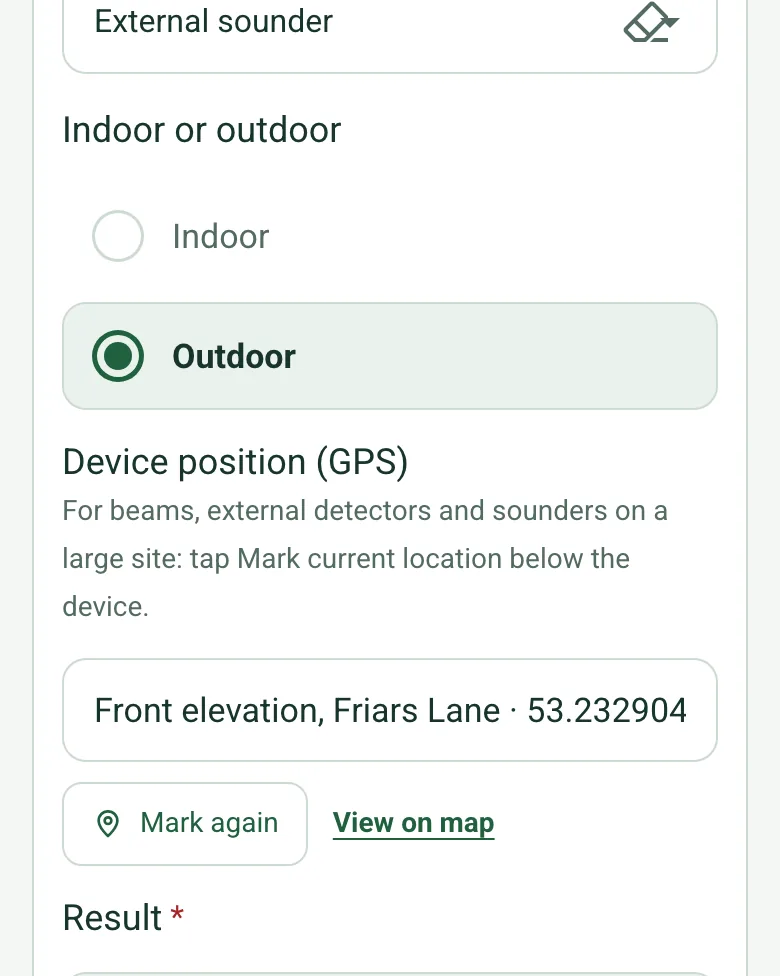
The external sounder row in the completed service record on a phone: Outdoor ticked and Device position (GPS) filled with Front elevation, Friars Lane and coordinates

External devices by GPS

Bell boxes, beams and external detectors take a GPS position under your note, so they are easy to find on a big site or a campus. Mark current location works on web forms in any phone browser today, and the app version is on its way.

How GPS location works →
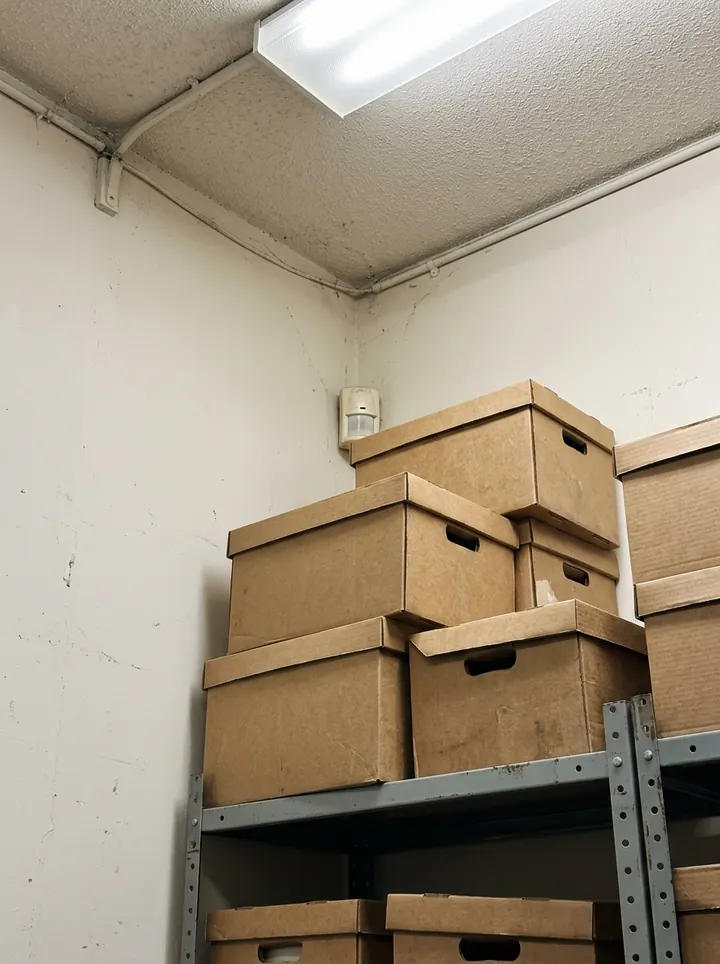
A motion detector high in the corner of a store room, partly hidden behind stacked archive boxes

A photo of every device and defect

Each zone takes its own photos: the detector blocked by boxes, the keypad, the bell box. They print beside that zone in the report.

Film the walk test

Walk Cam records each zone with your spoken result typed in as you talk.

How Walk Cam works →

A completed intruder alarm service record

A six-monthly service at a fictional law office: 14 zones and three devices tested, one detector blocked by archive boxes, a loft zone not tested, the standby battery replaced and the monitoring centre references recorded. A service log, not a certificate.

A motion detector partly hidden behind archive boxes in a store room
Zone 9 · rear store · blocked by boxes, cleared and walk tested
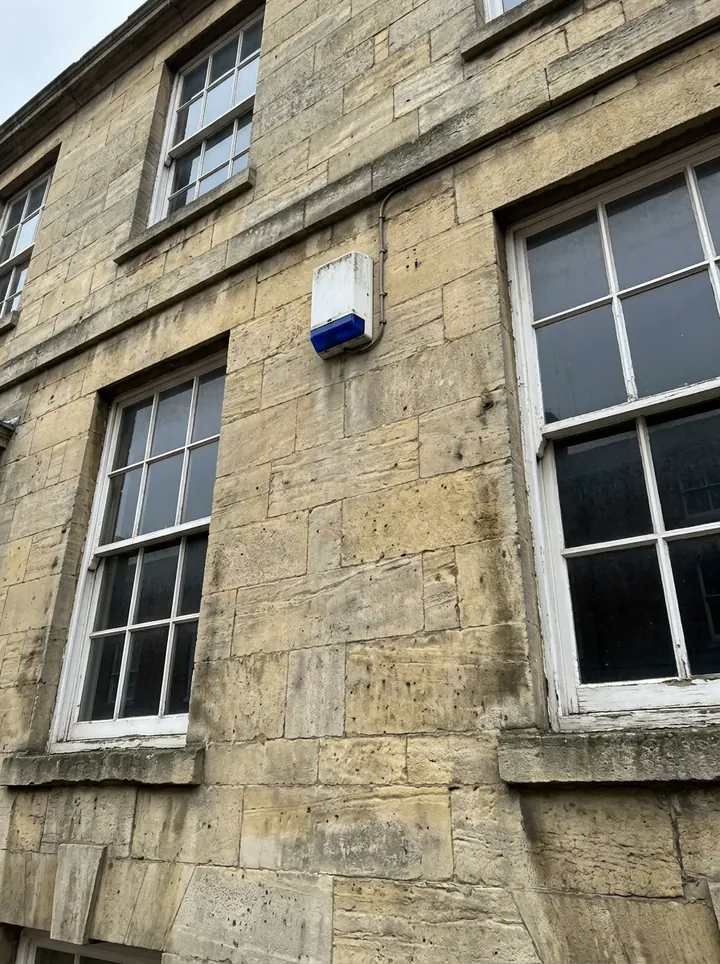
A white bell box with a blue light high on a stone office front between two sash windows
External sounder · front elevation · pinned by GPS
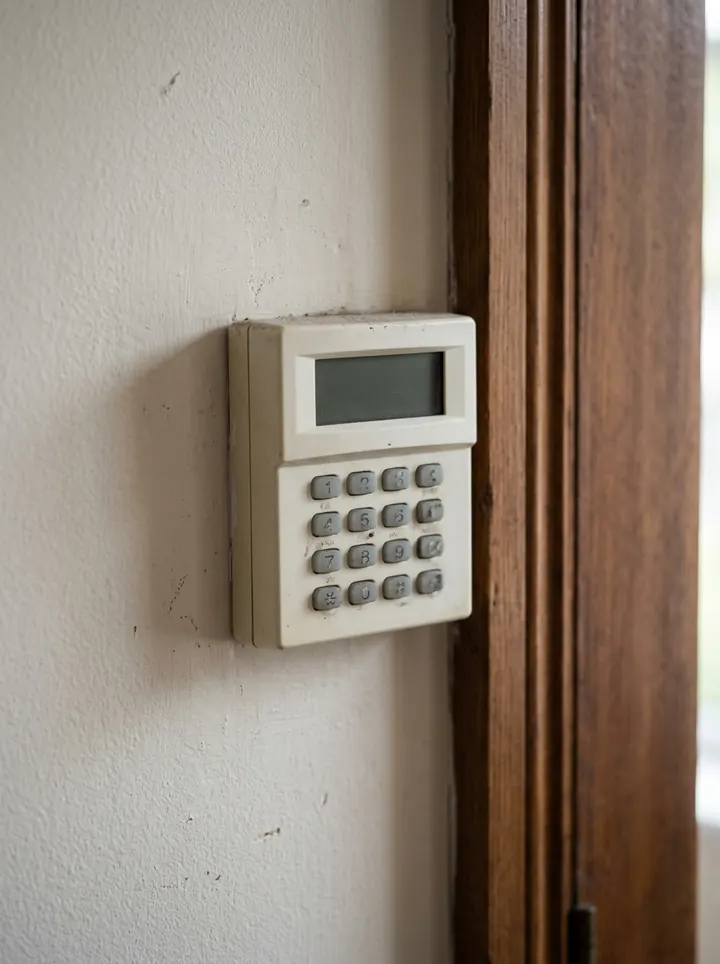
An alarm keypad on the wall of an entrance lobby beside a door frame
Keypad · entrance lobby · worked

Try the intruder alarm service record form live

Answer a few questions and watch it adapt. Your answers are not saved, and any photos you add are deleted within the hour.

Live form: Intruder Alarm Service RecordOpen full screen ↗
Fill it in right here

This is the real form as your team would use it: questions appear as you answer, scores work themselves out and you can add photos and signatures. No sign-up needed. Or open a completed example to see every answer, photo and score filled in.

Want to see one filled in? See a completed intruder alarm service record report (PDF), made by SiteSurvey from a fictional site visit.

For teams

Using the intruder alarm service record template for client work?

Paper or a spreadsheet works for the odd job. When your team does this every week, SiteSurvey keeps every visit in one place and turns each one into a report you can send.

  • Everyone fills in the same form on their phone, with photos attached to the answer they belong to.
  • Each visit becomes a branded PDF report for the client, with no retyping.
  • Every site, visit and report is kept together in one account, not scattered across email and shared drives.

Fill it in on a phone or tablet

Your team completes the intruder alarm service record on site in the SiteSurvey app on iPhone, iPad and Android phones and tablets. The project name and address fill in for them, it works without signal, and it syncs when the device is back online with photos kept against the question they answer.

Customers and subcontractors do not need the app: send them a link and they can fill it in from any browser.

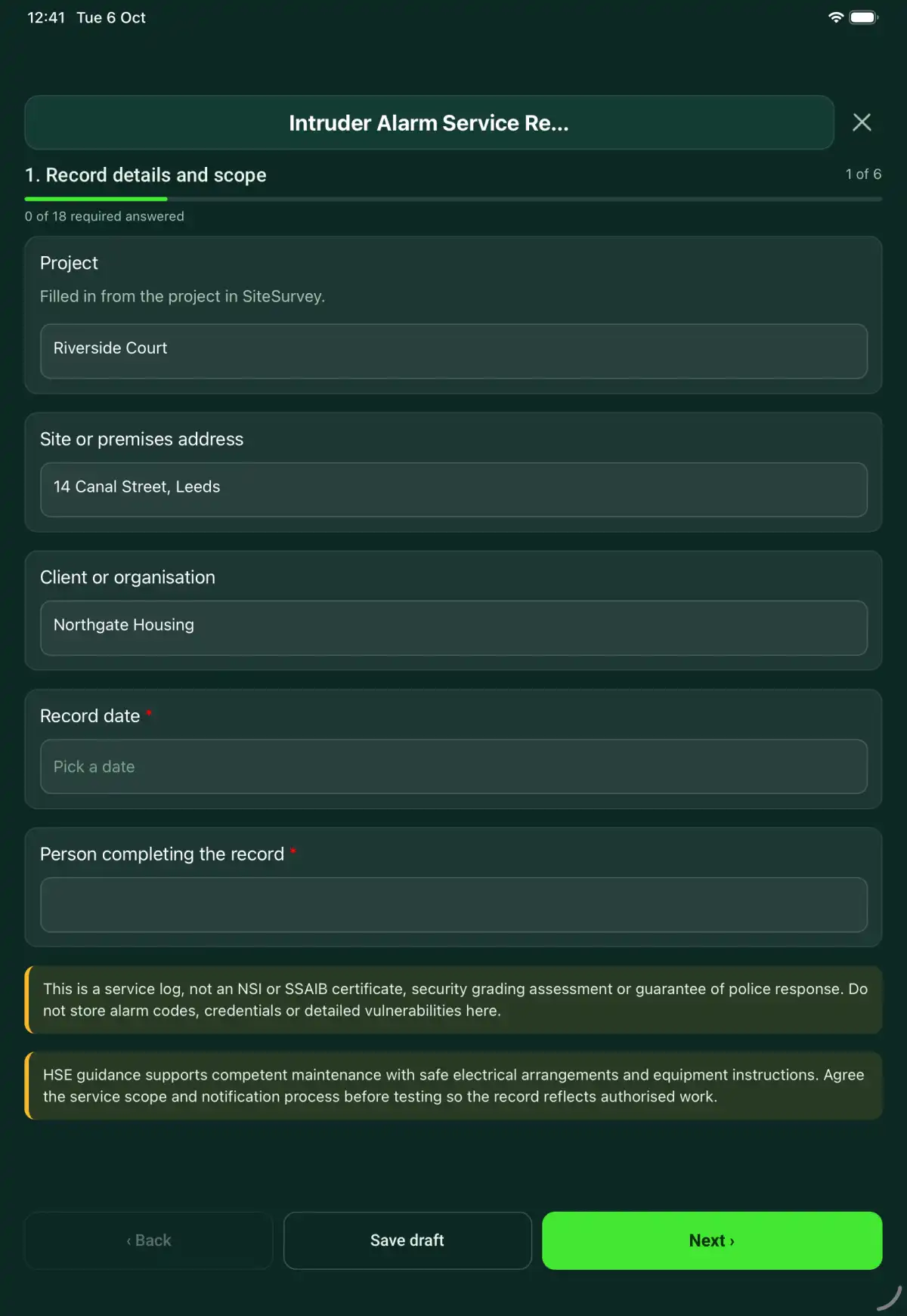
The Intruder Alarm Service Record form in the SiteSurvey app on a tablet
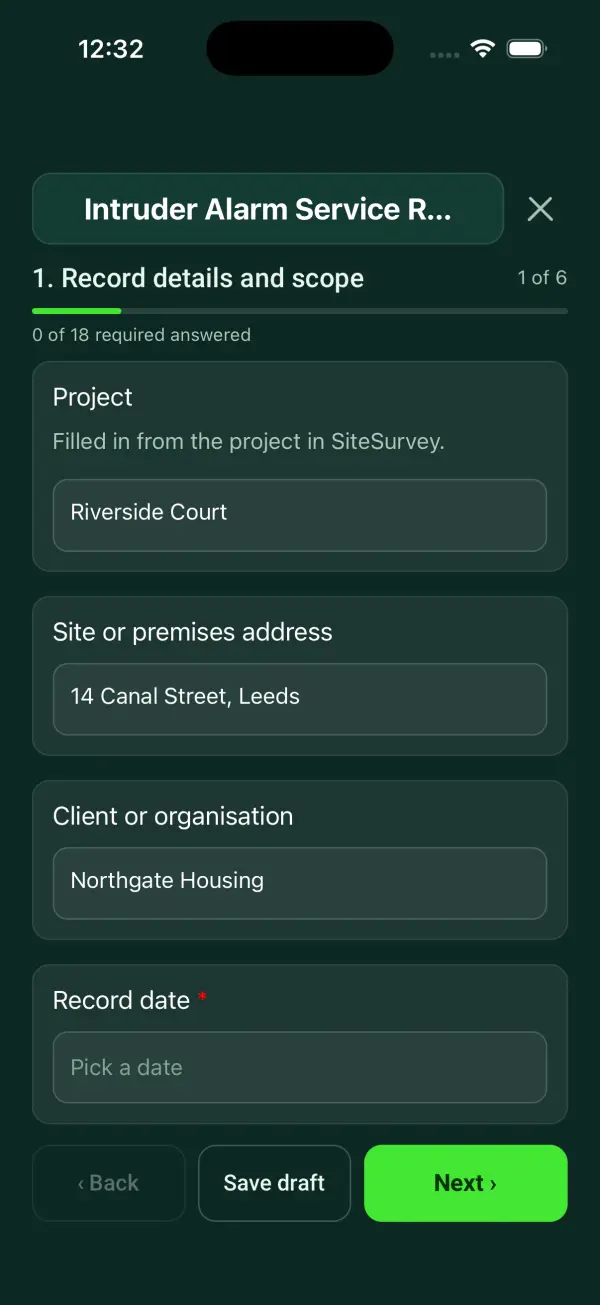
The Intruder Alarm Service Record form in the SiteSurvey app on a phone

Every question in the intruder alarm service record template

An intruder alarm service record covering system scope, authorised tests, detector and power observations, faults, restoration and customer handover. 7 sections and 62 questions. Follow-up questions and guidance appear only when an answer calls for them, so the person on site never sees the ones that do not apply.

Make it your own: every question is editable

This is a starting point, not a fixed form. Once it is in your SiteSurvey account you can reword any question, add or remove questions, sections and answer options, and add your own logo, so it fits the way your team works and the jobs you do.

Details you only enter once

Add this form to a project in SiteSurvey and it fills in what the project already knows, so nobody on site retypes it and every form on the job uses the same names. Anything filled in can still be changed.

  • Project: the project name
  • Site or premises address: the site address, from the space or the project
  • Client or organisation: the project's customer

Record details and scope

  • ProjectShort answer

    Filled in from the project in SiteSurvey.

    Fills in from the project name
  • Site or premises addressShort answer
    Fills in from the site address, from the space or the project
  • Client or organisationShort answer
    Fills in from the project's customer
  • Record date*Date
  • Person completing the record*Short answer
  • CheckThis is a service log, not an NSI or SSAIB certificate, security grading assessment or guarantee of police response. Do not store alarm codes, credentials or detailed vulnerabilities here.
  • CheckThe governing standards are BS EN 50131-1 (intrusion and hold-up alarm systems, system requirements and grading), PD 6662:2017 (the UK scheme for applying BS EN 50131), and BS 9263:2016 (code of practice for commissioning, maintenance and remote support). BS 9263 sets the routine preventive maintenance visits and what each one checks. Work for police-response systems must be done by a company certified by NSI or SSAIB. Agree the service scope and notification process before testing so the record reflects authorised work.

Equipment and scope

  • Intruder alarm ID, model and location*Short answer
  • Technician competence or authorisation reference*Short answer
  • Manufacturer or approved procedure reference*Short answer
  • Work or inspection scope and exclusions*Notes

Service authority

  • Zones and functions in scope (summary)Short answer
  • Client authority and test window*Short answer
  • Monitoring-centre notification and test-mode referenceShort answer
  • Reported faults and previous serviceShort answer

Authorised checks

  • Panel indications and visible condition checked*Choose one
    • Acceptable
    • Action needed
    • Not checked
    • Not applicable
  • Action, limitation or reason not applicable*Notes
    Shown only when the answers above make it relevant
  • Warning devices and communications tested within authority*Choose one
    • Acceptable
    • Action needed
    • Not checked
    • Not applicable
  • Action, limitation or reason not applicable*Notes
    Shown only when the answers above make it relevant
  • Power supply and backup evidence recorded*Choose one
    • Acceptable
    • Action needed
    • Not checked
    • Not applicable
  • Action, limitation or reason not applicable*Notes
    Shown only when the answers above make it relevant
  • Tamper or fault tests recorded under procedure*Choose one
    • Acceptable
    • Action needed
    • Not checked
    • Not applicable
  • Action, limitation or reason not applicable*Notes
    Shown only when the answers above make it relevant
  • Checks acceptableWorked out by the form
  • Checks needing actionWorked out by the form
  • Checks not doneWorked out by the form
  • Detailed controlled test-log referenceShort answer
  • Repairs and configuration-change referencesNotes

Zones and battery

  • Zones and devices tested
    Repeat for each zone. Each one asks:
    • Zone numberShort answer
    • Location*Short answer
    • DeviceChoose one
      • Movement detector
      • Door or window contact
      • Shock or vibration sensor
      • Glass break detector
      • External detector or beam
      • Hold-up or panic button
      • Keypad or reader
      • External sounder
      • Internal sounder
      • Other (describe)
    • Indoor or outdoorChoose one
      • Indoor
      • Outdoor
    • Device position (GPS)Short answer

      For beams, external detectors and sounders on a large site: tap Mark current location below the device.

      Shown when “Indoor or outdoor” is “Outdoor”
    • Result*Choose one
      • Tested: worked
      • Tested: fault found
      • Not tested
    • Fault found, or why it was not tested, and what was done*Notes
      Shown only when the answers above make it relevant
    • Photos of the device and any defectPhotos
  • Zones and devices listedWorked out by the form
  • Tested and workedWorked out by the form
  • Faults foundWorked out by the form
  • Not testedWorked out by the form
  • Tested zones that worked (%)Worked out by the form
    Shown only when the answers above make it relevant
  • CheckZones not tested. List them under Untested zones, faults and restrictions on the next page, and tell the client and the monitoring centre.
    Shown only when the answers above make it relevant
  • Standby battery voltage under load (V)Number

    As read at the control panel or power supply, under the procedure.

  • Date code printed on the batteryShort answer
  • Date the battery was fittedDate
  • Replacement interval from the battery maker (years)Number
  • Battery age (years)Worked out by the form
    Shown when “Date the battery was fitted” is answered and “Record date” is answered
  • CheckThe battery is older than the replacement interval the maker gives. Recommend replacing it.
    Shown only when the answers above make it relevant

Restoration

  • Test mode ended and normal status verified*Short answer

    Record restoration of the agreed system state and any remaining restriction. Keep access credentials and alarm codes out of the record.

  • Monitoring/customer restoration notification referenceShort answer
  • Untested zones, faults and restrictionsNotes
  • Handover recipientShort answer

Actions and review

  • Are further actions required?*Choose one
    • Yes
    • No
  • Further action
    Repeat for each further action. Each one asks:
    Shown when “Are further actions required?” is “Yes”
    • Action and evidence reference*Notes
    • PriorityChoose one
      • Urgent
      • High
      • Medium
      • Low
    • Person responsible*Short answer
    • Target dateDate
    • Action status*Choose one
      • Open
      • In progress
      • Completed
    • Completion evidence*Notes
      Shown when “Action status” is “Completed”
  • Outstanding limitations and information to pass onNotes
  • Record status*Choose one
    • Ready for review
    • Further work needed
    • Work or use stopped
  • Reviewed byShort answer
  • Review dateDate
  • Next service dueDate

    BS 9263:2016: remotely monitored systems need two preventive maintenance visits a year (one may be a remote check where allowed). Audible-only systems: as the maintenance contract sets.

  • Days to next dueWorked out by the form
    Shown when “Record date” is answered and “Next service due” is answered
  • CheckThe next service due date is before the record date. Check the date.
    Shown only when the answers above make it relevant
  • Author signature*Signature
  • CheckSigning records the information entered. It does not itself certify legal compliance, remove a limitation or authorise unsafe work.

Scope and responsibility

This is a service log, not an NSI or SSAIB certificate, security grading assessment or guarantee of police response. Do not store alarm codes, credentials or detailed vulnerabilities here.

What a useful entry looks like

Test mode ended and normal status verified

Record restoration of the agreed system state and any remaining restriction. Keep access credentials and alarm codes out of the record.

Service test window closed; system state checked against the agreed restoration procedure. Remaining limitation passed to the named client contact.

Fictional example of record wording. Use the actual evidence and approved arrangements for your job; this is not a completed report or an instruction to carry out the work.

See it filled in

A completed intruder alarm service record report, made by SiteSurvey from a fictional site visit: every answer, the photos, the guidance that applied and the sign-off, ready to send as a PDF.

See completed form (PDF) ↗

Intruder Alarm Service Record FAQs

How should I record “Test mode ended and normal status verified”?

Record restoration of the agreed system state and any remaining restriction. Keep access credentials and alarm codes out of the record.

Does this confirm a security grade?

No. Reference separate certification or assessment evidence where applicable.

Should engineer or user codes be entered?

No. Keep credentials in the approved secure system.

Does completing the form restore monitoring?

No. Perform restoration and notifications through the system procedure and record evidence.

What are the limits of this template?

This is a service log, not an NSI or SSAIB certificate, security grading assessment or guarantee of police response. Do not store alarm codes, credentials or detailed vulnerabilities here.

Can I complete this form on site and share the record?

In the SiteSurvey app the form works offline, with signatures recorded against the questions. Share the completed record as a PDF or a link. Dates and action owners are recorded fields; this form does not send reminders or update other systems.

Related

Use this intruder alarm service record form with your team

Add it from the form library in one click, change any question, and every completed form becomes a branded PDF report.

Start your trial →