Form library · Facilities and maintenance

Access control maintenance checklist

For people servicing access-controlled doors under agreed authority. Record equipment and scope, door scope and service checks. Try the form below, see every question or open a completed example.

Ready to use from the form library, and every question is yours to edit. Try it for a small trial fee, cancel any time.

Try it on your phone

Try it on this phone

Fill in the access control service record on your phone now

See how the access control service record looks on your phone

Scan the code with your phone camera. It opens the real form, no sign-up needed.

Open the live example and fill it in, just as your team would on site. No sign-up needed.

See it on this phone

Every question is editable. Add this form to your account, then change the wording, add or remove questions and options, and make it fit your own jobs.

Or start your trial with this form ready →

One email, and we won't add you to a mailing list.

What matters when access control affects escape?

HSE maintenance guidance requires safe work arrangements. Government fire guidance addresses escape routes and doors; changes to access-controlled exits need the appropriate fire-safety review and approved procedures.

Last updated . Facts checked by the SiteSurvey team on 6 October 2026 against HSE maintenance of work equipment and Government fire safety guidance for offices and shops.

Built for servicing access control door by door

Check each door, gate and reader in turn on a phone. The form counts the doors that passed and failed, works out the pass rate, counts faults on readers, locks and exit devices, measures reader heights from a photo and pins gates outside.

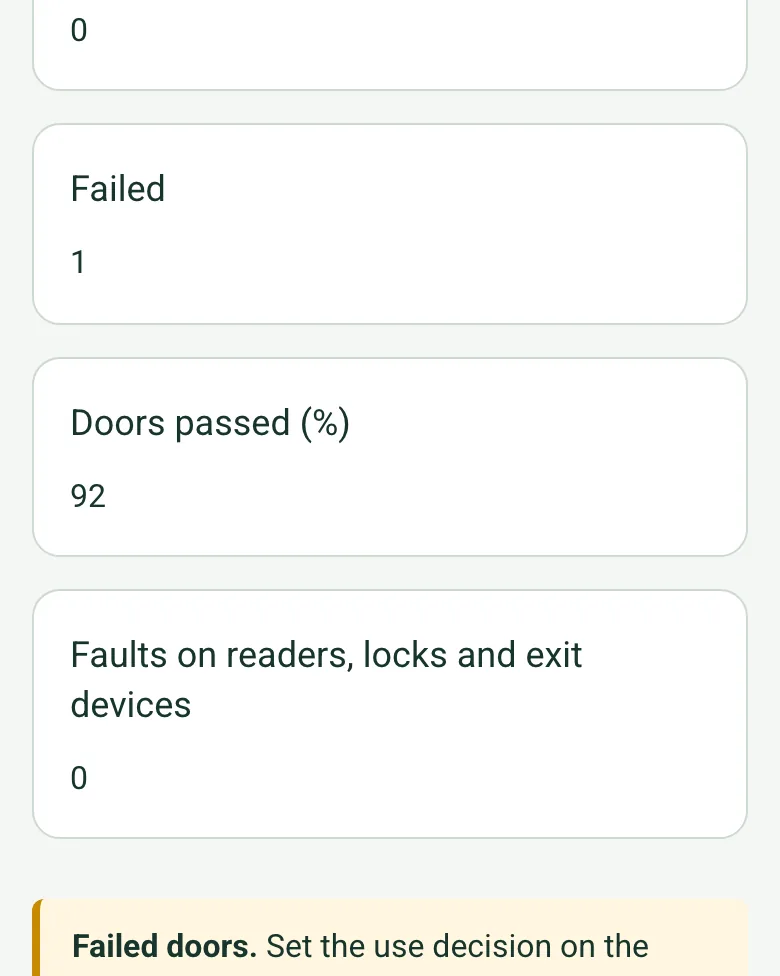
Worked-out totals in the completed access control service record on a phone: failed 1, doors passed 92%, faults on readers, locks and exit devices 0, and an amber note about failed doors

Doors passed, counted for you

Each door's result adds up as you go: passed, passed with advisory, failed, the share passed and the faults on readers, locks and exit devices. A failed door on an escape route brings up a red reminder to record the interim measure.

How calculated fields work →
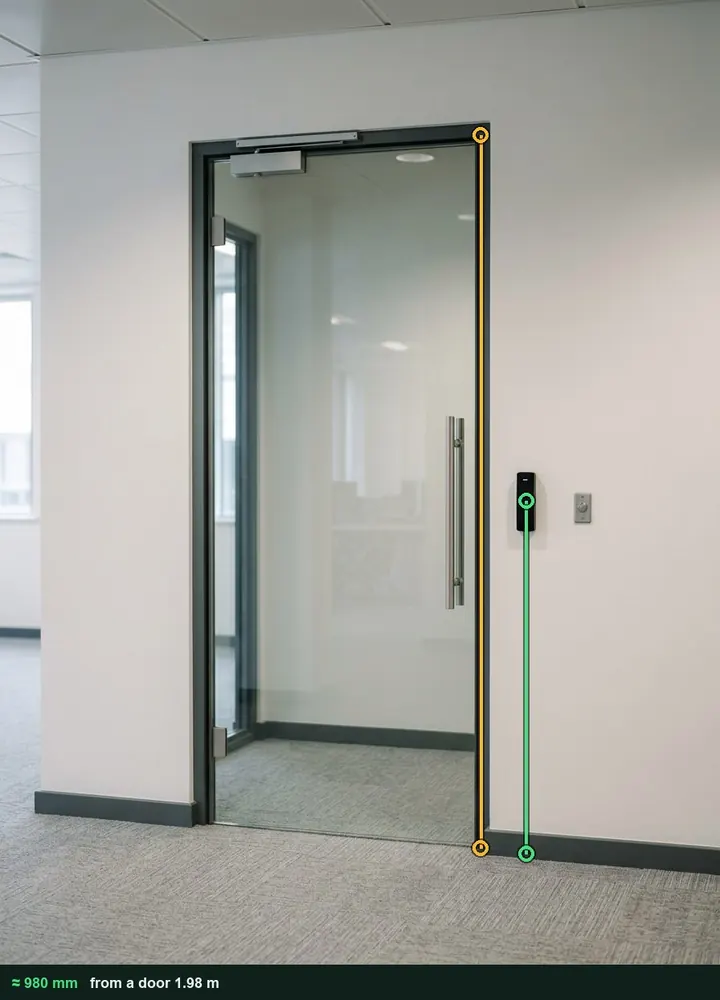
A glazed office door with a card reader beside it, marked up with an amber line on the door frame and a green line from the floor to the reader, about 980 mm

Reader height from a photo

Photograph the door with the reader beside it, use the door as the reference and tap the floor and the middle of the reader. The height in millimetres goes into the answer with the marked-up photo, to compare with the client's accessibility brief. It works on web forms in any phone browser today, and the app version is on its way.

How measuring from a photo works →
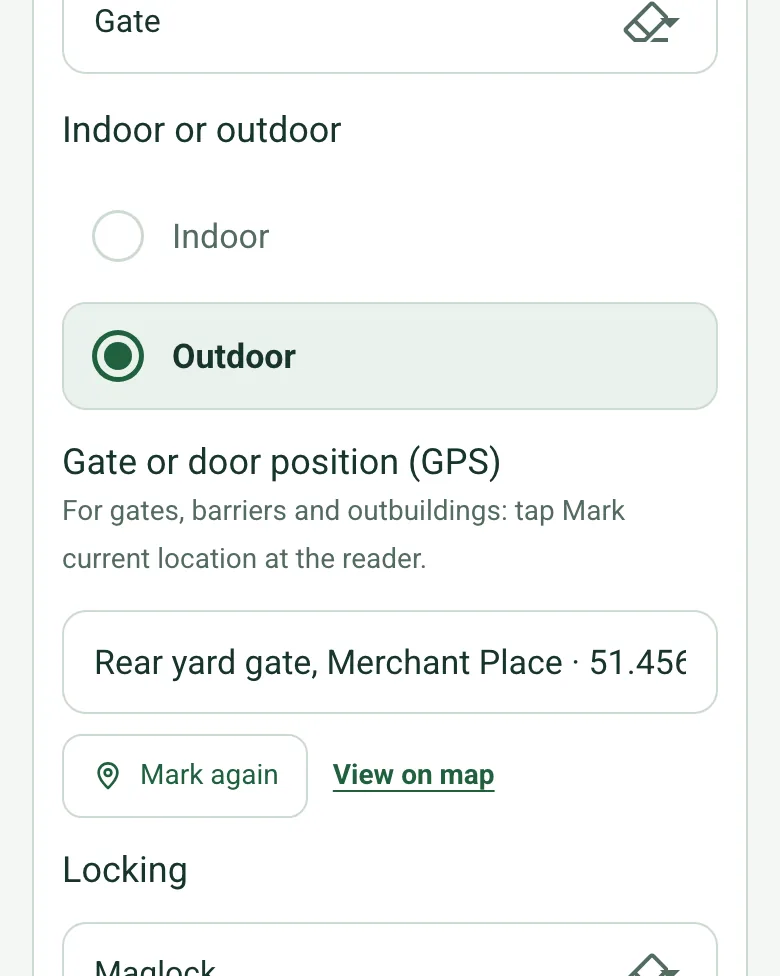
The rear yard gate in the completed service record on a phone: Outdoor ticked and Gate or door position (GPS) filled with Rear yard gate, Merchant Place and coordinates

Gates and barriers by GPS

Pin the reader at a yard gate, barrier or outbuilding so the next engineer goes straight to it. Mark current location works on web forms in any phone browser today, and the app version is on its way.

How GPS location works →

Film each door working

Walk Cam records the reader, the release and the door closing, with your spoken result typed in as you talk.

How Walk Cam works →

A completed access control service record

A six-monthly service of 12 doors at a fictional office building: 11 passed, one corridor door failed on a broken closer and is locked by hand at night until repaired, a reader height measured from a photo, the rear yard gate pinned by GPS and a battery replaced.

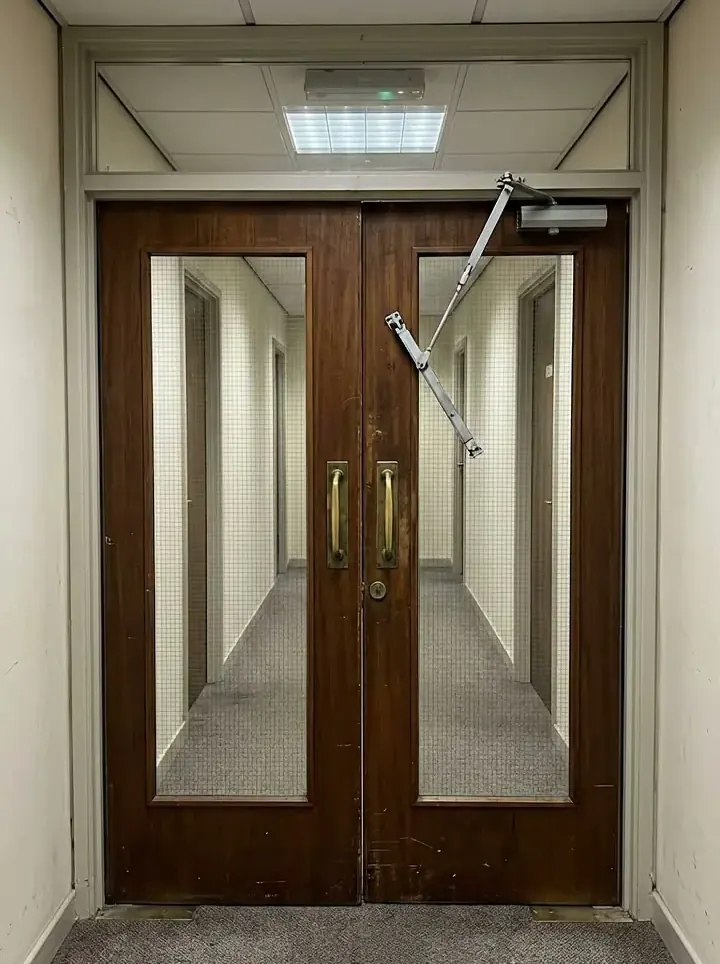
A pair of wooden corridor doors with the closer arm hanging loose from one leaf
D06 · first floor corridor · closer broken, failed
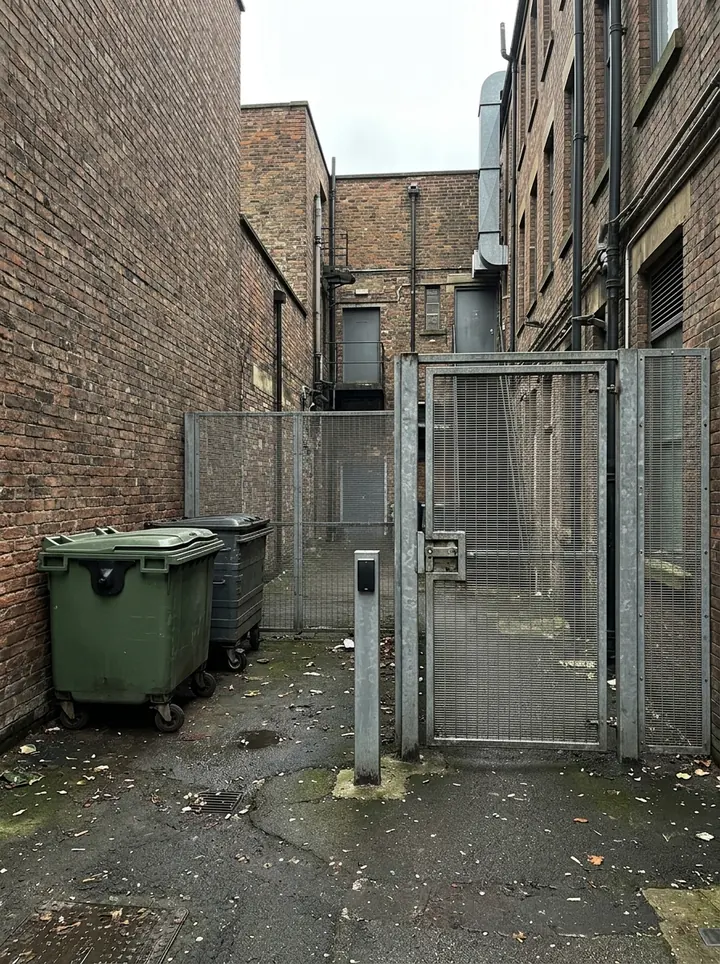
A steel mesh gate in a narrow service yard with a card reader on a post beside it and two wheelie bins
D12 · rear yard gate · passed, pinned by GPS
The reception door with its reader measured from a photo at about 980 mm
D03 · reception door · reader at 980 mm

Try the access control service record form live

Answer a few questions and watch it adapt. Your answers are not saved, and any photos you add are deleted within the hour.

Live form: Access Control Service RecordOpen full screen ↗
Fill it in right here

This is the real form as your team would use it: questions appear as you answer, scores work themselves out and you can add photos and signatures. No sign-up needed. Or open a completed example to see every answer, photo and score filled in.

Want to see one filled in? See a completed access control service record report (PDF), made by SiteSurvey from a fictional site visit.

For teams

Using the access control service record template for client work?

Paper or a spreadsheet works for the odd job. When your team does this every week, SiteSurvey keeps every visit in one place and turns each one into a report you can send.

  • Everyone fills in the same form on their phone, with photos attached to the answer they belong to.
  • Each visit becomes a branded PDF report for the client, with no retyping.
  • Every site, visit and report is kept together in one account, not scattered across email and shared drives.

Fill it in on a phone or tablet

Your team completes the access control service record on site in the SiteSurvey app on iPhone, iPad and Android phones and tablets. The project name and address fill in for them, it works without signal, and it syncs when the device is back online with photos kept against the question they answer.

Customers and subcontractors do not need the app: send them a link and they can fill it in from any browser.

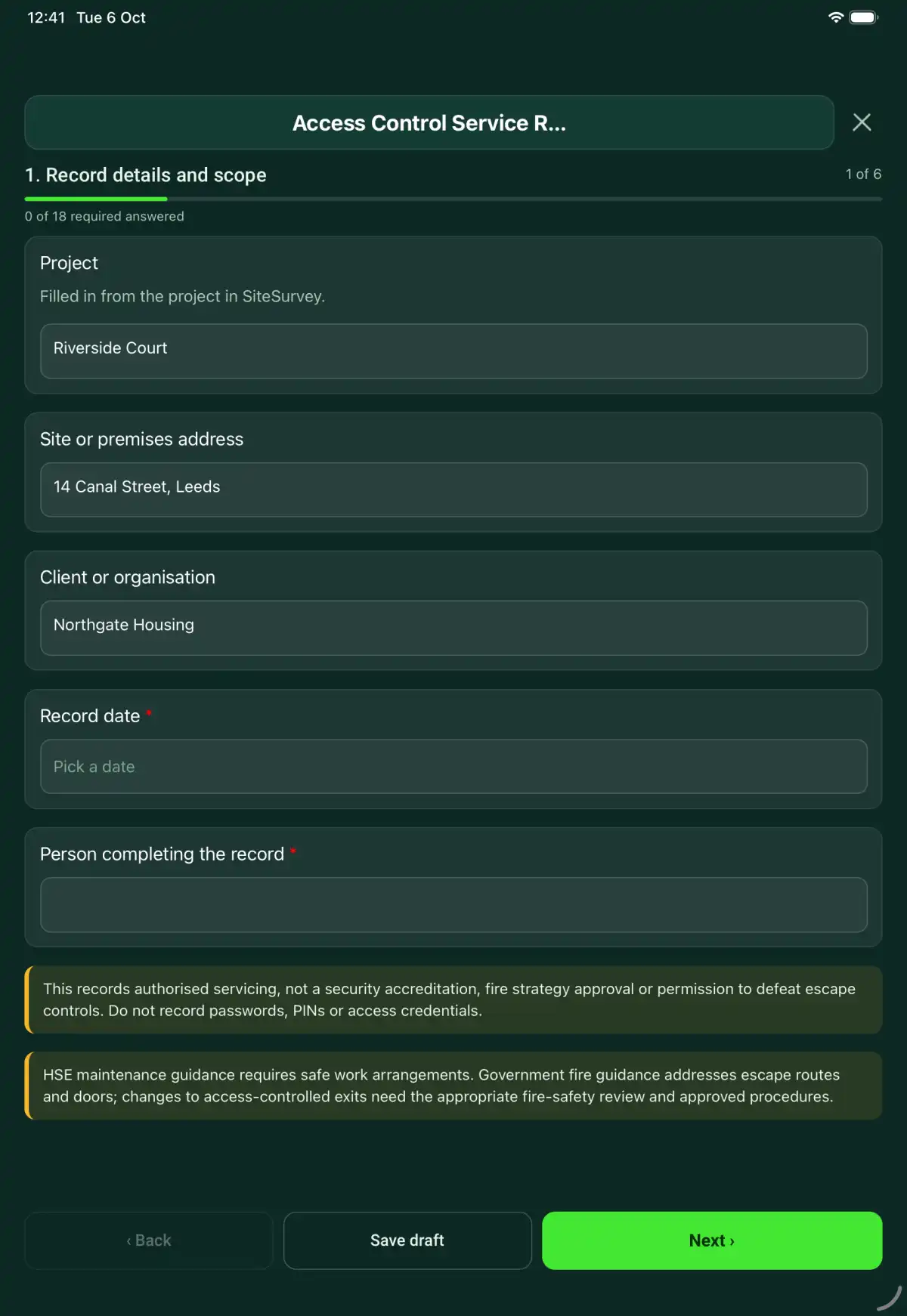
The Access Control Service Record form in the SiteSurvey app on a tablet
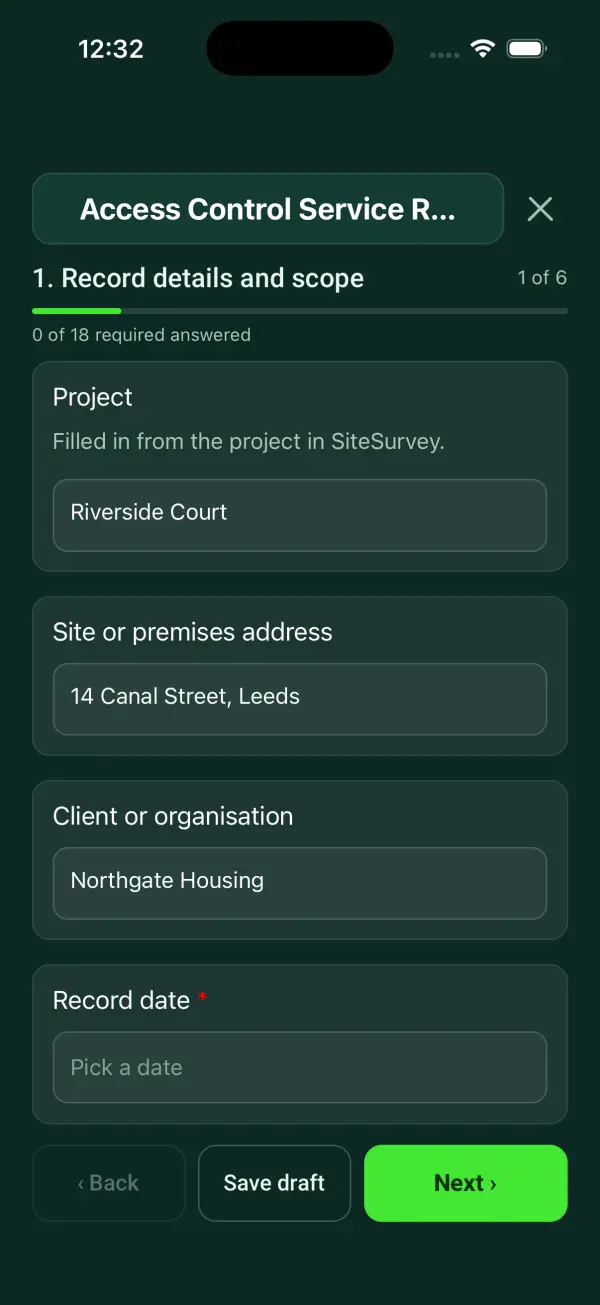
The Access Control Service Record form in the SiteSurvey app on a phone

Every question in the access control service record template

An access control service record covering authorised scope, door hardware, approved functional checks, event evidence, defects and secure handover. 7 sections and 68 questions. Follow-up questions and guidance appear only when an answer calls for them, so the person on site never sees the ones that do not apply.

Make it your own: every question is editable

This is a starting point, not a fixed form. Once it is in your SiteSurvey account you can reword any question, add or remove questions, sections and answer options, and add your own logo, so it fits the way your team works and the jobs you do.

Details you only enter once

Add this form to a project in SiteSurvey and it fills in what the project already knows, so nobody on site retypes it and every form on the job uses the same names. Anything filled in can still be changed.

  • Project: the project name
  • Site or premises address: the site address, from the space or the project
  • Client or organisation: the project's customer

Record details and scope

  • ProjectShort answer

    Filled in from the project in SiteSurvey.

    Fills in from the project name
  • Site or premises addressShort answer
    Fills in from the site address, from the space or the project
  • Client or organisationShort answer
    Fills in from the project's customer
  • Record date*Date
  • Person completing the record*Short answer
  • CheckThis records authorised servicing, not a security accreditation, fire strategy approval or permission to defeat escape controls. Do not record passwords, PINs or access credentials.
  • CheckThe Regulatory Reform (Fire Safety) Order 2005, article 14, requires emergency exit doors to open easily and immediately, and article 17 requires the responsible person to keep fire safety equipment and devices maintained in good working order. BS 7273-4:2015 sets how door release mechanisms on escape routes should be actuated by the fire alarm, and BS EN 60839-11-1:2013 covers the performance of electronic access control systems. The Workplace (Health, Safety and Welfare) Regulations 1992, regulation 18, require doors and gates to be suitably constructed and fitted with safety devices where needed. Any change to an access-controlled exit needs a fire safety review.

Equipment and scope

  • Access control system ID, model and location*Short answer
  • Technician competence or authorisation reference*Short answer
  • Manufacturer or approved procedure reference*Short answer
  • Work or inspection scope and exclusions*Notes

Door scope

  • Client authority and test window*Short answer
  • Escape-route interfaces and approved test reference*Short answer

    Reference the agreed escape arrangements and the authorised scope of checks. Keep passwords, PINs and credentials out of the record.

  • People and monitoring services notifiedShort answer

System checks

  • Authorised credential and access-rule tests recorded*Choose one
    • Acceptable
    • Action needed
    • Not checked
    • Not applicable
  • Action, limitation or reason not applicable*Notes
    Shown only when the answers above make it relevant
  • Power and fault indications checked under procedure*Choose one
    • Acceptable
    • Action needed
    • Not checked
    • Not applicable
  • Action, limitation or reason not applicable*Notes
    Shown only when the answers above make it relevant
  • Checks acceptableWorked out by the form
  • Checks needing actionWorked out by the form
  • Checks not doneWorked out by the form

Doors

  • Doors by floor or area
    Repeat for each entry. Each one asks:
    • Floor or area*Short answer

      For example Ground floor reception or Car park gate

    • Doors in this area
      Repeat for each door. Each one asks:
      • Door IDShort answer
      • Position in this area*Short answer
      • TypeChoose one
        • Single door
        • Double door
        • Gate
        • Vehicle barrier
        • Turnstile or speed lane
        • Other (describe)
      • Indoor or outdoorChoose one
        • Indoor
        • Outdoor
      • Gate or door position (GPS)Short answer

        For gates, barriers and outbuildings: tap Mark current location at the reader.

        Shown when “Indoor or outdoor” is “Outdoor”
      • LockingChoose one
        • Maglock
        • Electric strike
        • Electric lock in the door
        • Gate or barrier operator
        • Not known
        • Other (describe)
      • Is this door on an escape route?Yes or No
      • Reader and credentialChoose one
        • Working
        • Fault
        • Not tested
      • Lock and releaseChoose one
        • Working
        • Fault
        • Not tested
      • Exit device or break glassChoose one
        • Working
        • Fault
        • Not tested
        • Not fitted
      • Door closes and securesChoose one
        • Yes
        • No
        • Not applicable
      • Reader height (mm)Number

        Floor to the centre of the reader. Measure it, or estimate it from a photo with the door as the reference. Compare it with the client’s accessibility requirement.

      • Result for this door*Choose one
        • Pass
        • Pass with advisory
        • Fail
      • Advisory or fault, and what was done*Notes
        Shown only when the answers above make it relevant
      • WarningEscape route. A failed door on an escape route must not stop people getting out. Record the interim measure and who was told in Handover.
        Shown when “Is this door on an escape route?” is Yes and “Result for this door” is “Fail”
      • Photos of the door, reader and any defectPhotos
    • This floor or area: doors checkedWorked out by the form
    • This floor or area: passedWorked out by the form
    • This floor or area: passed with advisoryWorked out by the form
    • This floor or area: failedWorked out by the form
    • This floor or area: faults on readers, locks and exit devices (reader and credential)Worked out by the form
    • This floor or area: faults on readers, locks and exit devices (lock and release)Worked out by the form
    • This floor or area: faults on readers, locks and exit devices (exit device or break glass)Worked out by the form
  • Doors checkedWorked out by the form
  • PassedWorked out by the form
  • Passed with advisoryWorked out by the form
  • FailedWorked out by the form
  • Doors passed (%)Worked out by the form
    Shown only when the answers above make it relevant
  • Faults on readers, locks and exit devicesWorked out by the form
  • CheckFailed doors. Set the use decision on the next page to Restricted use or Out of service, and add an action for each one.
    Shown only when the answers above make it relevant
  • Controlled test/event log referenceShort answer
  • Work done and configuration change referenceNotes
  • Non-sensitive condition evidencePhotos

Handover

  • Use decision*Choose one
    • Available within recorded limits
    • Restricted use
    • Out of service
  • Restrictions, isolation and person informed*Notes
    Shown only when the answers above make it relevant
  • Repair or follow-up job referenceShort answer

Actions and review

  • Are further actions required?*Choose one
    • Yes
    • No
  • Further action
    Repeat for each further action. Each one asks:
    Shown when “Are further actions required?” is “Yes”
    • Action and evidence reference*Notes
    • PriorityChoose one
      • Urgent
      • High
      • Medium
      • Low
    • Person responsible*Short answer
    • Target dateDate
    • Action status*Choose one
      • Open
      • In progress
      • Completed
    • Completion evidence*Notes
      Shown when “Action status” is “Completed”
  • Outstanding limitations and information to pass onNotes
  • Record status*Choose one
    • Ready for review
    • Further work needed
    • Work or use stopped
  • Reviewed byShort answer
  • Review dateDate
  • Next service dueDate

    Set by the maintenance contract or the manufacturer.

  • Days to next serviceWorked out by the form
    Shown when “Record date” is answered and “Next service due” is answered
  • CheckThe next due date is before the date of this record. Check the date entered.
    Shown only when the answers above make it relevant
  • Author signature*Signature
  • CheckSigning records the information entered. It does not itself certify legal compliance, remove a limitation or authorise unsafe work.

Scope and responsibility

This records authorised servicing, not a security accreditation, fire strategy approval or permission to defeat escape controls. Do not record passwords, PINs or access credentials.

What a useful entry looks like

Escape-route interfaces and approved test reference

Reference the agreed escape arrangements and the authorised scope of checks. Keep passwords, PINs and credentials out of the record.

Door AC-04 checked within the agreed service scope. Any proposed change affecting escape operation is referred against the building's approved arrangements.

Fictional example of record wording. Use the actual evidence and approved arrangements for your job; this is not a completed report or an instruction to carry out the work.

See it filled in

A completed access control service record report, made by SiteSurvey from a fictional site visit: every answer, the photos, the guidance that applied and the sign-off, ready to send as a PDF.

See completed form (PDF) ↗

Access Control Service Record FAQs

How should I record “Escape-route interfaces and approved test reference”?

Reference the agreed escape arrangements and the authorised scope of checks. Keep passwords, PINs and credentials out of the record.

Should access codes be entered?

No. Reference controlled records without exposing credentials.

Can emergency release be bypassed during service?

This form gives no such permission. Follow the approved safe test and fire-safety arrangements.

Does it verify every access permission?

Only the explicitly recorded test scope; document untested doors, groups and functions.

What are the limits of this template?

This records authorised servicing, not a security accreditation, fire strategy approval or permission to defeat escape controls. Do not record passwords, PINs or access credentials.

Can I complete this form on site and share the record?

In the SiteSurvey app the form works offline, with photos and signatures recorded against the questions. Share the completed record as a PDF or a link. Dates and action owners are recorded fields; this form does not send reminders or update other systems.

Related

Use this access control service record form with your team

Add it from the form library in one click, change any question, and every completed form becomes a branded PDF report.

Start your trial →