Form library · Quality and compliance

Store audit checklist

For retail area managers and store teams auditing stores against the operating standard. Mark each of 26 checks Yes, Partly or No across six sections, from the entrance to the stockroom, and the form scores each section, works out the overall percentage and gives a red, amber or green result against your thresholds. A critical safety check that is not met turns the store red whatever the score. Pin the store by GPS, add photos per section and compare with the last audit. Try the form below, see every question or open a completed example.

Ready to use from the form library, and every question is yours to edit. Try it for a small trial fee, cancel any time.

Try it on your phone

Try it on this phone

Fill in the retail store audit on your phone now

See how the retail store audit looks on your phone

Scan the code with your phone camera. It opens the real form, no sign-up needed.

Open the live example and fill it in, just as your team would on site. No sign-up needed.

See it on this phone

Every question is editable. Add this form to your account, then change the wording, add or remove questions and options, and make it fit your own jobs.

Or start your trial with this form ready →

One email, and we won't add you to a mailing list.

Which safety issues should a store audit consider?

HSE identifies manual handling, slips and trips, violence and workplace transport as common retail risks. Include relevant observations in the store audit and refer significant hazards into the responsible safety process.

Last updated . Facts checked by the SiteSurvey team on 6 October 2026 against HSE common risks in retail and HSE retail slips and trips.

Built for area managers auditing stores

Walk the store with the form on a phone. Mark 26 checks Yes, Partly or No across six sections, from the entrance to the stockroom, and the form scores each section, works out the overall percentage and gives a red, amber or green result against your thresholds. A critical safety check that is not met turns the store red whatever the score. It records an operational review against your standard; it is not a legal, fire or food safety compliance audit.

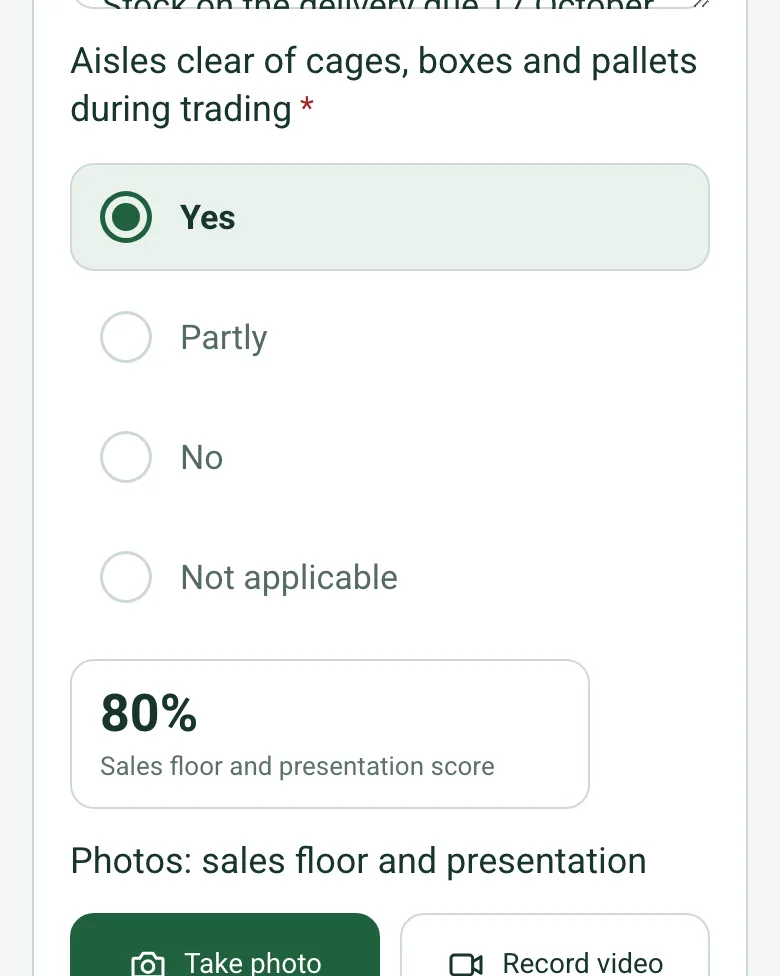
Sales floor checks answered Yes and Partly, with a note on the empty cookware lines, and a section score of 80%

Each section scored as you go

Yes scores 2 points, Partly 1 and No 0, and Not applicable is left out. Each of the six sections shows its own percentage as soon as its checks are answered, so you can see where the store is losing points before you reach the back door.

How calculated fields work →
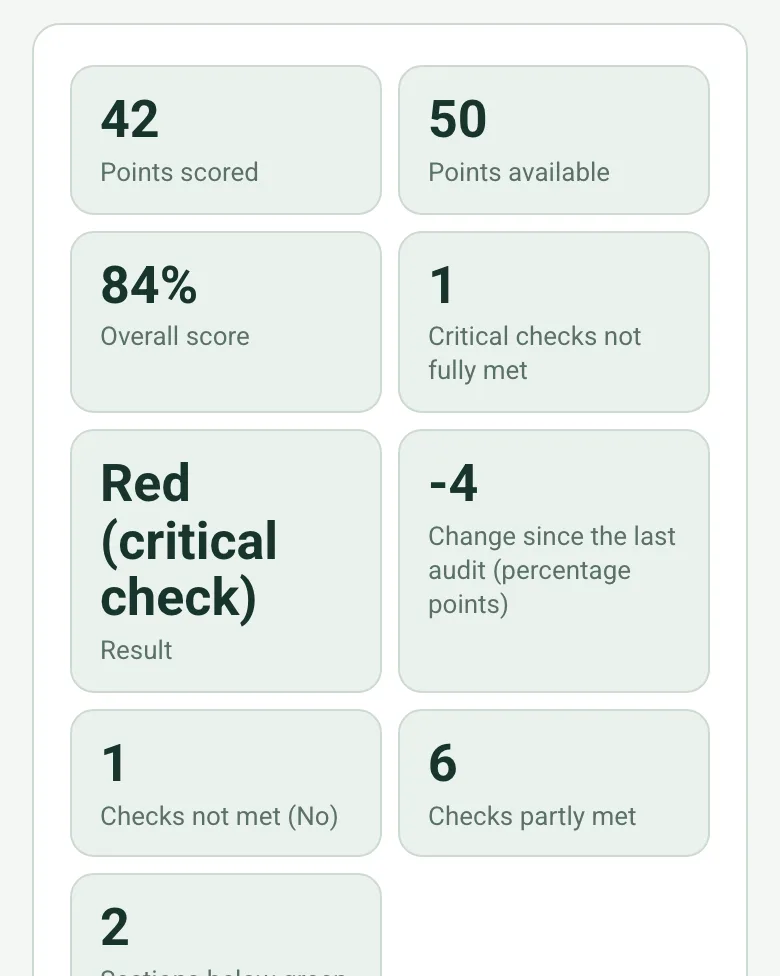
Points scored 42, points available 50, overall score 84%, 1 critical check not fully met, result Red (critical check), a change of -4 points since the last audit, 1 check not met and 6 partly met

Overall score and a red, amber or green result

The form adds up the points across all six sections, works out the overall percentage and compares it with your green and amber thresholds (85% and 70% unless you set your own). Enter the last audit's score and it shows the change in percentage points.

How calculated fields work →
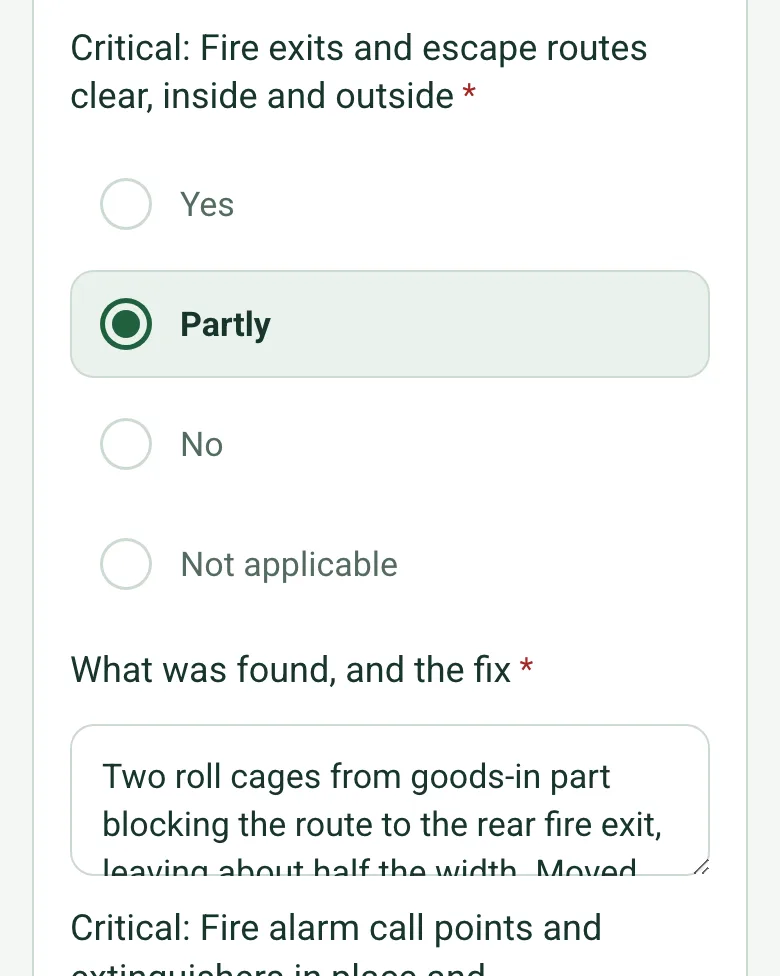
Critical: Fire exits and escape routes clear, answered Partly, with a note that roll cages were part blocking the rear fire exit and were moved during the visit

Critical checks turn the store red

The fire exit and fire equipment checks are marked critical. If either is only partly met or not met, the result is red whatever the score, and a red note asks you to put it right before you leave or escalate it straight away.

How calculated fields work →
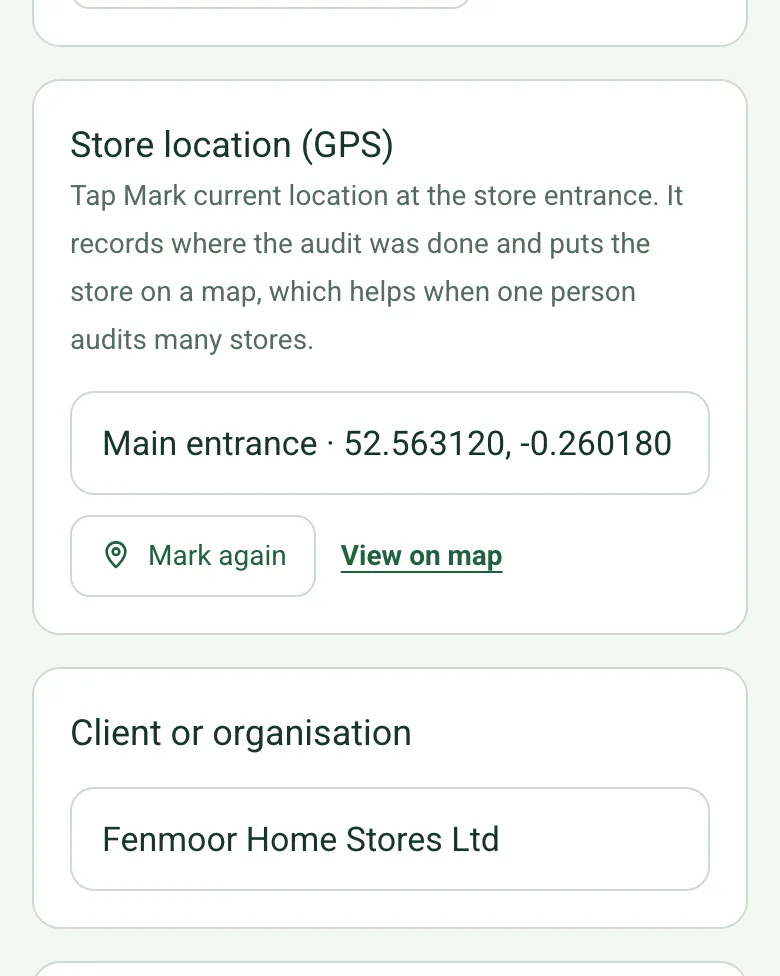
Store location (GPS) filled in as Main entrance with the coordinates, grid reference and accuracy, and a View on map link

Pin the store

Tap Mark current location at the entrance. Every audit records where it was done, which helps when one area manager covers a whole region of stores. Mark current location works on web forms in any phone browser today, and the app version is on its way.

How GPS location works →

A completed store audit

A routine audit of a fictional homeware store on a retail park: 42 of 50 points, 84% against a green threshold of 85%, and red because roll cages were part blocking the rear fire exit, moved during the visit. Open it as a filled-in form, or switch to a blank copy and try it yourself.

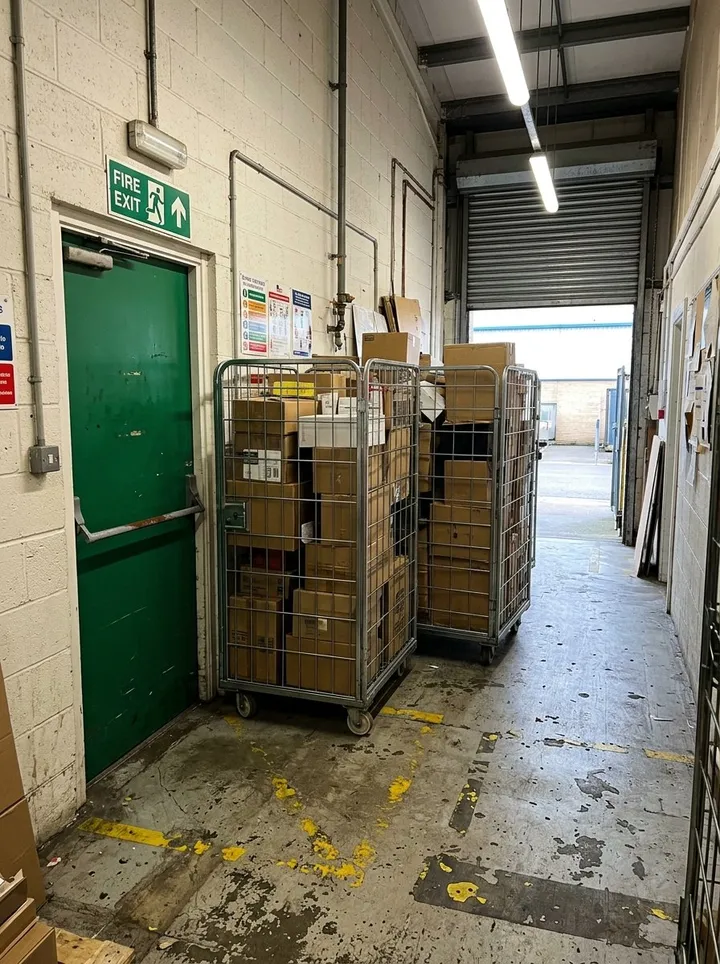
Two loaded roll cages standing in a back of house corridor, part blocking a green fire exit door
Rear fire exit route · critical check partly met · moved during the visit
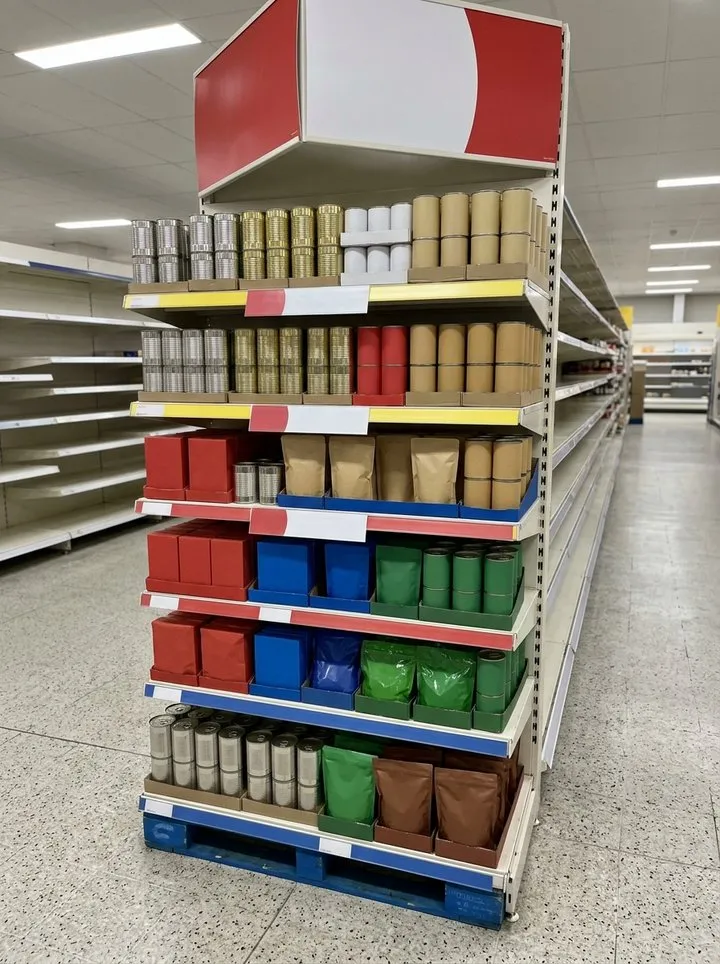
A promotion bay of boxed goods on red and white shelving in a bright store aisle
Aisle 14 promotion bay · 2 of 10 labels wrong · replaced
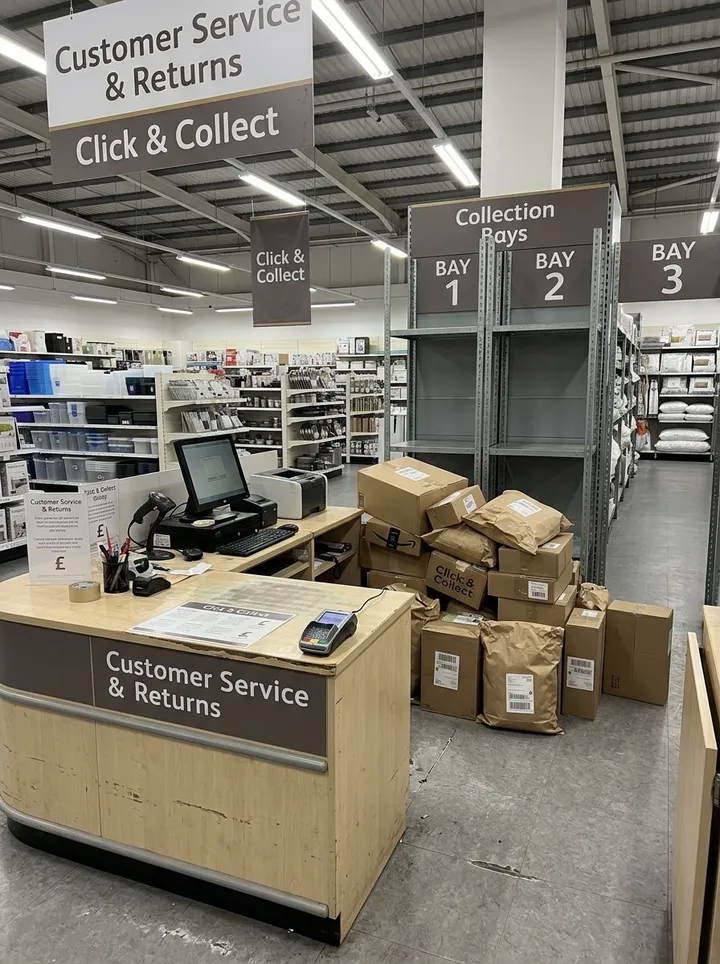
A store service desk with a till and card terminal, and click and collect parcels on the floor behind it
Service desk · parcels moved into the bays
Down the main aisle on the store walk-round

Try the retail store audit form live

Answer a few questions and watch it adapt. Your answers are not saved, and any photos you add are deleted within the hour.

Live form: Retail Store AuditOpen full screen ↗
Fill it in right here

This is the real form as your team would use it: questions appear as you answer, scores work themselves out and you can add photos and signatures. No sign-up needed. Or open a completed example to see every answer, photo and score filled in.

Want to see one filled in? See a completed retail store audit report (PDF), made by SiteSurvey from a fictional site visit.

For teams

Using the retail store audit template across several sites?

Paper or a spreadsheet works for one site. When several sites or managers do the same check, SiteSurvey keeps every result in one place.

  • Each site uses the same form on a phone or tablet, with photos attached to the answer they belong to.
  • Results from every site sit together, so you can compare sites and spot the same problem coming back.
  • Each completed check becomes a branded PDF report you can share or file.

Fill it in on a phone or tablet

Your team completes the retail store audit on site in the SiteSurvey app on iPhone, iPad and Android phones and tablets. The project name and address fill in for them, it works without signal, and it syncs when the device is back online with photos kept against the question they answer.

Customers and subcontractors do not need the app: send them a link and they can fill it in from any browser.

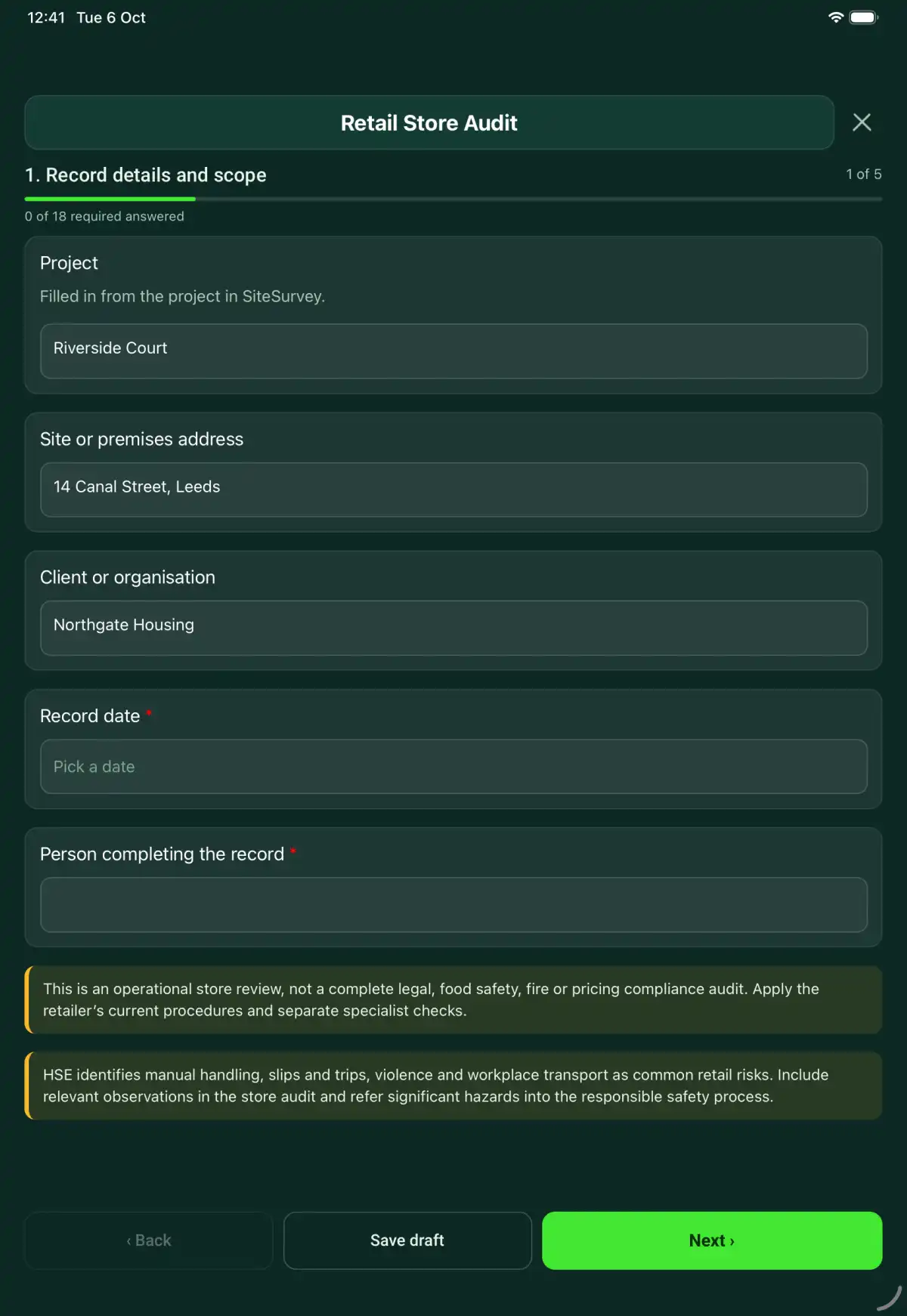
The Retail Store Audit form in the SiteSurvey app on a tablet
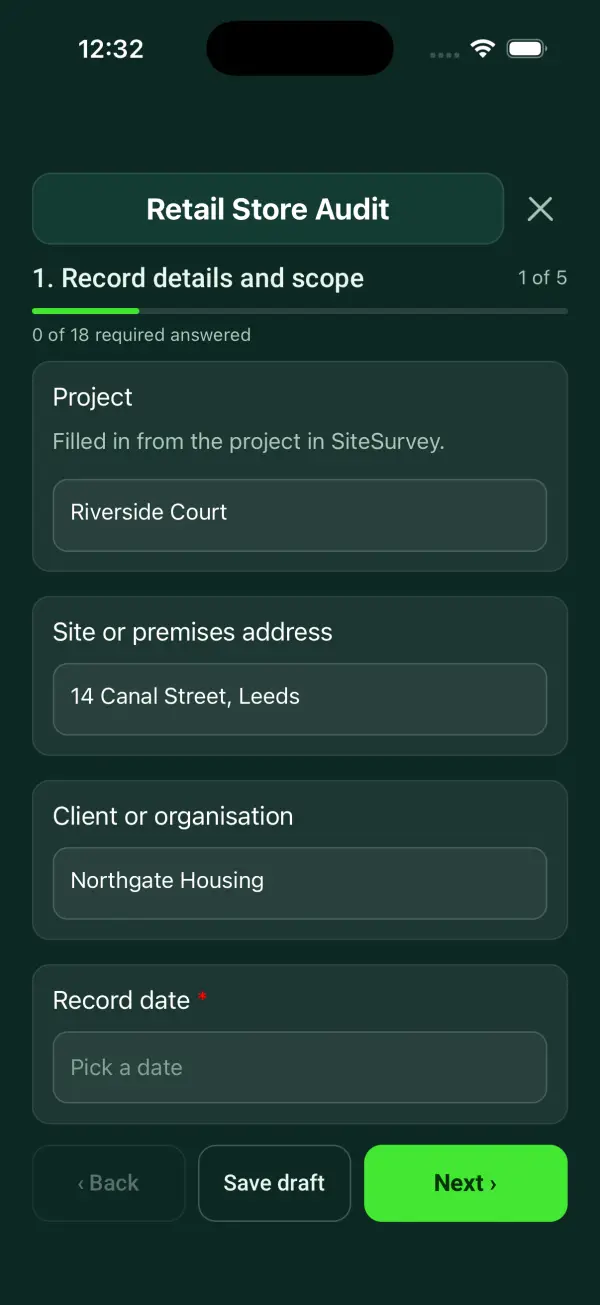
The Retail Store Audit form in the SiteSurvey app on a phone

Every question in the retail store audit template

A scored retail store audit for area managers and store teams: six sections scored Yes, Partly or No, section and overall percentages with a red, amber or green result, critical safety checks, the store's GPS location, exceptions and actions. 6 sections and 108 questions. Follow-up questions and guidance appear only when an answer calls for them, so the person on site never sees the ones that do not apply.

Make it your own: every question is editable

This is a starting point, not a fixed form. Once it is in your SiteSurvey account you can reword any question, add or remove questions, sections and answer options, and add your own logo, so it fits the way your team works and the jobs you do.

Details you only enter once

Add this form to a project in SiteSurvey and it fills in what the project already knows, so nobody on site retypes it and every form on the job uses the same names. Anything filled in can still be changed.

  • Project: the project name
  • Client or organisation: the project's customer
  • Site or premises address: the site address, from the space or the project

Record details and scope

  • ProjectShort answer

    Filled in from the project in SiteSurvey.

    Fills in from the project name
  • Client or organisationShort answer
    Fills in from the project's customer
  • Site or premises addressShort answer
    Fills in from the site address, from the space or the project
  • Store location (GPS)Short answer

    Tap Mark current location at the store entrance. It records where the audit was done and puts the store on a map, which helps when one person audits many stores.

  • Record date*Date
  • Person completing the record*Short answer
  • CheckThis is an operational store review, not a complete legal, food safety, fire or pricing compliance audit. Apply the retailer’s current procedures and separate specialist checks.
  • CheckHSE identifies manual handling, slips and trips, violence and workplace transport as common retail risks. Include relevant observations in the store audit and refer significant hazards into the responsible safety process.

Store and standards

  • Walk Cam: store walk-roundWalk Cam video with voice-to-text

    Optional. Film a guided walk-through on the SiteSurvey app.

  • Store ID and manager*Short answer
  • Operating standard and version*Short answer
  • Visit type*Choose one
    • Opening readiness
    • Routine audit
    • Follow-up
  • Region or areaShort answer
  • Overall score at the last audit (%)Number
  • Green from (%)Number

    Leave blank to use 85.

  • Amber from (%)Number

    Leave blank to use 70. Below this is red.

  • GuidanceHow the score works. Each check is Yes (2 points), Partly (1) or No (0). Not applicable leaves it out of the score. Each section gets a percentage, and the overall score is all the points scored out of all the points available. A check marked critical that is not fully met makes the result red, whatever the score.
  • Departments and exclusionsNotes

Customer areas

  • Frontage, windows and car park clean and free of litter*Choose one
    • Yes
    • Partly
    • No
    • Not applicable
  • What was found, and the fix*Notes
    Shown only when the answers above make it relevant
  • Fascia, window displays and opening hours lit, current and undamaged*Choose one
    • Yes
    • Partly
    • No
    • Not applicable
  • What was found, and the fix*Notes
    Shown only when the answers above make it relevant
  • Entrance clear, doors working and mats lying flat*Choose one
    • Yes
    • Partly
    • No
    • Not applicable
  • What was found, and the fix*Notes
    Shown only when the answers above make it relevant
  • Trolleys and baskets available, clean and in working order*Choose one
    • Yes
    • Partly
    • No
    • Not applicable
  • What was found, and the fix*Notes
    Shown only when the answers above make it relevant
  • Outside and entrance score (%)Worked out by the form
    Shown only when the answers above make it relevant
  • Photos: outside and entrancePhotos
  • Displays set to the current planogram or layout*Choose one
    • Yes
    • Partly
    • No
    • Not applicable
  • What was found, and the fix*Notes
    Shown only when the answers above make it relevant
  • Promotions in place as briefed, with the point-of-sale material up*Choose one
    • Yes
    • Partly
    • No
    • Not applicable
  • What was found, and the fix*Notes
    Shown only when the answers above make it relevant
  • Shelf-edge labels match the till price on a sample of 10 lines*Choose one
    • Yes
    • Partly
    • No
    • Not applicable
  • What was found, and the fix*Notes
    Shown only when the answers above make it relevant
  • Gaps and out-of-stocks within the agreed level*Choose one
    • Yes
    • Partly
    • No
    • Not applicable
  • What was found, and the fix*Notes
    Shown only when the answers above make it relevant
  • Aisles clear of cages, boxes and pallets during trading*Choose one
    • Yes
    • Partly
    • No
    • Not applicable
  • What was found, and the fix*Notes
    Shown only when the answers above make it relevant
  • Sales floor and presentation score (%)Worked out by the form
    Shown only when the answers above make it relevant
  • Photos: sales floor and presentationPhotos
  • Customers acknowledged and offered help on the shop floor*Choose one
    • Yes
    • Partly
    • No
    • Not applicable
  • What was found, and the fix*Notes
    Shown only when the answers above make it relevant
  • Queues within the store standard, extra tills opened when needed*Choose one
    • Yes
    • Partly
    • No
    • Not applicable
  • What was found, and the fix*Notes
    Shown only when the answers above make it relevant
  • Service desk staffed, returns and click and collect handled to procedure*Choose one
    • Yes
    • Partly
    • No
    • Not applicable
  • What was found, and the fix*Notes
    Shown only when the answers above make it relevant
  • Tills tidy, with bags, change and working card terminals*Choose one
    • Yes
    • Partly
    • No
    • Not applicable
  • What was found, and the fix*Notes
    Shown only when the answers above make it relevant
  • Customer service and tills score (%)Worked out by the form
    Shown only when the answers above make it relevant
  • Photos: customer service and tillsPhotos
Back of house, safety and people

  • Date codes and stock rotation correct on the lines sampled*Choose one
    • Yes
    • Partly
    • No
    • Not applicable
  • What was found, and the fix*Notes
    Shown only when the answers above make it relevant
  • Damaged and returned stock labelled and kept in the quarantine area*Choose one
    • Yes
    • Partly
    • No
    • Not applicable
  • What was found, and the fix*Notes
    Shown only when the answers above make it relevant
  • Stockroom tidy, racking undamaged and loads within the marked limits*Choose one
    • Yes
    • Partly
    • No
    • Not applicable
  • What was found, and the fix*Notes
    Shown only when the answers above make it relevant
  • Goods-in secure: door closed when unattended and deliveries checked in*Choose one
    • Yes
    • Partly
    • No
    • Not applicable
  • What was found, and the fix*Notes
    Shown only when the answers above make it relevant
  • Stock and back of house score (%)Worked out by the form
    Shown only when the answers above make it relevant
  • Photos: stock and back of housePhotos
  • Critical: Fire exits and escape routes clear, inside and outside*Choose one
    • Yes
    • Partly
    • No
    • Not applicable
  • What was found, and the fix*Notes
    Shown only when the answers above make it relevant
  • Critical: Fire alarm call points and extinguishers in place and unobstructed*Choose one
    • Yes
    • Partly
    • No
    • Not applicable
  • What was found, and the fix*Notes
    Shown only when the answers above make it relevant
  • Floors free of spills and trip hazards, wet floor signs in use*Choose one
    • Yes
    • Partly
    • No
    • Not applicable
  • What was found, and the fix*Notes
    Shown only when the answers above make it relevant
  • First aid kit stocked and accident book in use*Choose one
    • Yes
    • Partly
    • No
    • Not applicable
  • What was found, and the fix*Notes
    Shown only when the answers above make it relevant
  • Security tags, CCTV and intruder alarm working as briefed*Choose one
    • Yes
    • Partly
    • No
    • Not applicable
  • What was found, and the fix*Notes
    Shown only when the answers above make it relevant
  • Health, safety and security score (%)Worked out by the form
    Shown only when the answers above make it relevant
  • Photos: health, safety and securityPhotos
  • Rota covers the trading hours with a manager or key holder on duty*Choose one
    • Yes
    • Partly
    • No
    • Not applicable
  • What was found, and the fix*Notes
    Shown only when the answers above make it relevant
  • Training records up to date for a sample of 3 staff on shift*Choose one
    • Yes
    • Partly
    • No
    • Not applicable
  • What was found, and the fix*Notes
    Shown only when the answers above make it relevant
  • Age-restricted sales policy displayed and refusals recorded*Choose one
    • Yes
    • Partly
    • No
    • Not applicable
  • What was found, and the fix*Notes
    Shown only when the answers above make it relevant
  • Opening and closing checks signed off for the last 7 days*Choose one
    • Yes
    • Partly
    • No
    • Not applicable
  • What was found, and the fix*Notes
    Shown only when the answers above make it relevant
  • People and procedures score (%)Worked out by the form
    Shown only when the answers above make it relevant
  • Photos: people and proceduresPhotos
  • Other supporting photosPhotos

Results and exceptions

Tie each exception to the relevant store standard and a specific location. Identify immediate action and later follow-up separately.

  • Points scoredWorked out by the form
  • Points availableWorked out by the form
  • Overall score (%)Worked out by the form
    Shown only when the answers above make it relevant
  • Critical checks not fully metWorked out by the form
  • ResultWorked out by the form
    Shown only when the answers above make it relevant
  • Change since the last audit (percentage points)Worked out by the form
    Shown only when the answers above make it relevant
  • Checks not met (No)Worked out by the form
  • Checks partly metWorked out by the form
  • Sections below greenWorked out by the form
  • WarningA critical check was not met. Put it right before you leave if you can. If not, tell the store manager and your area or regional manager straight away and record what was done in the actions.
    Shown only when the answers above make it relevant
  • CheckBelow green. Agree actions with the store manager, with an owner and a date for each, and set a follow-up visit date on the next page.
    Shown only when the answers above make it relevant
  • Exceptions to the standard
    Repeat for each operational exception. Each one asks:
    • Department or location*Short answer
    • Requirement reference*Short answer
    • Observed deviation and evidence*Notes
    • Responsible manager*Short answer
  • Immediate controls and escalationNotes
  • Previous audit and action referencesShort answer

Actions and review

  • Are further actions required?Choose one
    • Yes
    • No
  • Further action
    Repeat for each further action. Each one asks:
    Shown when “Are further actions required?” is “Yes”
    • Action and evidence reference*Notes
    • Person responsibleShort answer
    • Target dateDate
    • Action statusChoose one
      • Open
      • In progress
      • Completed
    • Completion evidence*Notes
      Shown when “Action status” is “Completed”
  • Open actionsWorked out by the form
    Shown when “Are further actions required?” is “Yes”
  • Follow-up visit dateDate
  • Outstanding limitations and information to pass onNotes
  • Record status*Choose one
    • Ready for review
    • Further work needed
    • Work or use stopped
  • Reviewed byShort answer
  • Review dateDate
  • Author signature*Signature
  • CheckSigning records the information entered. It does not itself certify legal compliance, remove a limitation or authorise unsafe work.

Scope and responsibility

This is an operational store review, not a complete legal, food safety, fire or pricing compliance audit. Apply the retailer’s current procedures and separate specialist checks.

What a useful entry looks like

Exceptions to the standard

Tie each exception to the relevant store standard and a specific location. Identify immediate action and later follow-up separately.

Stock obstructed the designated rear access route at 10:15. Finding linked to standard ST-04 and reported to the shift manager.

Fictional example of record wording. Use the actual evidence and approved arrangements for your job; this is not a completed report or an instruction to carry out the work.

See it filled in

A completed retail store audit report, made by SiteSurvey from a fictional site visit: every answer, the photos, the guidance that applied and the sign-off, ready to send as a PDF.

See completed form (PDF) ↗

Retail Store Audit FAQs

How should I record “Exceptions to the standard”?

Tie each exception to the relevant store standard and a specific location. Identify immediate action and later follow-up separately.

Does it cover food departments?

Record the department and refer food-specific controls to the food safety and temperature forms. This audit does not replace them.

How is the store audit scored?

Each check is Yes (2 points), Partly (1) or No (0), and Not applicable is left out. Each section gets a percentage and the overall score is all points scored out of all points available. Green and amber thresholds default to 85% and 70%, and you can set your own. Two fire safety checks are marked critical: if either is not fully met, the result is red whatever the score.

Can I compare repeat visits and stores?

Enter the score from the last audit and the form shows the change in percentage points. Each audit records the store GPS location, region and visit type, so an area manager can line audits up across stores. The form does not chart trends across audits for you.

What are the limits of this template?

This is an operational store review, not a complete legal, food safety, fire or pricing compliance audit. Apply the retailer’s current procedures and separate specialist checks.

Can I complete this form on site and share the record?

In the SiteSurvey app the form works offline, with photos and signatures recorded against the questions. Share the completed record as a PDF or a link. Dates and action owners are recorded fields; this form does not send reminders or update other systems.

Related

Use this retail store audit form with your team

Add it from the form library in one click, change any question, and every completed form becomes a branded PDF report.

Start your trial →