Whole ladder and identity
Show the complete ladder from a safe position, with its asset reference recorded separately. Describe the type, storage location and any obvious damage.
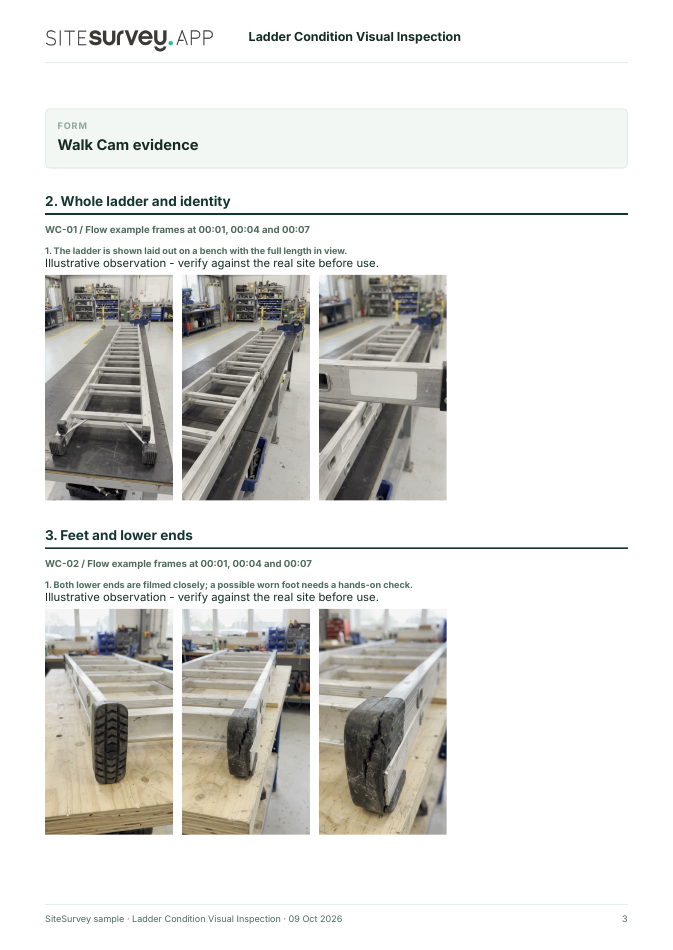
The ladder is shown laid out on a bench with the full length in view.
Form library · Health and safety
A ladder and stepladder inspection register for a site, a depot or a fleet of vans. Add each ladder with its ID, type, material and standard, run the HSE checks on stiles, feet, rungs, locks, platform and treads, photograph any defect and mark it pass or fail. A failed ladder records whether it was labelled for repair or destroyed, and a passed one gets its next detailed inspection date. Every question is listed below, and you can fill the live form in on this page.
Ready to use from the form library, and every question is yours to edit. Try it for a small trial fee, cancel any time.
Try it on your phone
Try it on this phone
Fill in the ladder inspection on your phone now
See how the ladder inspection looks on your phone
Scan the code with your phone camera. It opens the real form, no sign-up needed.
Open the live example and fill it in, just as your team would on site. No sign-up needed.
See it on this phoneEvery question is editable. Add this form to your account, then change the wording, add or remove questions and options, and make it fit your own jobs.
A ladder inspection checklist should check that the stiles are not bent or damaged, the feet are not missing, worn or damaged, the rungs are not bent, worn, missing or loose, locking mechanisms work, a stepladder platform is not split or buckled, and steps or treads are clean with tight fixings. A detailed inspection also records the ladder's ID, the date and the result, and HSE says detailed inspections should be recorded.
Last updated . Facts checked by the SiteSurvey team on 17 October 2026 against HSE: how to check your ladder is safe before you use it, HSE: inspecting the condition of ladders, HSE: how and when to use a ladder at work and HSE: product standards for ladders and stepladders.
New: AI inspector · Now live
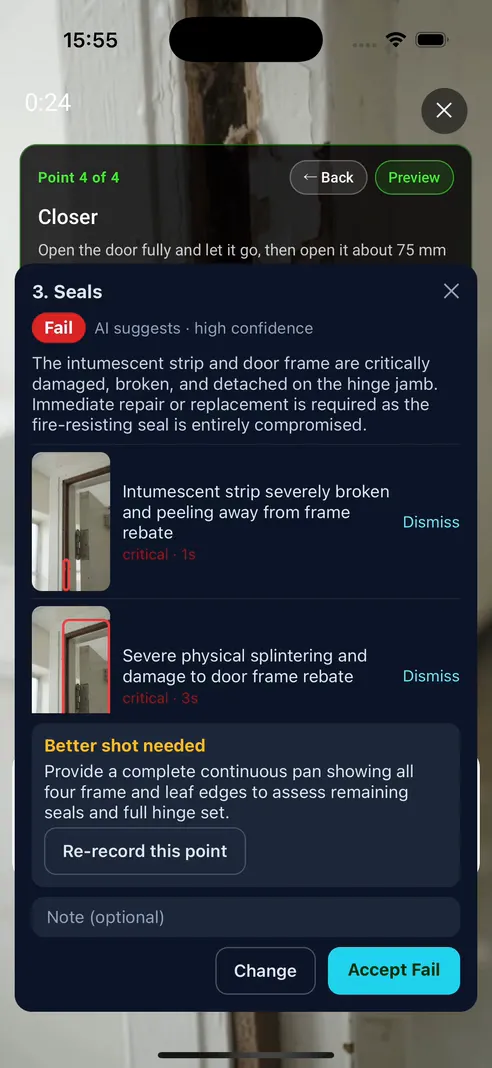
This form's Walk Cam field ships with an inspector brief: four points and 19 checks drawn from the HSE pre-use and detailed visual checks in INDG455. Film a point on the SiteSurvey app and six to ten seconds later the AI suggests pass, fail or cannot assess, with each defect boxed on a still from your clip. You confirm every point. Only confirmed verdicts and accepted photos reach the ladder record and the report.
Hold record and film what the point card asks for: the whole ladder, each foot close up, the stiles and rungs, the locks and the label. Let go and move on while it checks.
Pass, fail or cannot assess, with a short summary and each finding boxed in red on a still from your clip. If it could not see enough it says what to film instead.
Accept the verdict or change it to the one you would give. Dismiss a finding you disagree with and add a note. The report prints your confirmed verdict and names you, not the model.
Show the complete ladder from a safe position, with its asset reference recorded separately. Describe the type, storage location and any obvious damage.
Film each foot and the adjacent lower stile in close view. Look for wear, missing material or distortion without relying on video to prove grip.
Move along the accessible rails and rungs, keeping the affected location in context. Record visible dents, bends, cracks or loose-looking connections.
Show visible catches, stays and label area without operating the ladder for the camera. Note anything hidden or unreadable.
The AI judges only what it can see. It never judges grip, slip resistance, load capacity or whether a lock holds under load, and it never reads a standard or maximum load off a label it cannot see clearly. A missing foot or rung, a bent or cracked stile or a home-made repair is a fail. A label worn away is a fail; one that is only blurred by the camera comes back as cannot assess. Whether the ladder is the right equipment for the job stays with your work at height risk assessment, as it does on the rest of this form.
It is in the SiteSurvey app now, on every account. Clips are assessed by Google Gemini and are not used to train Google's models. Included in the subscription, with no per-clip charge.

Answer a few questions and watch it adapt. Your answers are not saved, and any photos you add are deleted within the hour.
This is the real form as your team would use it: questions appear as you answer, scores work themselves out and you can add photos and signatures. No sign-up needed. Or open a completed example to see every answer, photo and score filled in.
Want to see one filled in? See a completed ladder inspection report (PDF), made by SiteSurvey from a fictional site visit.
Walk Cam route · four guided clips
Give each ladder its own visual record. Film the whole asset, then show its feet, rails, rungs and locking parts so the responsible person can locate a concern.
Identify the ladder, manufacturer and site before filming. Record an overview, then visible condition at the feet, stiles, rungs and locking parts. Note anything obscured or needing a hands-on check.
Show the complete ladder from a safe position, with its asset reference recorded separately. Describe the type, storage location and any obvious damage.
The ladder is shown laid out on a bench with the full length in view.
Film each foot and the adjacent lower stile in close view. Look for wear, missing material or distortion without relying on video to prove grip.
Both lower ends are filmed closely; a possible worn foot needs a hands-on check.
Move along the accessible rails and rungs, keeping the affected location in context. Record visible dents, bends, cracks or loose-looking connections.
The camera passes along the side rails and rungs to document accessible visible condition.
Show visible catches, stays and label area without operating the ladder for the camera. Note anything hidden or unreadable.
The locking area and label position are shown; correct engagement was not tested.
A fictional six-page example with the four points, twelve stills from the clips, observations, follow-up actions and the limits of a visual record.
View the visual evidence (PDF) ↗ · Download the full sample report

This is an example visual evidence record. HSE distinguishes a user's pre-use check from a detailed visual inspection recorded by a competent person. Filming does not establish that the ladder is safe, replace the manufacturer's instructions or authorise use. Example footage was generated in Google Flow and the observations are scripted; no real site is shown. Walk Cam works inside any form in the app. How Walk Cam works · All visual inspections
A ladder and stepladder inspection register: pre-use and detailed inspections for each ladder with its ID, the HSE checks, defects with photos and a keep or remove result. 4 sections and 55 questions. Follow-up questions and guidance appear only when an answer calls for them, so the person on site never sees the ones that do not apply.
This is a starting point, not a fixed form. Once it is in your SiteSurvey account you can reword any question, add or remove questions, sections and answer options, and add your own logo, so it fits the way your team works and the jobs you do.
Add this form to a project in SiteSurvey and it fills in what the project already knows, so nobody on site retypes it and every form on the job uses the same names. Anything filled in can still be changed.
Optional. Scan the label or tag to capture its numbers.
Optional. Film the four guided points on the SiteSurvey app; each clip keeps its spoken note. The AI inspector reviews each point and suggests a verdict for you to confirm.
A completed ladder inspection report, made by SiteSurvey from a fictional site visit: every answer, the photos, the guidance that applied and the sign-off, ready to send as a PDF.
HSE separates the two. Pre-use checks, done by the person using the ladder, do not need to be recorded, but any problem should be reported to a manager. Detailed visual inspections are the employer's responsibility, should be carried out at fixed intervals by a competent person following the manufacturer's instructions, and should be recorded. The form handles both: choose the type of inspection at the start.
HSE says the person using the ladder should check it at the beginning of the working day, and again after something has changed, for example if the ladder has been dropped or moved from a dirty area to a clean one, when the feet need checking again.
HSE lists damaged or worn feet, twisted, bent or dented stiles, cracked, worn, bent or loose rungs, missing or damaged tie rods, and cracked or damaged welded joints, loose rivets or damaged stays. The form adds checks on locks and spreaders, extension ropes and pulleys, and whether the label with the standard and maximum load can still be read.
HSE says that if you spot a defect, do not use the ladder and tell the person in charge of the work. The form marks the ladder as failed and asks what happens to it: labelled do not use and taken out of service for repair, destroyed or disposed of, or returned to the supplier. It counts the ladders passed and failed on the visit.
HSE says BS 2037 and BS 1129 have been withdrawn, but ladders made to them before withdrawal may still be used, following the user instructions and guidance on safe use. HSE names EN 131 as the standard for portable steps and ladders. The form records which standard is on the label, and treats a missing or unreadable label as something to follow up.
HSE says that if a task would mean staying up a leaning ladder or stepladder for more than 30 minutes at a time, other equipment is recommended. The form asks about the job, and whether leaning ladders can be secured: tied, held by a stability device, wedged, or footed as a last resort.
Yes. This form's Walk Cam field carries an inspector brief written from the HSE ladder checks: four points and 19 checks covering the whole ladder, the feet, the stiles and rungs, and the locking parts and label. Film each point in the SiteSurvey app and the AI inspector suggests pass, fail or cannot assess within about ten seconds, with each defect boxed on a still from the clip. It never judges grip or load from a video, and you confirm every verdict before it reaches the ladder record. It is in the SiteSurvey app now, on every account.
Who each hazard harms, what the law expects and the control measures to look for, in our hazard library.
Related templates
Construction site safety walk: perimeter, work at height, welfare, housekeeping, plant, hazards and actions.
Hazards, who might be harmed, controls and risk scores, with a briefing record and review date.
Risk assessment for a task at height: can it be avoided, how falls are prevented, access equipment, fragile surfaces, falling objects, rescue and scored hazards.
Risk assessment for someone working alone: the work and place, violence, health, high risk tasks, check-in arrangements, what happens if contact is lost and scored hazards.
Add it from the form library in one click, change any question, and every completed form becomes a branded PDF report.
Start your trial →