Form library · Health and safety

Hoist inspection checklist

For hoist operators carrying out authorised pre-use checks. Record the hoist and its position, the rated load against the heaviest load planned for the day and each pre-use check. The form counts checks acceptable, needing action and not checked, and any action brings up a red note not to use the hoist until it is put right. Try the form below, see every question or open a completed example.

Ready to use from the form library, and every question is yours to edit. Try it for a small trial fee, cancel any time.

Try it on your phone

Try it on this phone

Fill in the construction hoist pre-use check on your phone now

See how the construction hoist pre-use check looks on your phone

Scan the code with your phone camera. It opens the real form, no sign-up needed.

Open the live example and fill it in, just as your team would on site. No sign-up needed.

See it on this phone

Every question is editable. Add this form to your account, then change the wording, add or remove questions and options, and make it fit your own jobs.

Or start your trial with this form ready →

One email, and we won't add you to a mailing list.

Does a pre-use check replace a thorough examination?

HSE distinguishes operator pre-use checks from formal inspection and thorough examination. Construction hoists require suitable planning, maintenance and competent operation; checks must follow the specific hoist instructions.

Last updated . Facts checked by the SiteSurvey team on 20 October 2026 against HSE construction lifting operations and HSE lifting equipment at work.

Built for the daily hoist check

Record the hoist and where it stands, check the heaviest load planned for the day against the rated load on the data plate, then work through the pre-use checks. The form counts what needs action and tells the operator not to use the hoist until it is put right. It is a pre-use record, not a thorough examination.

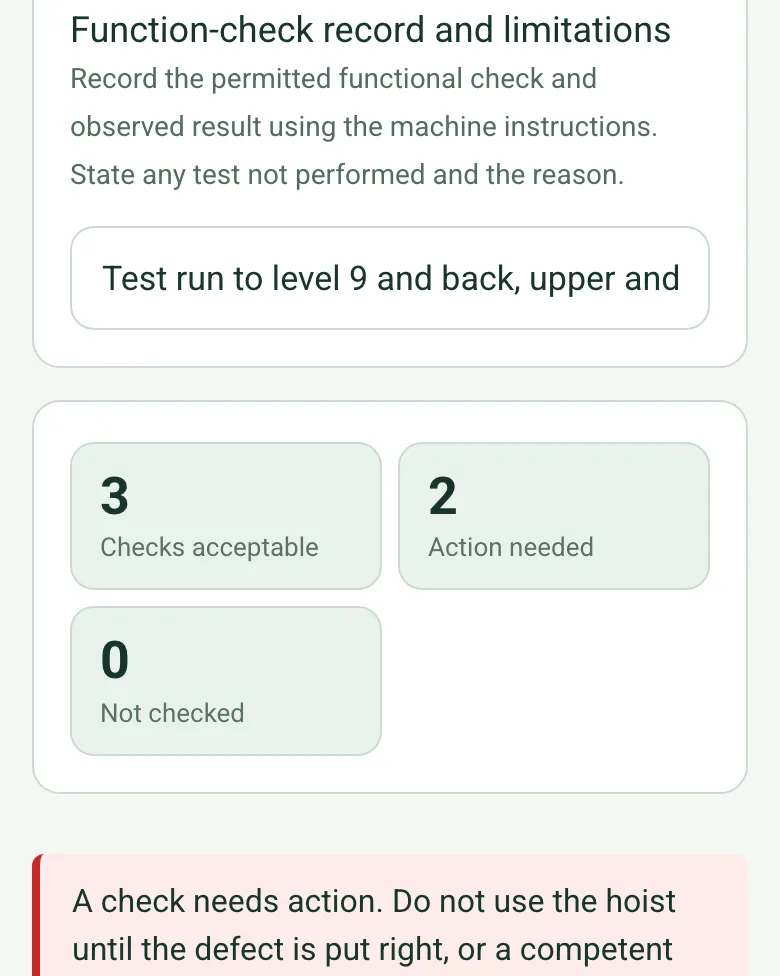
The completed hoist check on a phone: checks acceptable 3, action needed 2, not checked 0, with a red note not to use the hoist until the defect is put right

Checks needing action counted

The form counts checks acceptable, needing action and not checked. Any action brings up a red note not to use the hoist until the defect is put right or a competent person agrees a recorded restriction, and an amber note if the hoist is still marked available.

How calculated fields work →
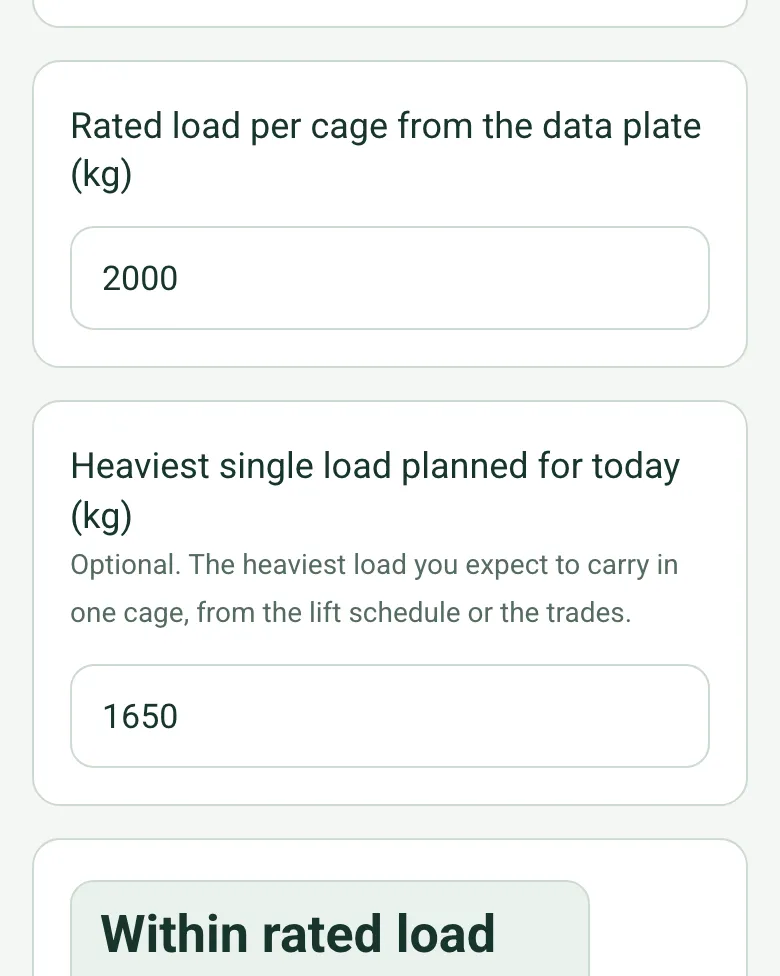
Rated load per cage from the data plate 2000 kg, heaviest single load planned for today 1650 kg, and the result Within rated load

Planned load against the rated load

Enter the rated load from the data plate and the heaviest load planned for the day. The form shows whether it is within the rated load, with a red note to split the load if it is over.

How calculated fields work →
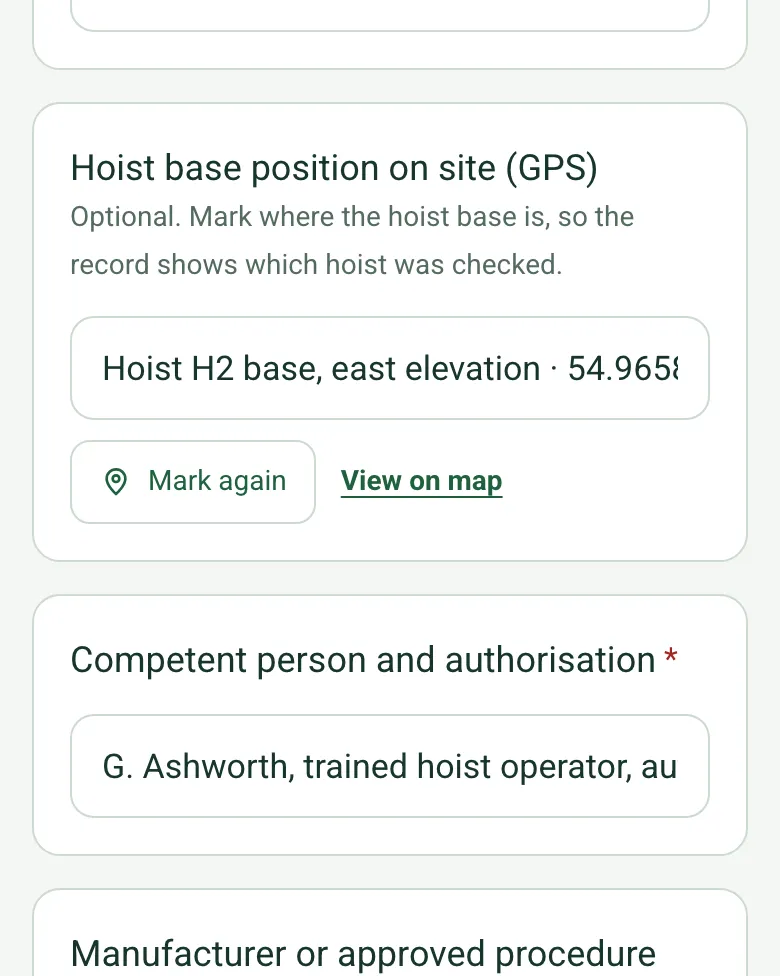
Hoist base position on site (GPS) filled in as Hoist H2 base, east elevation, with coordinates, Mark again and View on map

Which hoist was checked

Mark the hoist base with GPS, so a site with two or three hoists has a clear record of which one was checked.

How GPS location works →

Film the base and mast

Add a short video of the base enclosure, gates and mast ties to the record, so the supervisor sees what the operator saw.

A completed hoist pre-use check

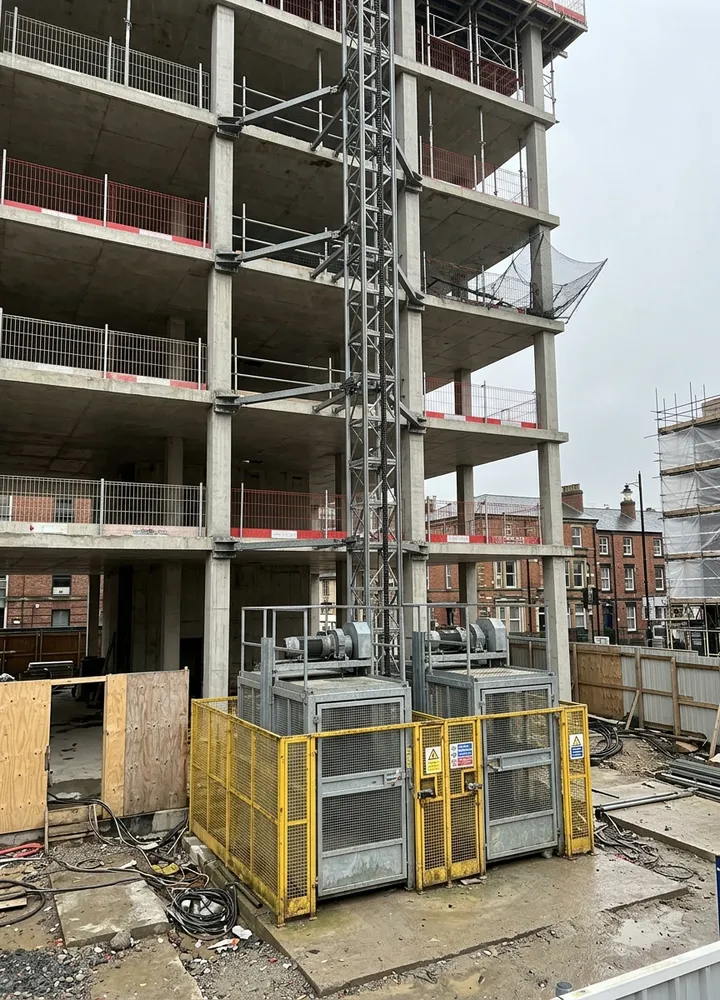
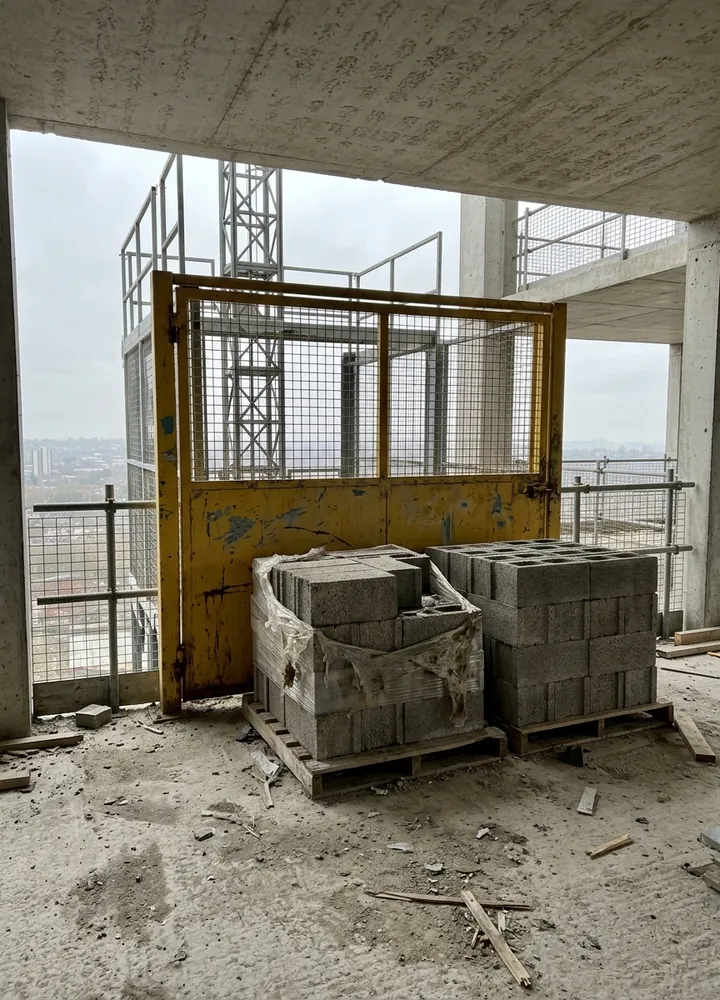
A fictional city centre block: the level 6 landing intercom was faulty, so the hoist ran on hand signals at that landing until the repair, and pallets blocking the level 4 gate were cleared before use. The planned load of 1,650 kg was within the 2,000 kg rated load.

A twin cage construction hoist at the base of a concrete frame building with a yellow mesh enclosure and the mast tied into the slabs
Hoist H2 · base enclosure and mast ties
Two pallets of concrete blocks left in front of a yellow mesh hoist landing gate
Level 4 landing · pallets blocking the gate · cleared

Try the construction hoist pre-use check form live

Answer a few questions and watch it adapt. Your answers are not saved, and any photos you add are deleted within the hour.

Live form: Construction Hoist Pre-use CheckOpen full screen ↗
Fill it in right here

This is the real form as your team would use it: questions appear as you answer, scores work themselves out and you can add photos and signatures. No sign-up needed. Or open a completed example to see every answer, photo and score filled in.

Want to see one filled in? See a completed construction hoist pre-use check report (PDF), made by SiteSurvey from a fictional site visit.

For teams

Using the construction hoist pre-use check template for client work?

Paper or a spreadsheet works for the odd job. When your team does this every week, SiteSurvey keeps every visit in one place and turns each one into a report you can send.

  • Everyone fills in the same form on their phone, with photos attached to the answer they belong to.
  • Each visit becomes a branded PDF report for the client, with no retyping.
  • Every site, visit and report is kept together in one account, not scattered across email and shared drives.

Fill it in on a phone or tablet

Your team completes the construction hoist pre-use check on site in the SiteSurvey app on iPhone, iPad and Android phones and tablets. The project name and address fill in for them, it works without signal, and it syncs when the device is back online with photos kept against the question they answer.

Customers and subcontractors do not need the app: send them a link and they can fill it in from any browser.

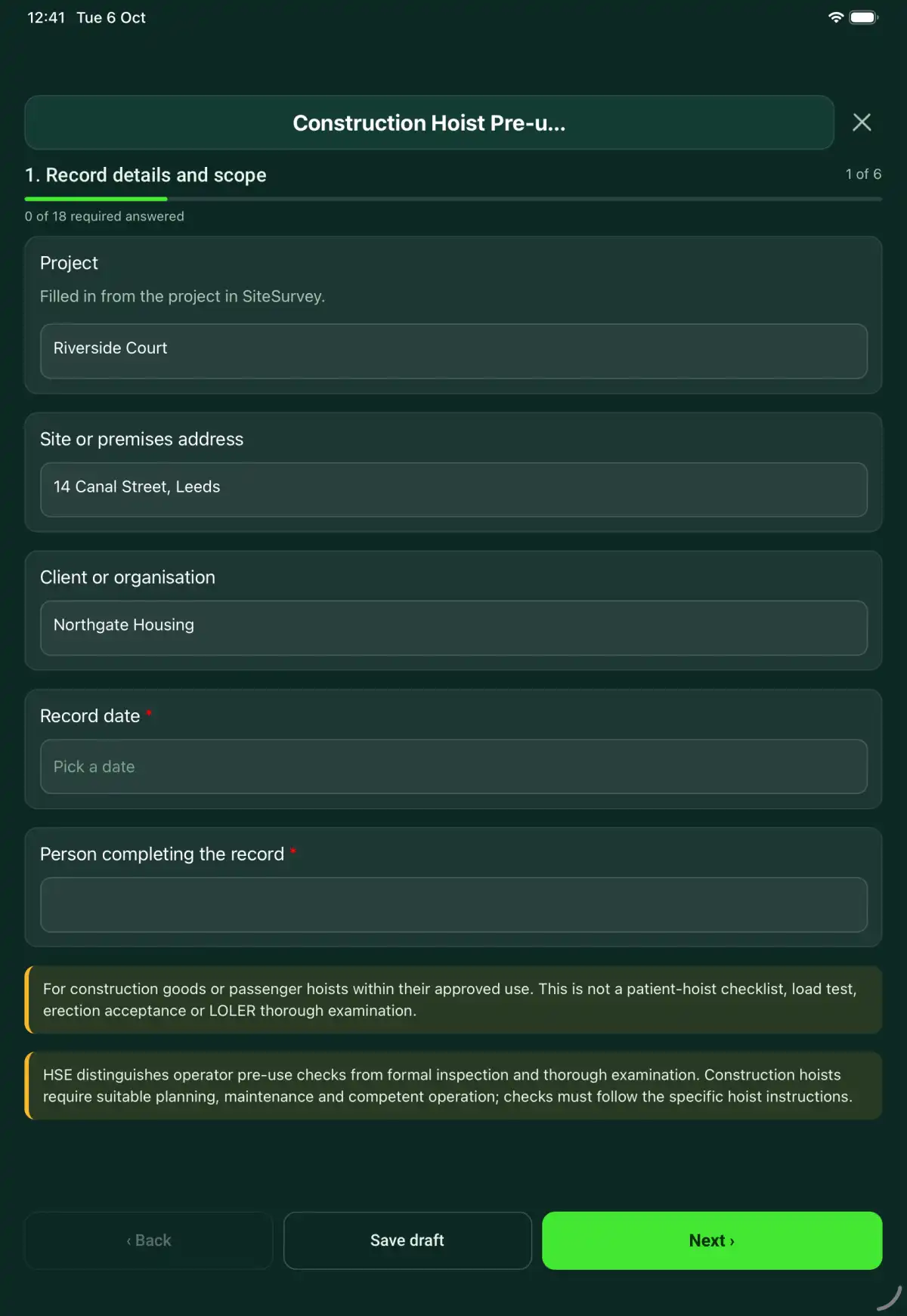
The Construction Hoist Pre-use Check form in the SiteSurvey app on a tablet
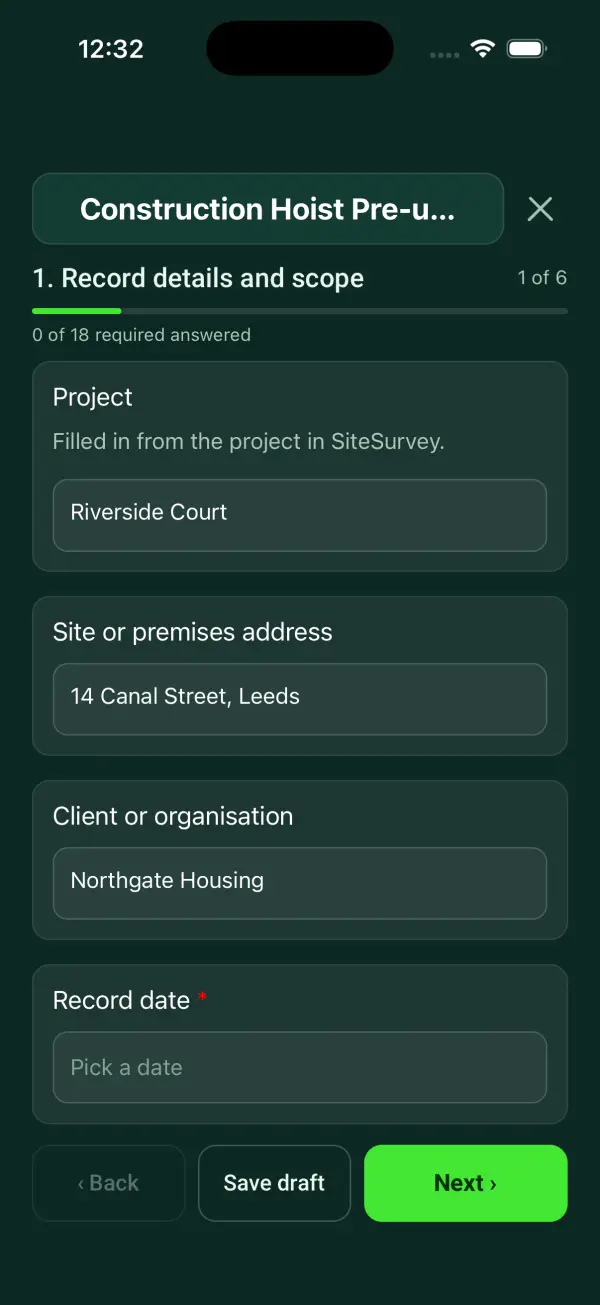
The Construction Hoist Pre-use Check form in the SiteSurvey app on a phone

Every question in the construction hoist pre-use check template

A construction hoist pre-use record covering equipment identity, landing protection, visible condition, authorised function checks and defect handover. 6 sections and 50 questions. Follow-up questions and guidance appear only when an answer calls for them, so the person on site never sees the ones that do not apply.

Make it your own: every question is editable

This is a starting point, not a fixed form. Once it is in your SiteSurvey account you can reword any question, add or remove questions, sections and answer options, and add your own logo, so it fits the way your team works and the jobs you do.

Details you only enter once

Add this form to a project in SiteSurvey and it fills in what the project already knows, so nobody on site retypes it and every form on the job uses the same names. Anything filled in can still be changed.

  • Project: the project name
  • Site or premises address: the site address, from the space or the project
  • Client or organisation: the project's customer

Record details and scope

  • ProjectShort answer

    Filled in from the project in SiteSurvey.

    Fills in from the project name
  • Site or premises addressShort answer
    Fills in from the site address, from the space or the project
  • Client or organisationShort answer
    Fills in from the project's customer
  • Record date*Date
  • Person completing the record*Short answer
  • Weather on siteAnswer
  • CheckFor construction goods or passenger hoists within their approved use. This is not a patient-hoist checklist, load test, erection acceptance or LOLER thorough examination.
  • CheckA pre-use check by the operator is not an inspection or a thorough examination. Under regulation 9 of the Lifting Operations and Lifting Equipment Regulations 1998 (LOLER), a hoist must be thoroughly examined by a competent person after installation and before first use, after any event that could affect its safety, and at least every 6 months if it carries people (every 12 months for goods only), or as set by an examination scheme; regulation 9(3) also requires inspections at suitable intervals between examinations. Regulation 6 of the Provision and Use of Work Equipment Regulations 1998 (PUWER) covers inspection. BS 7212:2016 is the code of practice for the safe use of construction hoists. Checks must follow the specific hoist instructions.

Equipment and scope

  • Hoist ID, model and location*Short answer
  • Hoist base position on site (GPS)Short answer

    Optional. Mark where the hoist base is, so the record shows which hoist was checked.

  • Competent person and authorisation*Short answer
  • Manufacturer or approved procedure reference*Short answer
  • Work or inspection scope and exclusions*Notes

Hoist configuration

  • Approved hoist use*Choose one
    • Goods only
    • Passengers and goods
  • Rated capacity and posted restrictions*Short answer
  • Rated load per cage from the data plate (kg)Number
  • Heaviest single load planned for today (kg)Number

    Optional. The heaviest load you expect to carry in one cage, from the lift schedule or the trades.

  • Planned load against the rated loadWorked out by the form
    Shown only when the answers above make it relevant
  • WarningThe planned load is more than the rated load on the data plate. Do not load the cage beyond it: split the load or plan another lifting method with the lifting supervisor.
    Shown only when the answers above make it relevant
  • Landings in use and access arrangementShort answer
  • Current examination and inspection references*Short answer
  • Next thorough examination dueDate

    From the current LOLER report of thorough examination: at least every 6 months for a hoist that carries people, 12 months for goods only, unless an examination scheme sets otherwise.

  • Days to next thorough examinationWorked out by the form
    Shown when “Record date” is answered and “Next thorough examination due” is answered
  • WarningThe thorough examination date has passed. Do not use the hoist until it has been thoroughly examined by a competent person.
    Shown only when the answers above make it relevant

Pre-use checks

  • Landing gates and enclosure visibly intact*Choose one
    • Acceptable
    • Action needed
    • Not checked
    • Not applicable
  • Action, limitation or reason not applicable*Notes
    Shown only when the answers above make it relevant
  • Car gates and interlock checks completed under procedure*Choose one
    • Acceptable
    • Action needed
    • Not checked
    • Not applicable
  • Action, limitation or reason not applicable*Notes
    Shown only when the answers above make it relevant
  • Mast, ties and fixings visibly checked within safe access*Choose one
    • Acceptable
    • Action needed
    • Not checked
    • Not applicable
  • Action, limitation or reason not applicable*Notes
    Shown only when the answers above make it relevant
  • Controls, stops and communications checked under procedure*Choose one
    • Acceptable
    • Action needed
    • Not checked
    • Not applicable
  • Action, limitation or reason not applicable*Notes
    Shown only when the answers above make it relevant
  • Travel path and loading area clear*Choose one
    • Acceptable
    • Action needed
    • Not checked
    • Not applicable
  • Action, limitation or reason not applicable*Notes
    Shown only when the answers above make it relevant
  • Function-check record and limitationsShort answer

    Record the permitted functional check and observed result using the machine instructions. State any test not performed and the reason.

  • Checks acceptableWorked out by the form
  • Action neededWorked out by the form
  • Not checkedWorked out by the form
  • WarningA check needs action. Do not use the hoist until the defect is put right, or a competent person has agreed it is safe to use within a recorded restriction, and tell the site manager.
    Shown only when the answers above make it relevant

Handover

  • Use decision*Choose one
    • Available within recorded limits
    • Restricted use
    • Out of service
  • Restrictions, isolation and person informed*Notes
    Shown only when the answers above make it relevant
  • CheckA check needs action but the hoist is recorded as available within its limits. Record the restriction, or take the hoist out of service until the defect is put right.
    Shown only when the answers above make it relevant
  • Repair or follow-up job referenceShort answer
  • Condition and defect evidencePhotos

Actions and review

  • Are further actions required?*Choose one
    • Yes
    • No
  • Further action
    Repeat for each further action. Each one asks:
    Shown when “Are further actions required?” is “Yes”
    • Action and evidence reference*Notes
    • PriorityChoose one
      • Urgent
      • High
      • Medium
      • Low
    • Person responsible*Short answer
    • Target dateDate
    • Action status*Choose one
      • Open
      • In progress
      • Completed
    • Completion evidence*Notes
      Shown when “Action status” is “Completed”
  • Outstanding limitations and information to pass onNotes
  • Record status*Choose one
    • Ready for review
    • Further work needed
    • Work or use stopped
  • CheckA check is marked as not checked or needing action. Make sure the actions record what was done before this is marked ready for review.
    Shown only when the answers above make it relevant
  • Reviewed byShort answer
  • Date reviewedDate
  • Author signature*Signature
  • CheckSigning records the information entered. It does not itself certify legal compliance, remove a limitation or authorise unsafe work.

Scope and responsibility

For construction goods or passenger hoists within their approved use. This is not a patient-hoist checklist, load test, erection acceptance or LOLER thorough examination.

What a useful entry looks like

Function-check record and limitations

Record the permitted functional check and observed result using the machine instructions. State any test not performed and the reason.

Functional checks completed only within operator procedure H-04. One listed check was not performed because access was restricted and was reported for review.

Fictional example of record wording. Use the actual evidence and approved arrangements for your job; this is not a completed report or an instruction to carry out the work.

See it filled in

A completed construction hoist pre-use check report, made by SiteSurvey from a fictional site visit: every answer, the photos, the guidance that applied and the sign-off, ready to send as a PDF.

See completed form (PDF) ↗

Construction Hoist Pre-use Check FAQs

Does the form check the load?

Enter the rated load per cage from the data plate and the heaviest load planned for the day. The form shows whether the planned load is within the rated load, with a red note if it is over. It does not work out loads for you or replace the lift planning.

Can passengers use a goods-only hoist?

No. Record the approved use and restrictions from the equipment information; this form does not change them.

Should I defeat an interlock to test it?

No. Use only the approved safe checking procedure and refer defects to a competent person.

What happens when a defect is found?

Record the defect, use decision, isolation or restriction, and the person informed.

What are the limits of this template?

For construction goods or passenger hoists within their approved use. This is not a patient-hoist checklist, load test, erection acceptance or LOLER thorough examination.

Can I complete this form on site and share the record?

In the SiteSurvey app the form works offline, with photos and signatures recorded against the questions. Share the completed record as a PDF or a link. Dates and action owners are recorded fields; this form does not send reminders or update other systems.

Related

Use this construction hoist pre-use check form with your team

Add it from the form library in one click, change any question, and every completed form becomes a branded PDF report.

Start your trial →