Form library · Facilities and maintenance

Gym equipment inspection checklist

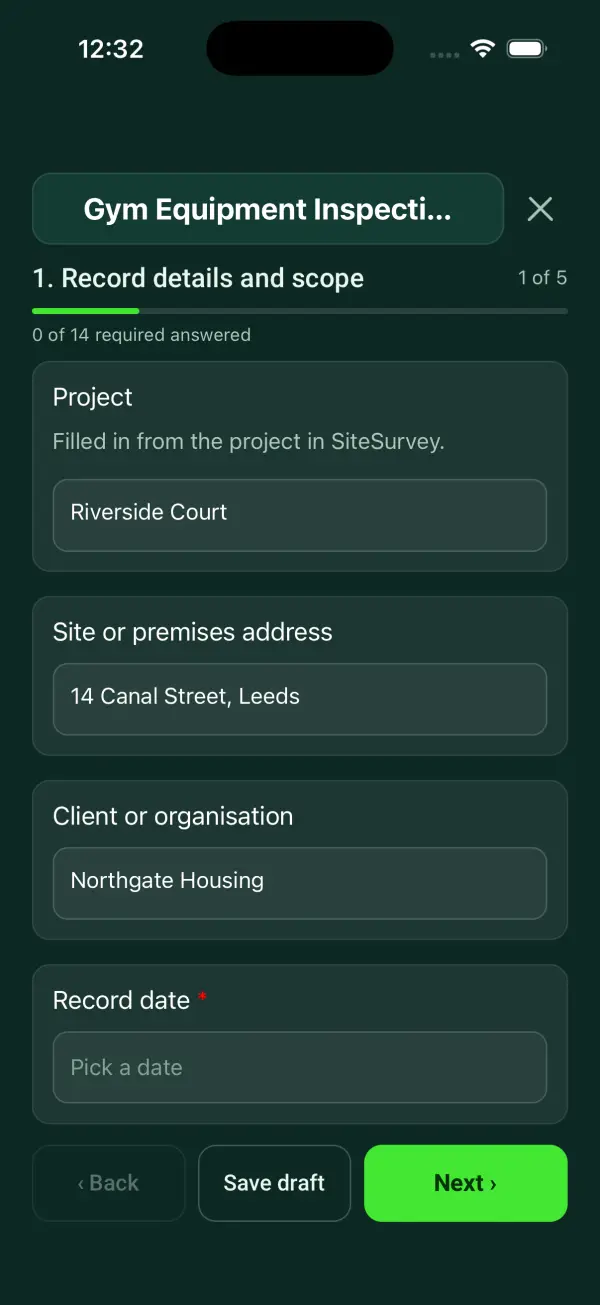
For leisure centre duty managers and gym supervisors doing routine equipment checks. Add each machine, scan its label, mark six checks pass or fail and record a use decision. For treadmills, enter the run-off space the manufacturer asks for and what you measured behind it. The form counts the items with a failed check, restricted or out of service, and the treadmills short of space. Try the form below, see every question or open a completed example.

Ready to use from the form library, and every question is yours to edit. Try it for a small trial fee, cancel any time.

Try it on your phone

Try it on this phone

Fill in the gym equipment inspection on your phone now

See how the gym equipment inspection looks on your phone

Scan the code with your phone camera. It opens the real form, no sign-up needed.

Open the live example and fill it in, just as your team would on site. No sign-up needed.

See it on this phone

Every question is editable. Add this form to your account, then change the wording, add or remove questions and options, and make it fit your own jobs.

Or start your trial with this form ready →

One email, and we won't add you to a mailing list.

How should gym equipment checks be determined?

HSE guidance explains risk-based inspection and maintenance of work equipment. Use the manufacturer instructions, usage and risk assessment to define competent checks and defect handling for the equipment concerned.

Last updated . Facts checked by the SiteSurvey team on 6 October 2026 against HSE inspection of work equipment and HSE maintenance of work equipment.

Built for checking the whole gym floor

Work along the gym with the form on a phone. Add each machine, scan its label, mark six checks pass or fail and record a use decision, with photos of any fault. For treadmills, enter the run-off space the manufacturer asks for and what you measured behind it. The form counts the faults and the equipment restricted or out of service. It records user-level condition checks; it is not a service or a load test.

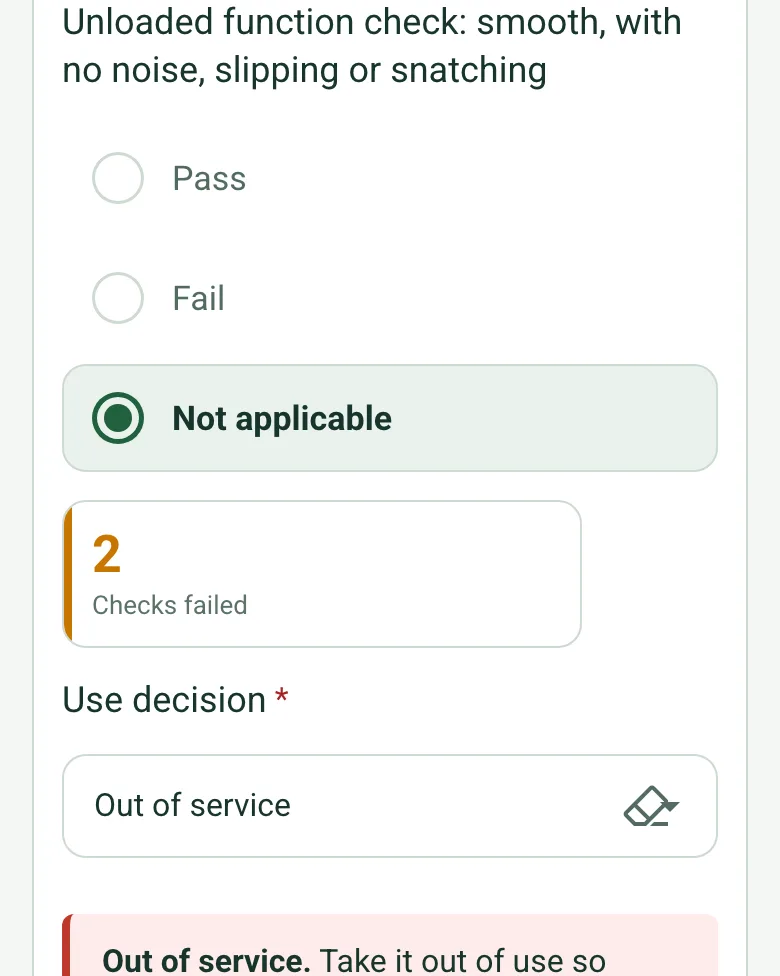
A cable crossover with its cables and moving parts failed, labels failed, 2 checks failed and the use decision Out of service, with a red note on taking it out of use

Six checks and a use decision per machine

Each machine gets the same six checks: frame and fixings, cables and moving parts, guards, pads and pins, labels and controls, and an unloaded function check. A failed check asks for the defect and who was told, and Out of service shows what to do before you walk away.

How calculated fields work →
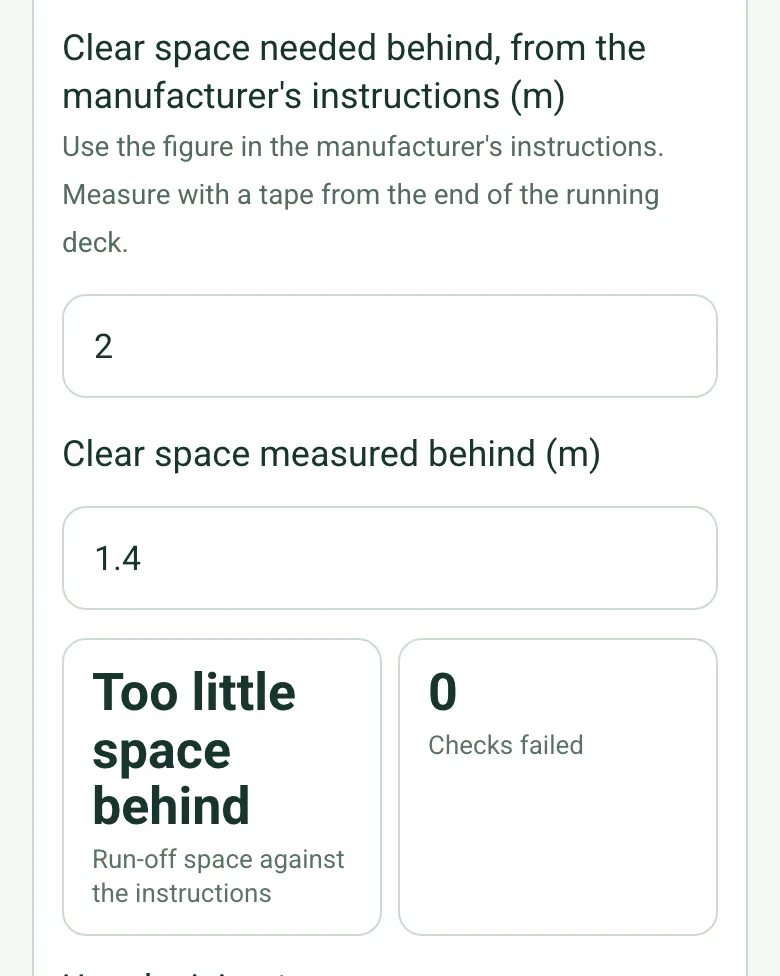
Clear space needed behind 2 m from the manufacturer's instructions, 1.4 m measured, and Too little space behind

Treadmill run-off space

Enter the clear space the manufacturer's instructions ask for behind the running deck and what you measured with a tape. The form says when kit has crept too close, which is easy to miss after a deep clean or a layout change.

How calculated fields work →
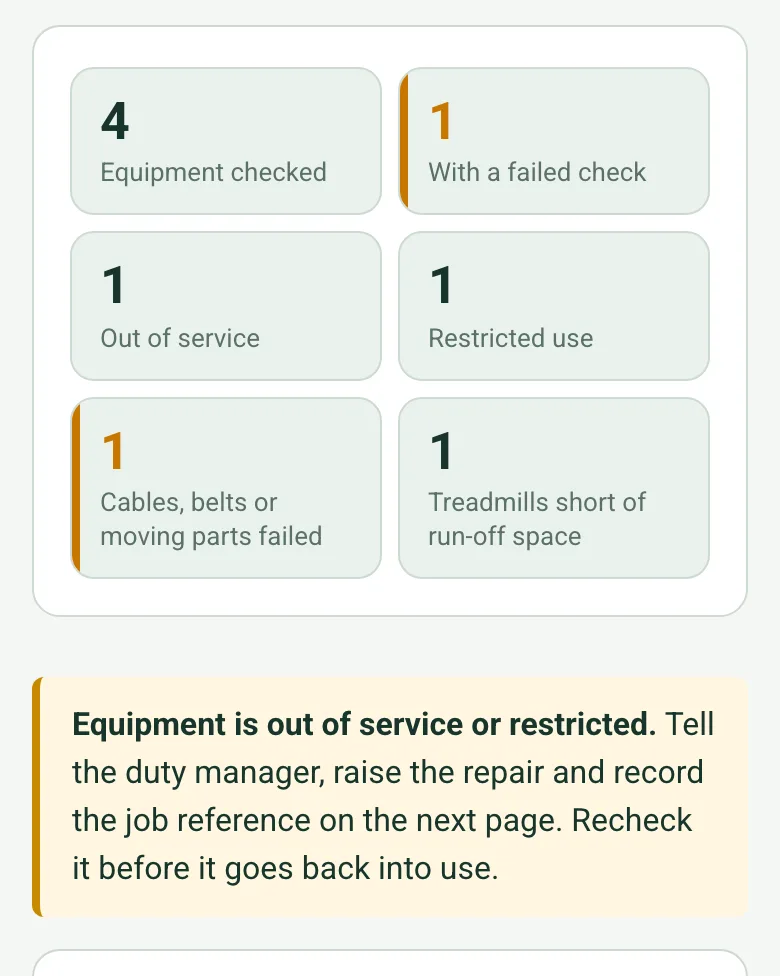
4 pieces of equipment checked, 1 with a failed check, 1 out of service, 1 restricted, 1 cable or belt failure and 1 treadmill short of run-off space

Faults and closures counted

The form counts the machines checked, those with a failed check, restricted or out of service, the cable and belt failures and the treadmills short of space, so the duty manager sees the state of the gym at a glance.

How calculated fields work →

A completed gym equipment inspection

A monthly check at a fictional leisure centre: four items, a cable crossover out of service with a frayed cable, and a treadmill restricted because a cross trainer had been moved too close behind it. Open it as a filled-in form, or switch to a blank copy and try it yourself.

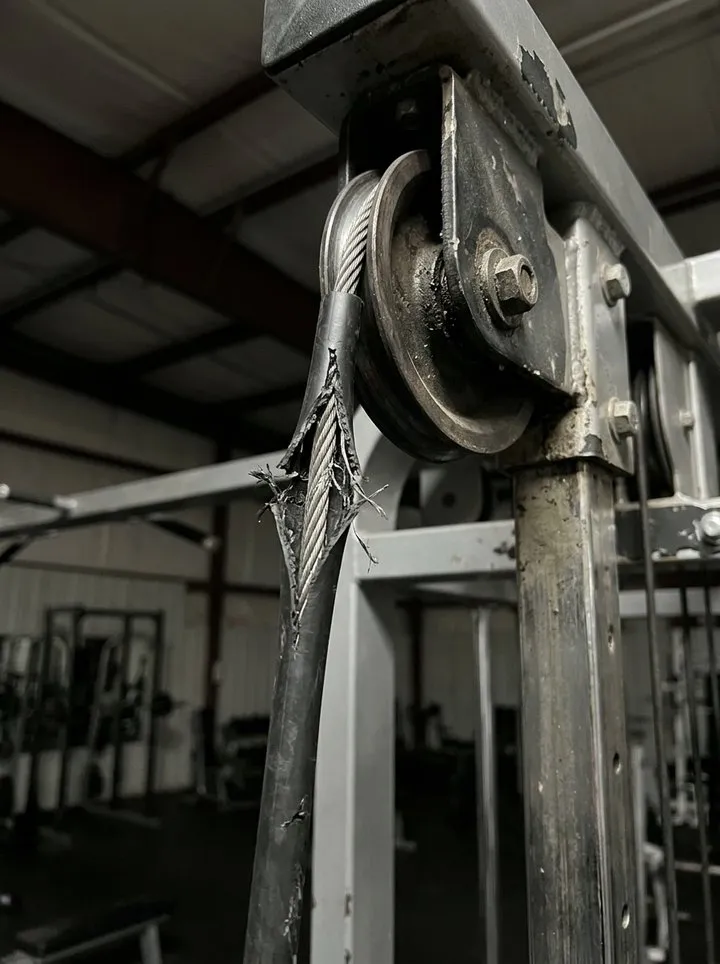
A steel cable with its sheath frayed where it runs over the top pulley of a cable station
GYM-014 · frayed cable · out of service
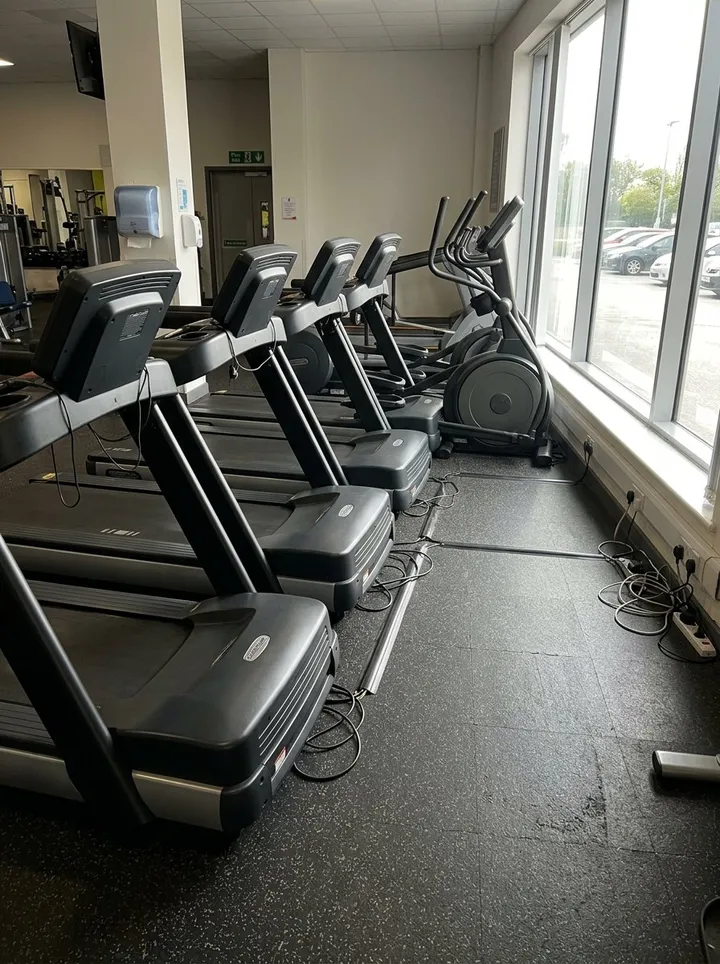
A row of treadmills by the gym windows, with a cross trainer at the end of the row
Cardio row · GYM-006 had 1.4 m behind it against 2.0 m · restricted
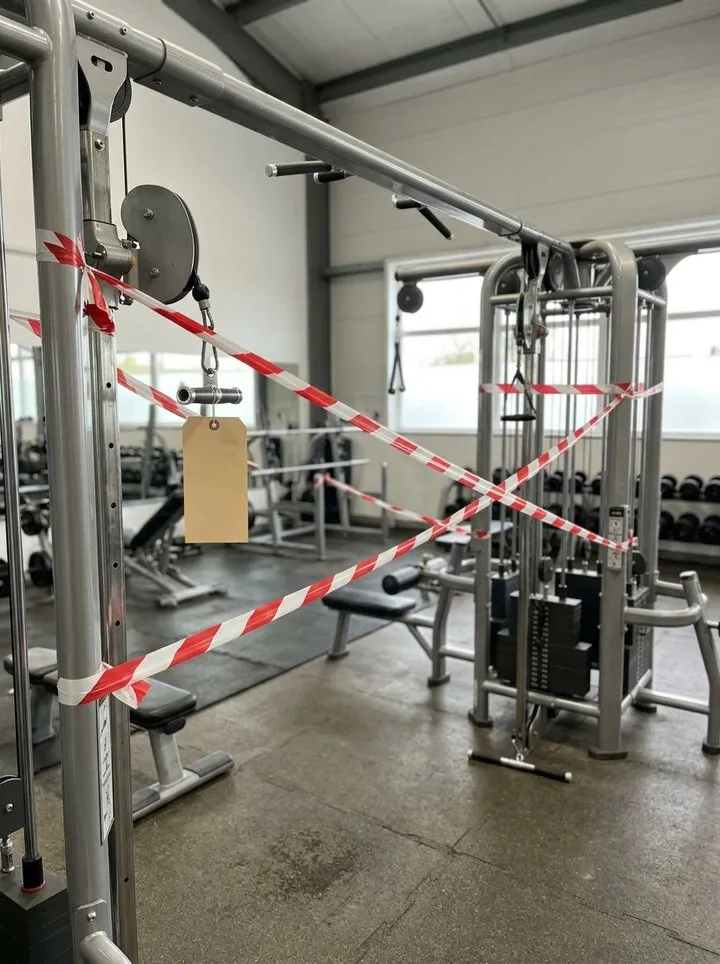
A cable station taped off with red and white tape and an out of order tag
GYM-014 taped off and tagged
Along the treadmills to the cable station

Try the gym equipment inspection form live

Answer a few questions and watch it adapt. Your answers are not saved, and any photos you add are deleted within the hour.

Live form: Gym Equipment InspectionOpen full screen ↗
Fill it in right here

This is the real form as your team would use it: questions appear as you answer, scores work themselves out and you can add photos and signatures. No sign-up needed. Or open a completed example to see every answer, photo and score filled in.

Want to see one filled in? See a completed gym equipment inspection report (PDF), made by SiteSurvey from a fictional site visit.

Fill it in on a phone or tablet

Your team completes the gym equipment inspection on site in the SiteSurvey app on iPhone, iPad and Android phones and tablets. The project name and address fill in for them, it works without signal, and it syncs when the device is back online with photos kept against the question they answer.

Customers and subcontractors do not need the app: send them a link and they can fill it in from any browser.

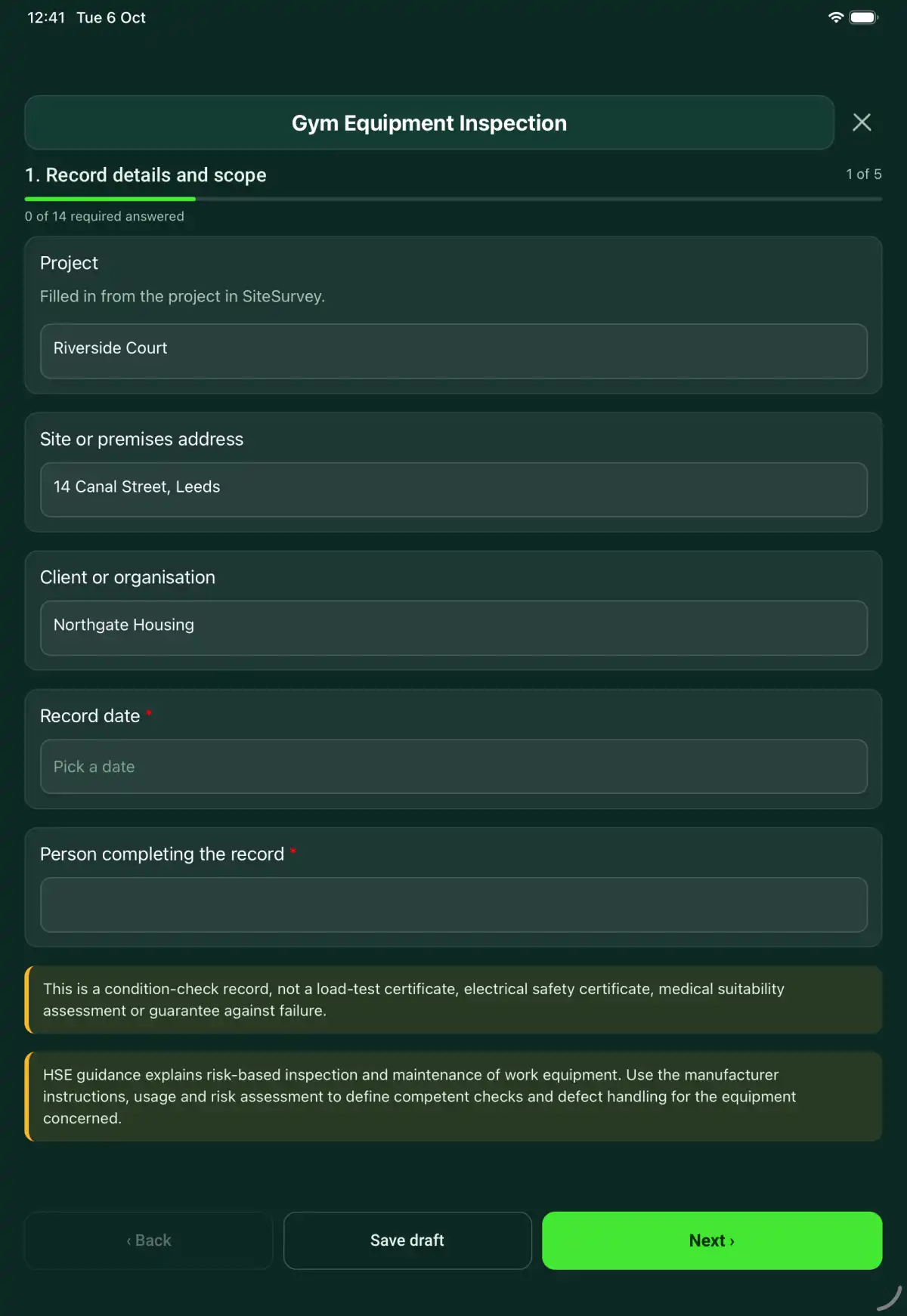
The Gym Equipment Inspection form in the SiteSurvey app on a tablet
The Gym Equipment Inspection form in the SiteSurvey app on a phone

Every question in the gym equipment inspection template

A gym equipment inspection for the whole gym floor: each item checked pass or fail, treadmill run-off space against the manufacturer's figure, a use decision per item, and counts of failures and equipment out of service. 5 sections and 58 questions. Follow-up questions and guidance appear only when an answer calls for them, so the person on site never sees the ones that do not apply.

Make it your own: every question is editable

This is a starting point, not a fixed form. Once it is in your SiteSurvey account you can reword any question, add or remove questions, sections and answer options, and add your own logo, so it fits the way your team works and the jobs you do.

Details you only enter once

Add this form to a project in SiteSurvey and it fills in what the project already knows, so nobody on site retypes it and every form on the job uses the same names. Anything filled in can still be changed.

  • Project: the project name
  • Site or premises address: the site address, from the space or the project
  • Client or organisation: the project's customer

Record details and scope

  • ProjectShort answer

    Filled in from the project in SiteSurvey.

    Fills in from the project name
  • Site or premises addressShort answer
    Fills in from the site address, from the space or the project
  • Client or organisationShort answer
    Fills in from the project's customer
  • Record date*Date
  • Person completing the record*Short answer
  • CheckThis is a condition-check record, not a load-test certificate, electrical safety certificate, medical suitability assessment or guarantee against failure.
  • CheckThe Provision and Use of Work Equipment Regulations 1998 (PUWER): regulation 5 requires work equipment to be maintained in an efficient state, in efficient working order and in good repair, and regulation 6 requires inspection by a competent person where deterioration could lead to danger, with the results recorded. BS EN ISO 20957-1:2024 sets the general safety requirements for stationary training equipment, including the free space around it. Use the manufacturer instructions, usage and risk assessment to define competent checks and defect handling for the equipment concerned.

Gym and check scope

  • Gym or area checked*Short answer
  • Manufacturer instructions and check schedule used*Short answer
  • Checker's competence or authorised scope*Short answer
  • Previous defects and service referenceShort answer

Equipment checked

  • Equipment by zone
    Repeat for each entry. Each one asks:
    • Zone of the gym*Short answer
    • Equipment in this zone
      Repeat for each equipment. Each one asks:
      • Equipment ID and name*Short answer
      • Scan the equipment labelScan a label: serial number, model number, asset number

        Optional. Scan the label or data plate to capture the serial and other numbers.

      • TypeChoose one
        • Treadmill
        • Cross trainer or bike
        • Rower
        • Selectorised weight machine
        • Cable or pulley station
        • Plate-loaded machine
        • Rack, bench or free weights
        • Functional training kit
        • Other
      • Frame, visible fixings and stabilityChoose one
        • Pass
        • Fail
        • Not applicable
      • Cables, belts, chains and moving partsChoose one
        • Pass
        • Fail
        • Not applicable
      • Guards, covers and pinch-point protectionChoose one
        • Pass
        • Fail
        • Not applicable
      • Seats, pads, grips and adjustment pinsChoose one
        • Pass
        • Fail
        • Not applicable
      • Labels, user instructions and stop or emergency controlsChoose one
        • Pass
        • Fail
        • Not applicable
      • Unloaded function check: smooth, with no noise, slipping or snatchingChoose one
        • Pass
        • Fail
        • Not applicable
      • Clear space needed behind, from the manufacturer's instructions (m)Number

        Use the figure in the manufacturer's instructions. Measure with a tape from the end of the running deck.

        Shown when “Type” is “Treadmill”
      • Clear space measured behind (m)Number

        Measuring from a photo gives an estimate. Use a tape for the final figure.

        Shown when “Type” is “Treadmill”
      • Run-off space against the instructionsWorked out by the form
        Shown only when the answers above make it relevant
      • Checks failedWorked out by the form
      • Use decision*Choose one
        • Available within recorded limits
        • Restricted use
        • Out of service
      • WarningOut of service. Take it out of use so nobody can use it (remove handles or pins, or isolate it), fit an out of order sign, and keep it out of use until a competent person has repaired it and recorded that it is safe.
        Shown when “Use decision” is “Out of service”
      • Defect, restriction and who was told*Notes
        Shown only when the answers above make it relevant
      • PhotosPhotos
    • This zone: equipment checkedWorked out by the form
    • This zone: with a failed checkWorked out by the form
    • This zone: out of serviceWorked out by the form
    • This zone: restricted useWorked out by the form
    • This zone: cables, belts or moving parts failedWorked out by the form
    • This zone: treadmills short of run-off spaceWorked out by the form
  • Equipment checkedWorked out by the form
  • With a failed checkWorked out by the form
  • Out of serviceWorked out by the form
  • Restricted useWorked out by the form
  • Cables, belts or moving parts failedWorked out by the form
  • Treadmills short of run-off spaceWorked out by the form
  • CheckEquipment is out of service or restricted. Tell the duty manager, raise the repair and record the job reference on the next page. Recheck it before it goes back into use.
    Shown only when the answers above make it relevant
  • General notes on the function checksNotes

    Record only the functional checks authorised for the equipment and your role. Refer faults without exposing users to an unresolved condition.

  • Other photosPhotos

Handover

  • Duty manager or supervisor told*Short answer
  • Repair or follow-up job referencesShort answer
  • Out of order signs and isolation photosPhotos

Actions and review

  • Are further actions required?*Choose one
    • Yes
    • No
  • Further action
    Repeat for each further action. Each one asks:
    Shown when “Are further actions required?” is “Yes”
    • Action and evidence reference*Notes
    • PriorityChoose one
      • Urgent
      • High
      • Medium
      • Low
    • Person responsible*Short answer
    • Target dateDate
    • Action status*Choose one
      • Open
      • In progress
      • Completed
    • Completion evidence*Notes
      Shown when “Action status” is “Completed”
  • Open actionsWorked out by the form
    Shown when “Are further actions required?” is “Yes”
  • Outstanding limitations and information to pass onNotes
  • Record status*Choose one
    • Ready for review
    • Further work needed
    • Work or use stopped
  • Reviewed byShort answer
  • Review dateDate
  • Next inspection dueDate

    Set by the manufacturer's instructions and the operator's risk assessment.

  • Days to next dueWorked out by the form
    Shown when “Record date” is answered and “Next inspection due” is answered
  • CheckThe next inspection due date is before the inspection date. Check the date.
    Shown only when the answers above make it relevant
  • Author signature*Signature
  • CheckSigning records the information entered. It does not itself certify legal compliance, remove a limitation or authorise unsafe work.

Scope and responsibility

This is a condition-check record, not a load-test certificate, electrical safety certificate, medical suitability assessment or guarantee against failure.

What a useful entry looks like

General notes on the function checks

Record only the functional checks authorised for the equipment and your role. Refer faults without exposing users to an unresolved condition.

Equipment G-12 checked using the recorded instruction. The reported operating fault is referred for assessment and the equipment status recorded separately.

Fictional example of record wording. Use the actual evidence and approved arrangements for your job; this is not a completed report or an instruction to carry out the work.

See it filled in

A completed gym equipment inspection report, made by SiteSurvey from a fictional site visit: every answer, the photos, the guidance that applied and the sign-off, ready to send as a PDF.

See completed form (PDF) ↗

Gym Equipment Inspection FAQs

How should I record the unloaded function check?

Record only the functional checks authorised for the equipment and your role. Refer faults without exposing users to an unresolved condition.

Can this certify a cable load capacity?

No. It records observed condition and references specialist testing where required.

Should users continue with defective equipment?

Record the restriction or out-of-service decision, marking and person informed under the local procedure.

Is the checklist suitable for every machine?

Add one entry per machine and mark checks that do not apply as Not applicable. Treadmills get the run-off space check. Adapt the scope to the equipment instructions and record limitations.

What are the limits of this template?

This is a condition-check record, not a load-test certificate, electrical safety certificate, medical suitability assessment or guarantee against failure.

Can I complete this form on site and share the record?

In the SiteSurvey app the form works offline, with photos and signatures recorded against the questions. Share the completed record as a PDF or a link. Dates and action owners are recorded fields; this form does not send reminders or update other systems.

Related

Use this gym equipment inspection form with your team

Add it from the form library in one click, change any question, and every completed form becomes a branded PDF report.

Start your trial →