Form library · Facilities and maintenance

Fan coil unit maintenance checklist

For maintenance technicians recording a fan coil service. Enter the supply air temperature on full cooling and heating demand with the expected ranges from the commissioning record: the form marks each one below, within or above, and counts the checks and the defects by priority, so a stuck valve or actuator is on the record. Try the form below, see every question or open a completed example.

Ready to use from the form library, and every question is yours to edit. Try it for a small trial fee, cancel any time.

Try it on your phone

Try it on this phone

Fill in the fan coil maintenance visit on your phone now

See how the fan coil maintenance visit looks on your phone

Scan the code with your phone camera. It opens the real form, no sign-up needed.

Open the live example and fill it in, just as your team would on site. No sign-up needed.

See it on this phone

Every question is editable. Add this form to your account, then change the wording, add or remove questions and options, and make it fit your own jobs.

Or start your trial with this form ready →

One email, and we won't add you to a mailing list.

How should fan coil maintenance be planned?

HSE guidance calls for safe maintenance by competent people, using suitable isolation and equipment information. Follow the installed unit instructions and site procedure when deciding service tasks.

Last updated . Facts checked by the SiteSurvey team on 6 October 2026 against HSE maintenance of work equipment and HSE electrical maintenance safety.

Built for servicing fan coil units

Record the service at the unit on a phone. Enter the supply air temperature on full cooling and heating demand with the expected ranges from the commissioning record: the form marks each one below, within or above and counts the checks and the defects by priority, so a stuck valve or actuator is on the record with the photos. The ranges come from your records; the form sets none.

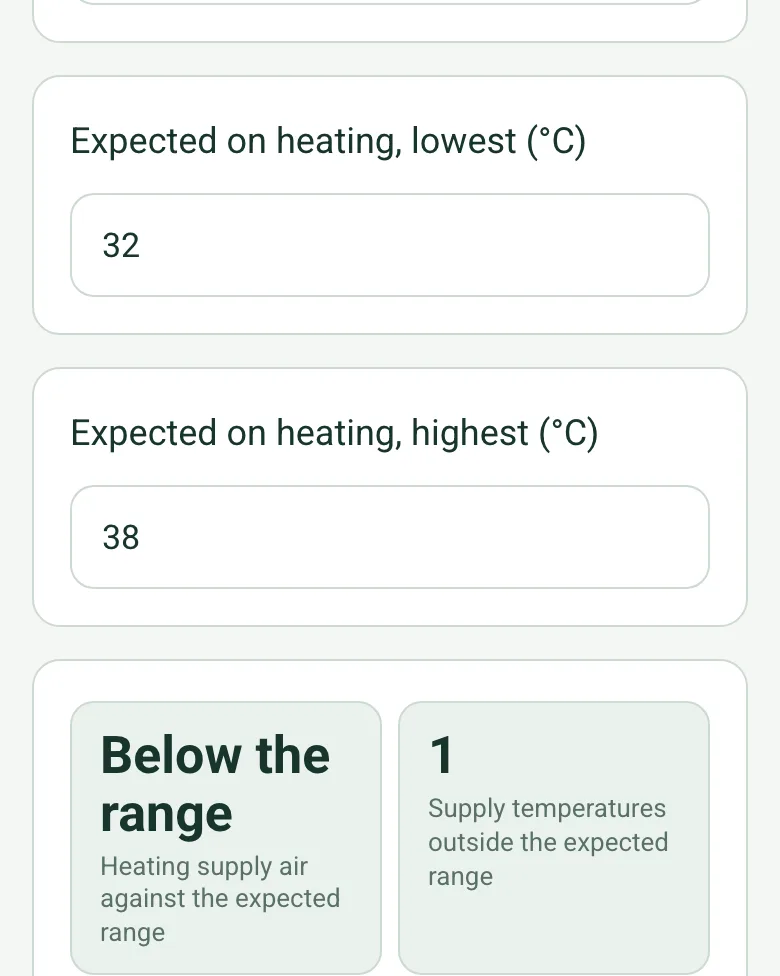
Expected on heating 32 to 38 °C, and the heating supply air worked out as Below the range, with 1 supply temperature outside the expected range

Supply air against the expected range

Take the supply air temperature at the diffuser on a full cooling and a full heating demand and enter the ranges from the commissioning record. The form marks each one below, within or above, counts them and shows an amber note to check the valve, actuator and water temperatures.

How calculated fields work →
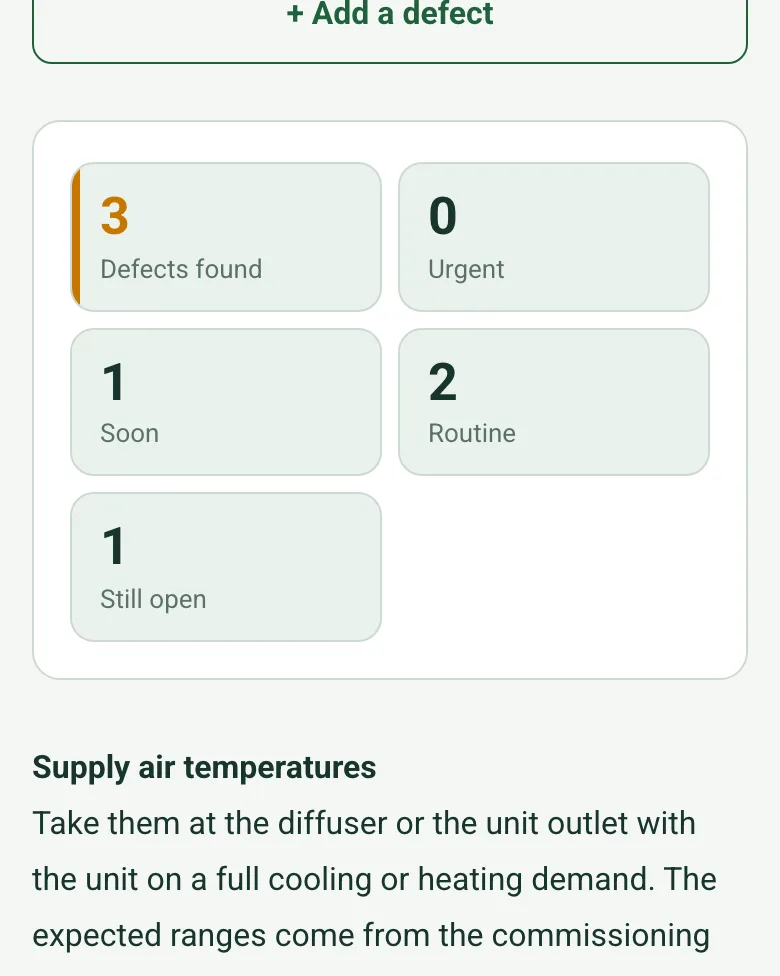
Counts worked out as 3 defects found: 0 urgent, 1 soon, 2 routine and 1 still open

Defects by priority

Log each defect with where it is, a photo and a priority. The form counts them and shows how many are still open; an open urgent defect shows a red note to record how the unit was left.

How calculated fields work →

Film the unit in the ceiling void

Record a short clip with the tiles lifted and say what you found. The note is written down for you and kept with the visit.

How Walk Cam works →

A completed fan coil maintenance record

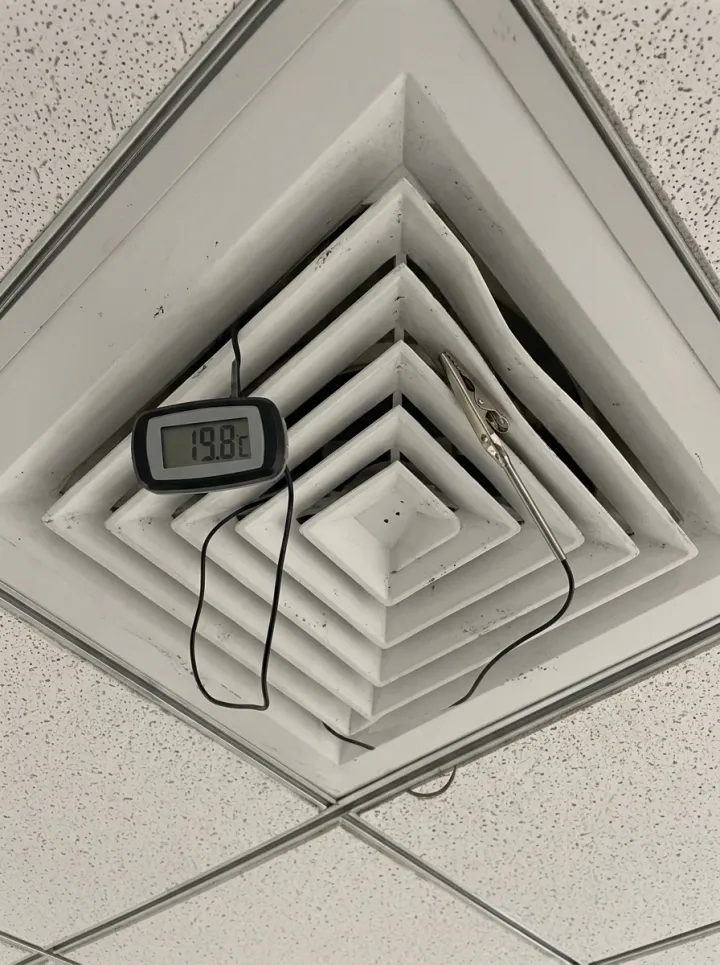
A six-monthly service of a fictional meeting room fan coil: filter replaced and the condensate drain flushed, cooling supply air 14.1 °C within 13 to 15 °C, but heating supply air only 19.8 °C against 32 to 38 °C because the heating valve actuator does not respond, so the unit was left on cooling only with a repair booked. Open it as a filled-in form, or switch to a blank copy and try it yourself.

A digital probe thermometer clipped to a square ceiling diffuser reading 19.8
Heating supply air · 19.8 °C · expected 32 to 38 °C
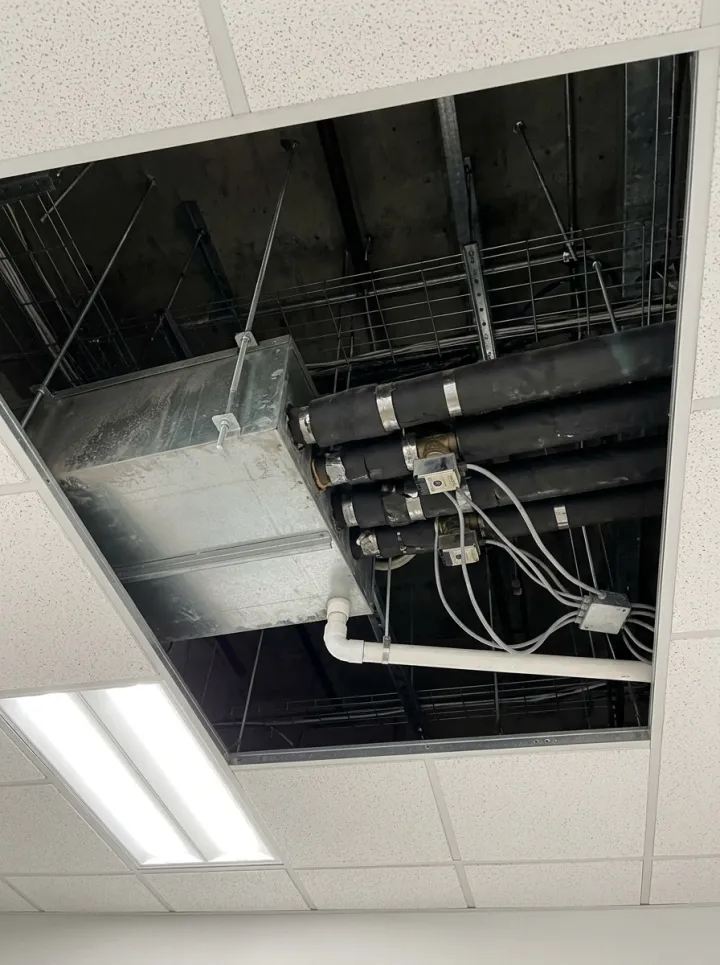
Looking up into a ceiling void at a fan coil unit with insulated pipework, valve actuators and a white condensate drain
Fan coil unit with the tiles lifted
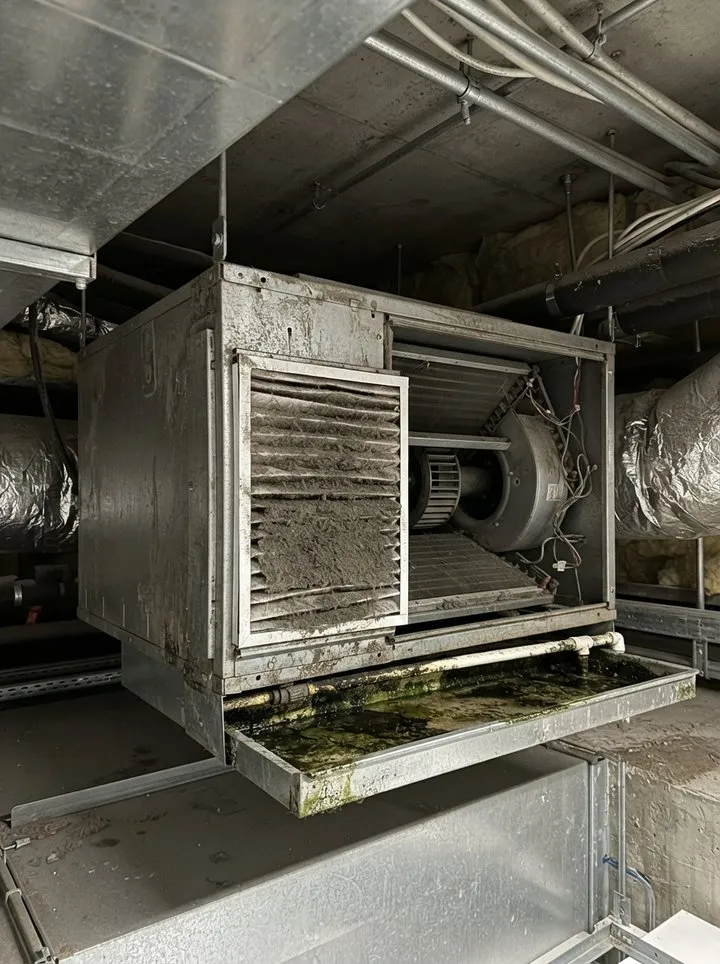
A dusty fan coil filter and condensate tray
Filter and condensate tray before cleaning

Try the fan coil maintenance visit form live

Answer a few questions and watch it adapt. Your answers are not saved, and any photos you add are deleted within the hour.

Live form: Fan Coil Maintenance VisitOpen full screen ↗
Fill it in right here

This is the real form as your team would use it: questions appear as you answer, scores work themselves out and you can add photos and signatures. No sign-up needed. Or open a completed example to see every answer, photo and score filled in.

Want to see one filled in? See a completed fan coil maintenance visit report (PDF), made by SiteSurvey from a fictional site visit.

Fill it in on a phone or tablet

Your team completes the fan coil maintenance visit on site in the SiteSurvey app on iPhone, iPad and Android phones and tablets. The project name and address fill in for them, it works without signal, and it syncs when the device is back online with photos kept against the question they answer.

Customers and subcontractors do not need the app: send them a link and they can fill it in from any browser.

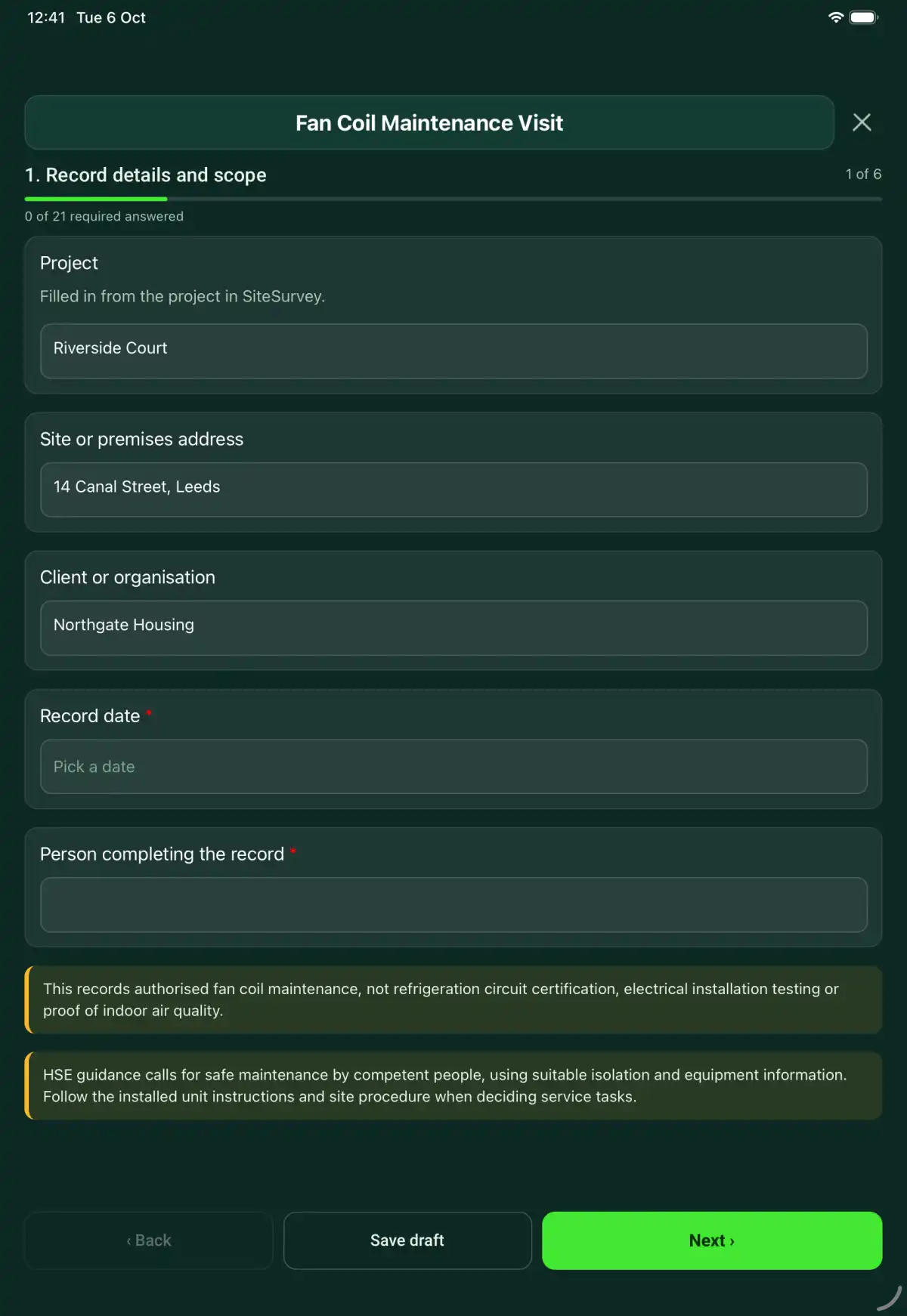
The Fan Coil Maintenance Visit form in the SiteSurvey app on a tablet
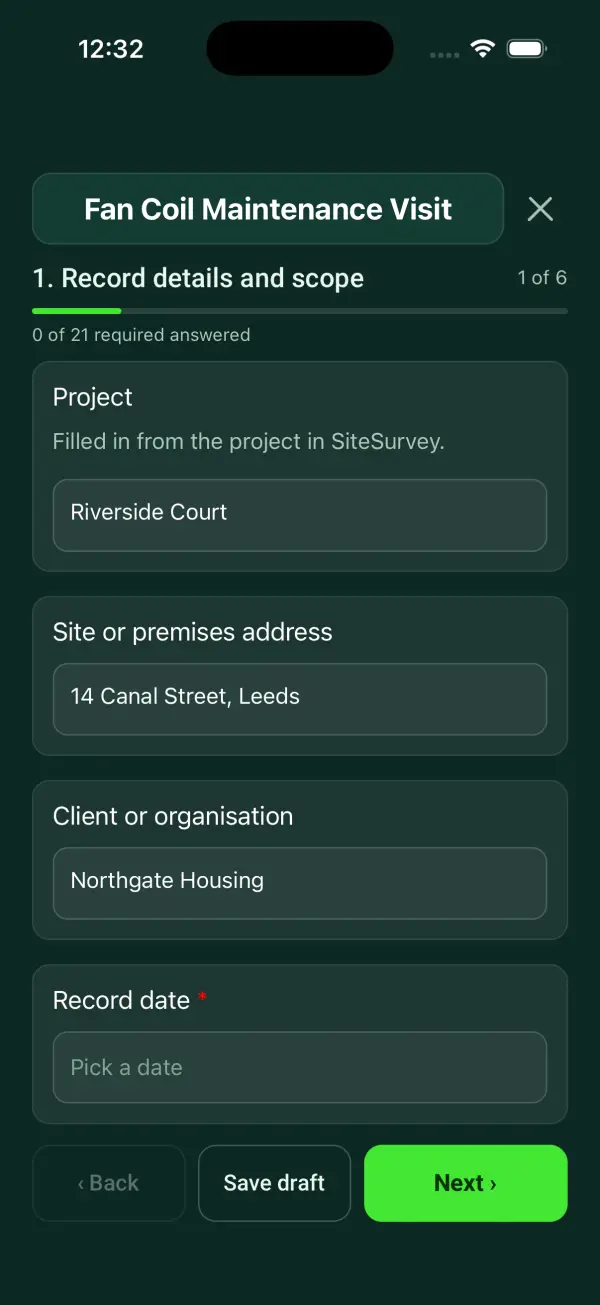
The Fan Coil Maintenance Visit form in the SiteSurvey app on a phone

Every question in the fan coil maintenance visit template

A fan coil maintenance record covering unit identity, isolation, filters, coil and condensate observations, controls, service work and handover evidence. 7 sections and 72 questions. Follow-up questions and guidance appear only when an answer calls for them, so the person on site never sees the ones that do not apply.

Make it your own: every question is editable

This is a starting point, not a fixed form. Once it is in your SiteSurvey account you can reword any question, add or remove questions, sections and answer options, and add your own logo, so it fits the way your team works and the jobs you do.

Details you only enter once

Add this form to a project in SiteSurvey and it fills in what the project already knows, so nobody on site retypes it and every form on the job uses the same names. Anything filled in can still be changed.

  • Project: the project name
  • Site or premises address: the site address, from the space or the project
  • Client or organisation: the project's customer

Record details and scope

  • ProjectShort answer

    Filled in from the project in SiteSurvey.

    Fills in from the project name
  • Site or premises addressShort answer
    Fills in from the site address, from the space or the project
  • Client or organisationShort answer
    Fills in from the project's customer
  • Record date*Date
  • Person completing the record*Short answer
  • CheckThis records authorised fan coil maintenance, not refrigeration circuit certification, electrical installation testing or proof of indoor air quality.
  • CheckSources. The Provision and Use of Work Equipment Regulations 1998 (PUWER), regulation 5, requires work equipment to be maintained in efficient working order and good repair, by competent people using safe isolation. SFG20 (the industry standard maintenance specification for building services) sets the task list and frequency for fan coil units. Follow the manufacturer instructions and site procedure for the installed unit.

Equipment and scope

  • Fan coil unit ID, model and location*Short answer
  • Scan the data plateScan a label: serial number, model number, asset number

    Optional. Scan the label or data plate to capture the serial and other numbers.

  • Technician competence or authorisation reference*Short answer
  • Manufacturer or approved procedure reference*Short answer
  • Work or inspection scope and exclusions*Notes

Service preparation

  • Served zone or rooms*Short answer
  • Coil arrangementChoose one
    • Four-pipe (separate heating and cooling coils)
    • Two-pipe changeover
    • Two-pipe cooling only
    • Other or not known
  • Isolation and safe access verification*Short answer
  • Reported faults and previous workShort answer

    Record the reported symptom, affected area and conditions under which it occurs. Separate the report from the technician's findings.

Service checks

  • Filter condition and replacement recorded*Choose one
    • Acceptable
    • Action needed
    • Not checked
    • Not applicable
  • Action, limitation or reason not applicable*Notes
    Shown only when the answers above make it relevant
  • Accessible coil and fan condition checked*Choose one
    • Acceptable
    • Action needed
    • Not checked
    • Not applicable
  • Action, limitation or reason not applicable*Notes
    Shown only when the answers above make it relevant
  • Condensate tray and drain checked under procedure*Choose one
    • Acceptable
    • Action needed
    • Not checked
    • Not applicable
  • Action, limitation or reason not applicable*Notes
    Shown only when the answers above make it relevant
  • Visible pipework, valves and insulation checked*Choose one
    • Acceptable
    • Action needed
    • Not checked
    • Not applicable
  • Action, limitation or reason not applicable*Notes
    Shown only when the answers above make it relevant
  • Controls and operation checked after safe restoration*Choose one
    • Acceptable
    • Action needed
    • Not checked
    • Not applicable
  • Action, limitation or reason not applicable*Notes
    Shown only when the answers above make it relevant
  • Checks acceptableWorked out by the form
  • Needing actionWorked out by the form
  • Not checkedWorked out by the form
  • Cleaning, parts and adjustments recordedShort answer
  • Defects found
    Repeat for each defect. Each one asks:
    • Where on the unit*Short answer
    • Defect*Notes
    • Priority*Choose one
      • Urgent: make safe or restrict use now
      • Soon: before the next visit
      • Routine: at the next planned visit
    • Put right on this visit?Yes or No
    • What happens next, and whoNotes
      Shown when “Put right on this visit?” is No
    • Photos of the defectPhotos
  • Defects foundWorked out by the form
  • UrgentWorked out by the form
  • SoonWorked out by the form
  • RoutineWorked out by the form
  • Still openWorked out by the form
  • WarningAn urgent defect is still open. Record under Use decision how the equipment was left (restricted or out of service) and who on site was told before you leave.
    Shown only when the answers above make it relevant

Supply air and readings

  • GuidanceSupply air temperatures Take them at the diffuser or the unit outlet with the unit on a full cooling or heating demand. The expected ranges come from the commissioning record or the unit schedule; the form sets none.
  • Supply air temperature on cooling demand (°C)Number
  • Expected on cooling, lowest (°C)Number
  • Expected on cooling, highest (°C)Number
  • Cooling supply air against the expected rangeWorked out by the form
    Shown when “Supply air temperature on cooling demand (°C)” is answered and “Expected on cooling, lowest (°C)” is answered and “Expected on cooling, highest (°C)” is answered
  • Supply air temperature on heating demand (°C)Number
    Shown only when the answers above make it relevant
  • Expected on heating, lowest (°C)Number
    Shown only when the answers above make it relevant
  • Expected on heating, highest (°C)Number
    Shown only when the answers above make it relevant
  • Heating supply air against the expected rangeWorked out by the form
    Shown when “Supply air temperature on heating demand (°C)” is answered and “Expected on heating, lowest (°C)” is answered and “Expected on heating, highest (°C)” is answered
  • Supply temperatures outside the expected rangeWorked out by the form
  • CheckA supply temperature is outside the expected range. Check the valve and actuator, the water temperatures and the filter before blaming the controls, and record what you found in the measured values below.
    Shown only when the answers above make it relevant
  • Other measured values
    Repeat for each measurement. Each one asks:
    • Measurement point and parameter*Short answer
    • Actual result and unit*Short answer
    • Acceptance criterion and source*Short answer
    • Instrument and calibration referenceShort answer
    • Comparison*Choose one
      • Within criterion
      • Outside criterion
      • Unable to assess
    • Exception and response*Notes
      Shown only when the answers above make it relevant

Handover

  • Use decision*Choose one
    • Available within recorded limits
    • Restricted use
    • Out of service
  • Restrictions, isolation and person informed*Notes
    Shown only when the answers above make it relevant
  • Repair or follow-up job referenceShort answer
  • Photos of the unit as leftPhotos

Actions and review

  • Are further actions required?*Choose one
    • Yes
    • No
  • Further action
    Repeat for each further action. Each one asks:
    Shown when “Are further actions required?” is “Yes”
    • Action and evidence reference*Notes
    • PriorityChoose one
      • Urgent
      • High
      • Medium
      • Low
    • Person responsible*Short answer
    • Target dateDate
    • Action status*Choose one
      • Open
      • In progress
      • Completed
    • Completion evidence*Notes
      Shown when “Action status” is “Completed”
  • Outstanding limitations and information to pass onNotes
  • Record status*Choose one
    • Ready for review
    • Further work needed
    • Work or use stopped
  • Next service dueDate

    Set by the maintenance schedule (for example SFG20) and the manufacturer instructions.

  • Days until the next serviceWorked out by the form
    Shown when “Record date” is answered and “Next service due” is answered
  • CheckCheck the date. The next date is before the date of this visit.
    Shown only when the answers above make it relevant
  • Reviewed byShort answer
  • Review dateDate
  • Author signature*Signature
  • CheckSigning records the information entered. It does not itself certify legal compliance, remove a limitation or authorise unsafe work.

Scope and responsibility

This records authorised fan coil maintenance, not refrigeration circuit certification, electrical installation testing or proof of indoor air quality.

What a useful entry looks like

Reported faults and previous work

Record the reported symptom, affected area and conditions under which it occurs. Separate the report from the technician's findings.

Occupants report intermittent noise from FCU-12 during morning start-up. The reported conditions are recorded before the service findings and test results.

Fictional example of record wording. Use the actual evidence and approved arrangements for your job; this is not a completed report or an instruction to carry out the work.

See it filled in

A completed fan coil maintenance visit report, made by SiteSurvey from a fictional site visit: every answer, the photos, the guidance that applied and the sign-off, ready to send as a PDF.

See completed form (PDF) ↗

Fan Coil Maintenance Visit FAQs

How should I record “Reported faults and previous work”?

Record the reported symptom, affected area and conditions under which it occurs. Separate the report from the technician's findings.

Does this require opening a refrigerant circuit?

No. Work beyond the authorised scope must be referred to appropriately qualified personnel.

Are airflow or temperature limits supplied?

No. Enter the expected supply air ranges from the commissioning record or unit schedule; the form compares your readings with them. Other criteria go with each measured value.

What if the condensate drain cannot be checked?

Record Not checked, the limitation and the follow-up action.

What are the limits of this template?

This records authorised fan coil maintenance, not refrigeration circuit certification, electrical installation testing or proof of indoor air quality.

Can I complete this form on site and share the record?

In the SiteSurvey app the form works offline, with photos and signatures recorded against the questions. Share the completed record as a PDF or a link. Dates and action owners are recorded fields; this form does not send reminders or update other systems.

Related

Use this fan coil maintenance visit form with your team

Add it from the form library in one click, change any question, and every completed form becomes a branded PDF report.

Start your trial →