- 01
Open AI Visual Inspector
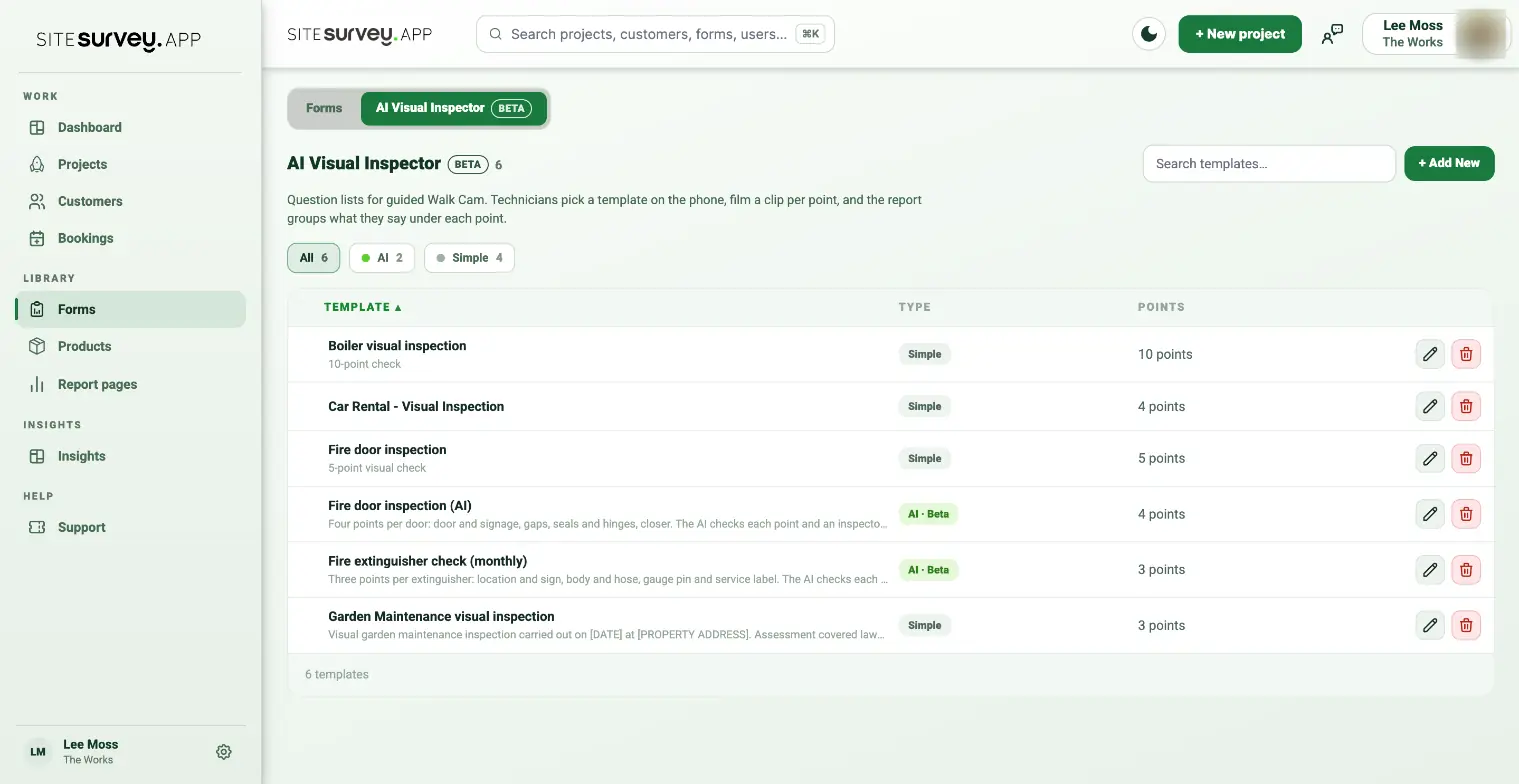
In the web dashboard, go to Forms and select the AI Visual Inspector tab. It lists every Walk Cam template with its type, Simple or AI · Beta, and how many points it has. Use the All, AI and Simple filters to narrow the list. You can also jump here from the Templates button on a project’s Walks tab.
- 02
Select + Add New
Choose Start from scratch, then Simple inspection for a plain question list. Choose AI inspection, Let me help you or Browse library if you want the AI to check each clip; see Set up an AI Visual Inspector template.
- 03
Name the template
Use a name the field team will recognise, such as the asset type or inspection standard it covers.
- 04
Add the points
Add each point in the order it should be filmed on site, with optional filming instructions that the phone shows under the question. Press Enter in a point to add the next one, and use the arrows to reorder.
- 05
Save and use it in the app
Select Create template. The template appears in the Walk Cam picker on the mobile app. Pull down to refresh the list if it was created recently.
Good to know
- ✓New templates download when the app is online, so create them before the team leaves for site.
- ✓Keep questions short and spoken-answer friendly; each recording answers exactly one question.
Was this guide helpful?
Your feedback helps us improve support content.