Form library · Quality and compliance

Site acceptance test template

For commissioning engineers and clients witnessing site acceptance tests. Record each test case against its criterion: enter the measured value and the limits, and the form says whether the reading is within them, counts the cases passed, failed and not run, and flags a pass that the reading does not support or an acceptance with cases outstanding. Try the form below, see every question or open a completed example.

Ready to use from the form library, and every question is yours to edit. Try it for a small trial fee, cancel any time.

Try it on your phone

Try it on this phone

Fill in the site acceptance test record on your phone now

See how the site acceptance test record looks on your phone

Scan the code with your phone camera. It opens the real form, no sign-up needed.

Open the live example and fill it in, just as your team would on site. No sign-up needed.

See it on this phone

Every question is editable. Add this form to your account, then change the wording, add or remove questions and options, and make it fit your own jobs.

Or start your trial with this form ready →

One email, and we won't add you to a mailing list.

Does passing a test automatically approve equipment?

HSE explains that work equipment whose safety depends on installation needs appropriate inspection before use. A site acceptance test records agreed tests; its scope must be distinguished from statutory inspections and product conformity duties.

Last updated . Facts checked by the SiteSurvey team on 6 October 2026 against HSE inspection of work equipment and HSE machinery safety.

Built for witnessing site acceptance tests

Record each test case as it is run, with the client's engineer beside you. Enter the reading and the limits from the approved protocol, and the form says whether the reading is within them, counts the cases passed, failed and not run, and flags a pass the reading does not support. It records the tests; acceptance and handover stay with the people named in it.

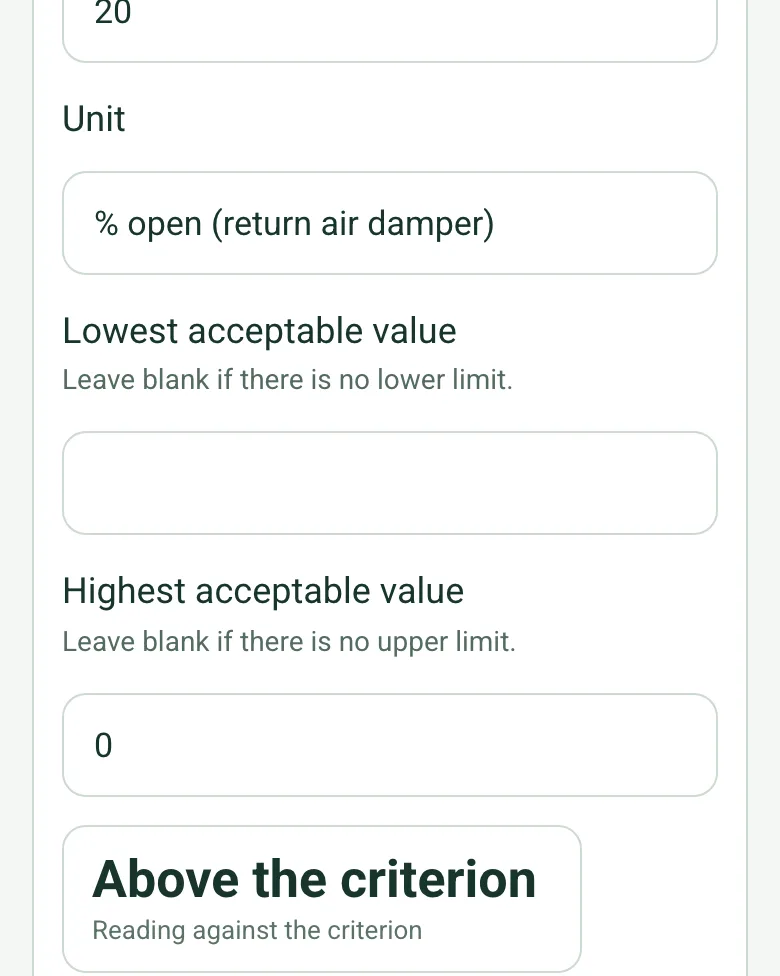
A reading of 20% open on the return air damper with a highest acceptable value of 0, worked out as Above the criterion

Each reading against its criterion

Where the criterion is a number, enter the measured value with the lowest and highest acceptable values from the protocol. The form says within, above or below, and shows a red note if a case is marked Pass with a reading outside the limits.

How calculated fields work →
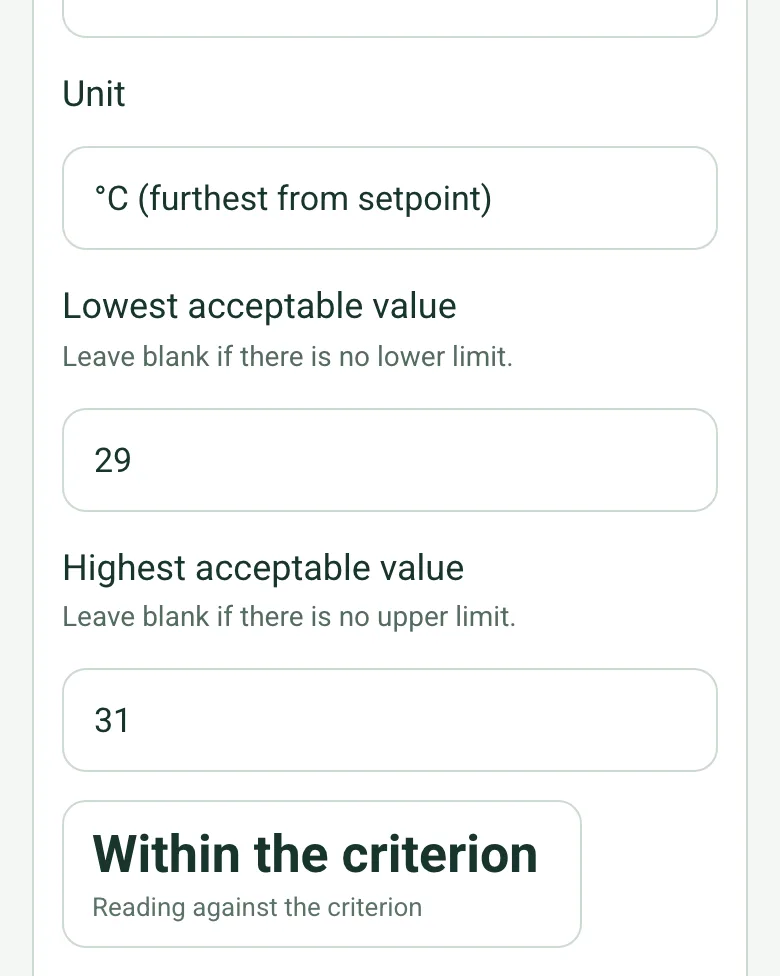
A supply air temperature reading with limits of 29 and 31 °C, worked out as Within the criterion

Within the limits

A temperature held within a band, an alarm within a time or a pressure within a range: each case keeps its reading, unit and limits together, so the evidence for the outcome is in the record, not in someone's notebook.

How calculated fields work →
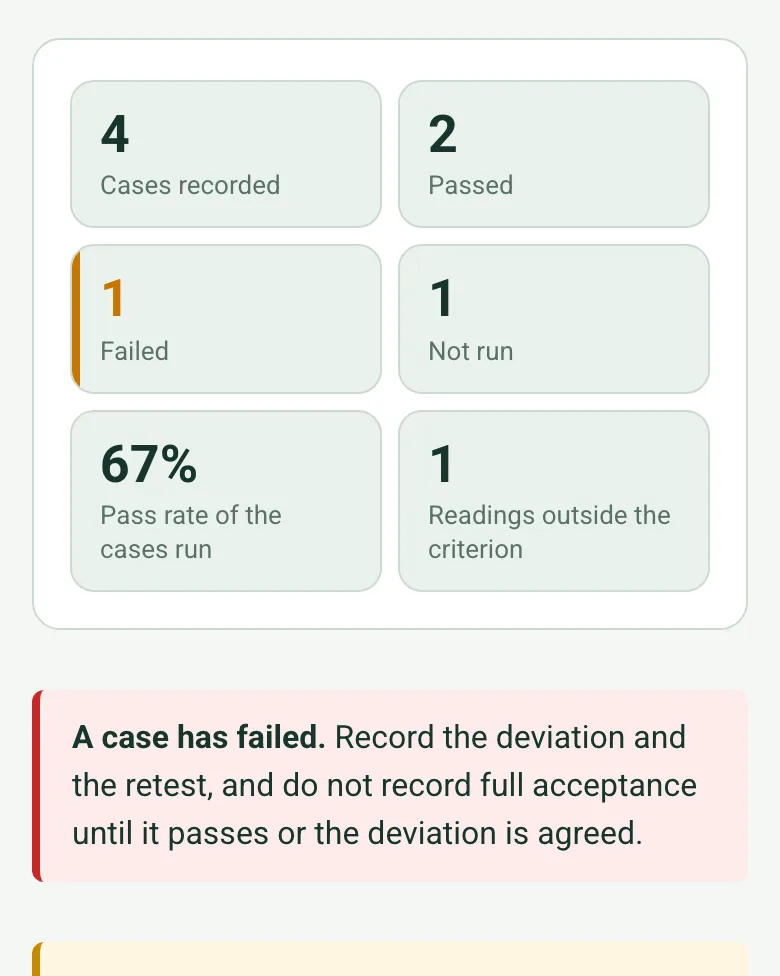
Counts worked out as 4 cases recorded, 2 passed, 1 failed, 1 not run, a 67% pass rate of the cases run and 1 reading outside the criterion, with a red note that a case has failed

Cases counted, with the pass rate

The form counts the cases and works out the pass rate of those run. A failed case or a case not run shows a note, and recording full acceptance with either still open shows a red one.

How calculated fields work →

A completed site acceptance test record

A fictional leisure centre's pool hall air handling unit: supply temperature within its band, the fan fail alarm in 12 seconds against 60, the return damper left 20% open on the fire signal (failed) and the night setback not yet run. Accepted for normal running only. Open it as a filled-in form, or switch to a blank copy and try it yourself.

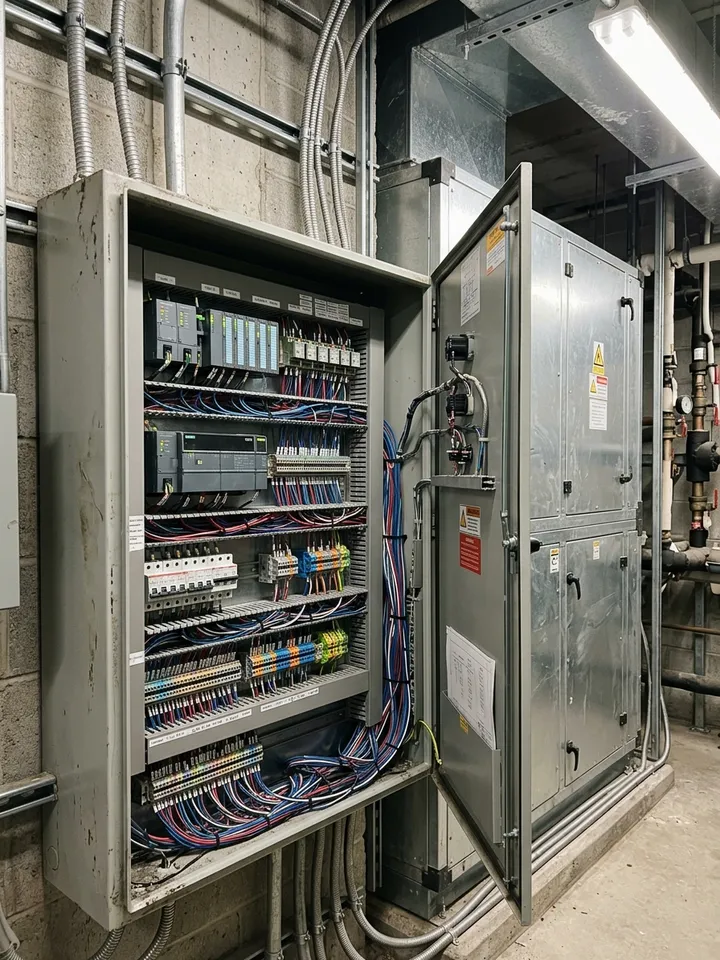
An open control panel in a plant room with controllers, terminal blocks and labelled wiring
Outstation OS-04 · SAT-01 trend within ±1 °C
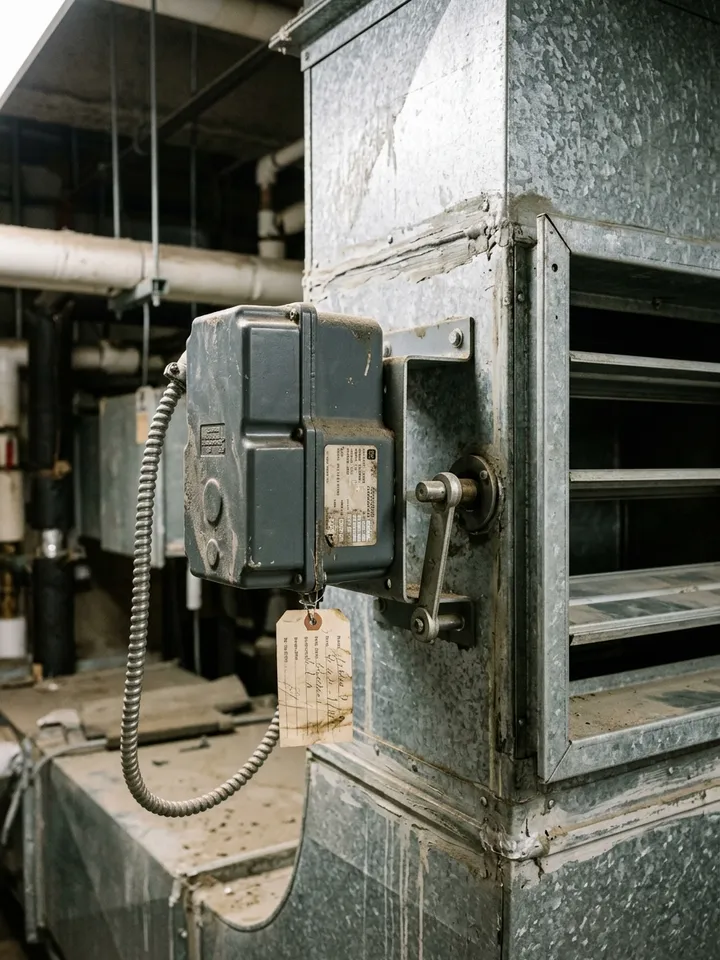
A grey damper actuator on a galvanised duct with the damper blades open
Return air damper · 20% open on the fire signal · failed
Across the plant room to the control panel

Try the site acceptance test record form live

Answer a few questions and watch it adapt. Your answers are not saved, and any photos you add are deleted within the hour.

Live form: Site Acceptance Test RecordOpen full screen ↗
Fill it in right here

This is the real form as your team would use it: questions appear as you answer, scores work themselves out and you can add photos and signatures. No sign-up needed. Or open a completed example to see every answer, photo and score filled in.

Want to see one filled in? See a completed site acceptance test record report (PDF), made by SiteSurvey from a fictional site visit.

For teams

Using the site acceptance test record template for client work?

Paper or a spreadsheet works for the odd job. When your team does this every week, SiteSurvey keeps every visit in one place and turns each one into a report you can send.

  • Everyone fills in the same form on their phone, with photos attached to the answer they belong to.
  • Each visit becomes a branded PDF report for the client, with no retyping.
  • Every site, visit and report is kept together in one account, not scattered across email and shared drives.

Fill it in on a phone or tablet

Your team completes the site acceptance test record on site in the SiteSurvey app on iPhone, iPad and Android phones and tablets. The project name and address fill in for them, it works without signal, and it syncs when the device is back online with photos kept against the question they answer.

Customers and subcontractors do not need the app: send them a link and they can fill it in from any browser.

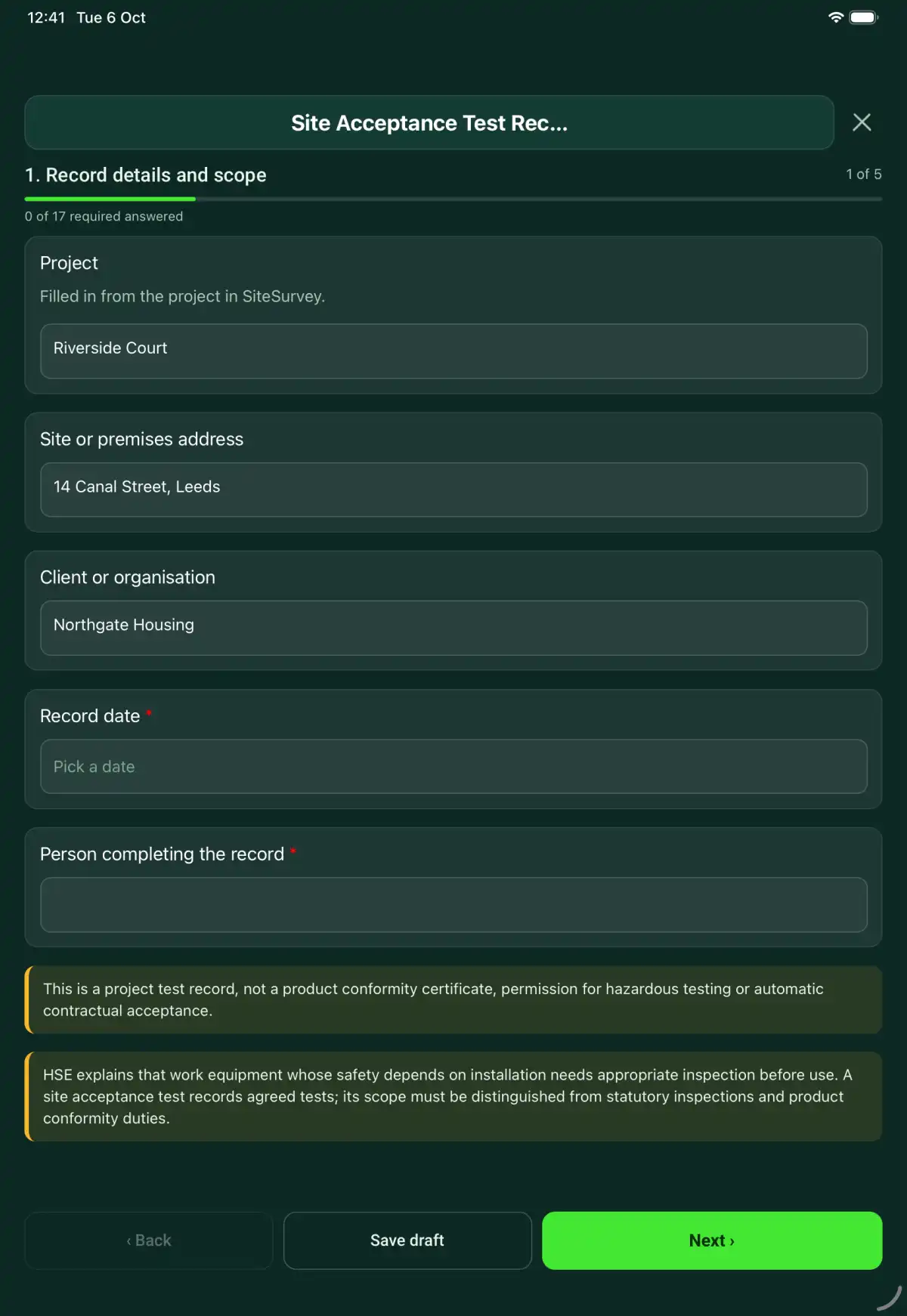
The Site Acceptance Test Record form in the SiteSurvey app on a tablet
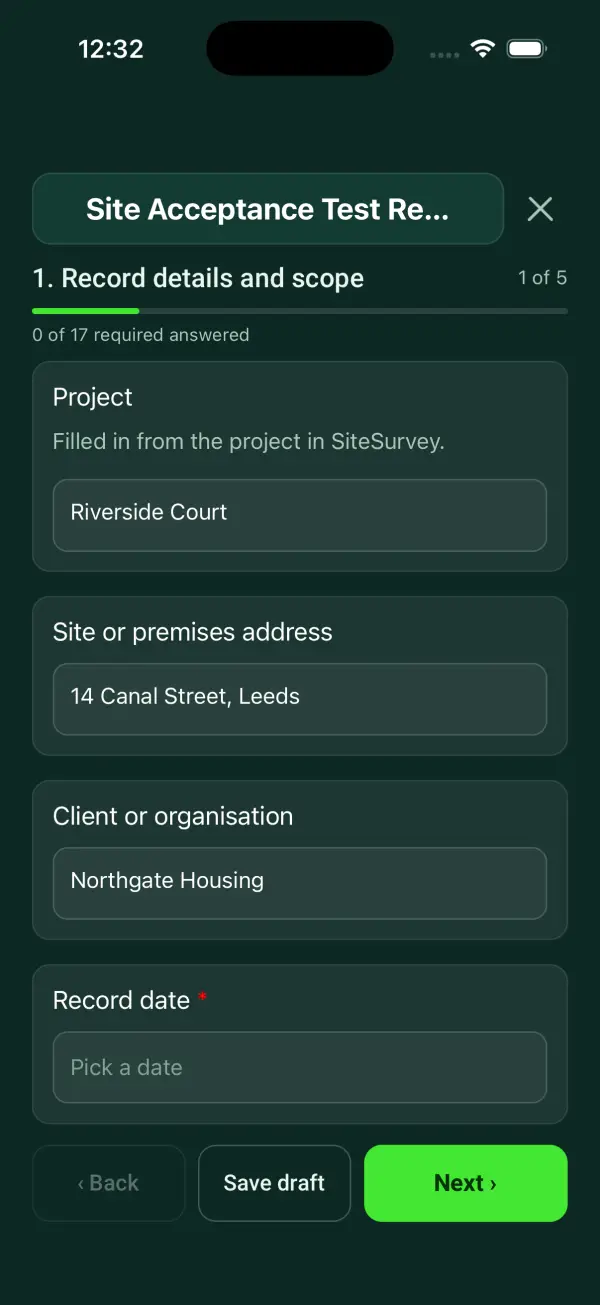
The Site Acceptance Test Record form in the SiteSurvey app on a phone

Every question in the site acceptance test record template

A site acceptance test record linking installed equipment, approved test cases, expected results, observed evidence, deviations and acceptance decisions. 5 sections and 44 questions. Follow-up questions and guidance appear only when an answer calls for them, so the person on site never sees the ones that do not apply.

Make it your own: every question is editable

This is a starting point, not a fixed form. Once it is in your SiteSurvey account you can reword any question, add or remove questions, sections and answer options, and add your own logo, so it fits the way your team works and the jobs you do.

Details you only enter once

Add this form to a project in SiteSurvey and it fills in what the project already knows, so nobody on site retypes it and every form on the job uses the same names. Anything filled in can still be changed.

  • Project: the project name
  • Client or organisation: the project's customer
  • Site or premises address: the site address, from the space or the project

Record details and scope

  • ProjectShort answer

    Filled in from the project in SiteSurvey.

    Fills in from the project name
  • Client or organisationShort answer
    Fills in from the project's customer
  • Site or premises addressShort answer
    Fills in from the site address, from the space or the project
  • Record date*Date
  • Person completing the record*Short answer
  • CheckThis is a project test record, not a product conformity certificate, permission for hazardous testing or automatic contractual acceptance.
  • CheckSources. The usual reference for factory, site and integration acceptance testing of automation systems is IEC 62381 (Automation systems in the process industry: factory acceptance test (FAT), site acceptance test (SAT) and site integration test (SIT)). The governing document for this test is the project's approved test protocol and contract. Where safety depends on installation, the Provision and Use of Work Equipment Regulations 1998 (PUWER), regulation 6, also requires inspection before first use. A site acceptance test records agreed tests; its scope must be distinguished from statutory inspections and product conformity duties.

Test basis

  • Installed system and location*Short answer
  • Approved protocol and revision*Short answer
  • Hardware/software configuration*Short answer
  • Prerequisites, safe test controls and authority*Notes

    List the conditions needed for the agreed tests and whether each was available. Distinguish a test not run from a passed test.

Test cases

  • Test case
    Repeat for each test case. Each one asks:
    • Case ID and requirement*Short answer
    • Approved method reference*Short answer
    • Expected result and criterion*Short answer
    • Measured valueNumber

      Where the criterion is a number, enter the reading in the same unit. Leave blank for a yes or no criterion.

    • UnitShort answer
    • Lowest acceptable valueNumber

      Leave blank if there is no lower limit.

      Shown when “Measured value” is answered
    • Highest acceptable valueNumber

      Leave blank if there is no upper limit.

      Shown when “Measured value” is answered
    • Reading against the criterionWorked out by the form
      Shown only when the answers above make it relevant
    • Actual result and evidence reference*Notes
    • Outcome*Choose one
      • Pass
      • Fail
      • Not run
    • WarningThe reading is outside the criterion but the case is marked Pass. Check the reading or the outcome.
      Shown only when the answers above make it relevant
    • Photos or screenshotsPhotos
    • Deviation, restriction and retest reference*Notes
      Shown only when the answers above make it relevant
  • Cases recordedWorked out by the form
  • PassedWorked out by the form
  • FailedWorked out by the form
  • Not runWorked out by the form
  • Pass rate of the cases run (%)Worked out by the form
    Shown only when the answers above make it relevant
  • Readings outside the criterionWorked out by the form
  • WarningA case has failed. Record the deviation and the retest, and do not record full acceptance until it passes or the deviation is agreed.
    Shown only when the answers above make it relevant
  • CheckSome cases have not been run. Record when they will be, and keep them out of the acceptance until they are.
    Shown only when the answers above make it relevant

Acceptance review

  • Witnesses and organisationsShort answer
  • Open defects and restrictions*Notes
  • Review decision*Choose one
    • Accepted within agreed scope
    • Conditional acceptance
    • Rejected or incomplete
  • WarningAccepted with a failed case or a case not run. Check the decision, or record the cases as excluded from the agreed scope.
    Shown only when the answers above make it relevant
  • Decision basis and authorised reviewer*Notes
  • Separate contractual acceptance referenceShort answer

Actions and review

  • Are further actions required?Choose one
    • Yes
    • No
  • Further action
    Repeat for each further action. Each one asks:
    Shown when “Are further actions required?” is “Yes”
    • Action and evidence reference*Notes
    • PriorityChoose one
      • Urgent
      • High
      • Medium
      • Low
    • Person responsibleShort answer
    • Target dateDate
    • Action statusChoose one
      • Open
      • In progress
      • Completed
    • Completion evidence*Notes
      Shown when “Action status” is “Completed”
  • Outstanding limitations and information to pass onNotes
  • Record status*Choose one
    • Ready for review
    • Further work needed
    • Work or use stopped
  • Reviewed byShort answer
  • Review dateDate
  • Author signature*Signature
  • CheckSigning records the information entered. It does not itself certify legal compliance, remove a limitation or authorise unsafe work.

Scope and responsibility

This is a project test record, not a product conformity certificate, permission for hazardous testing or automatic contractual acceptance.

What a useful entry looks like

Prerequisites, safe test controls and authority

List the conditions needed for the agreed tests and whether each was available. Distinguish a test not run from a passed test.

Test case SAT-14 requires the upstream interface. The interface was unavailable, so the test is recorded as not run with a retest action.

Fictional example of record wording. Use the actual evidence and approved arrangements for your job; this is not a completed report or an instruction to carry out the work.

See it filled in

A completed site acceptance test record report, made by SiteSurvey from a fictional site visit: every answer, the photos, the guidance that applied and the sign-off, ready to send as a PDF.

See completed form (PDF) ↗

Site Acceptance Test Record FAQs

How should I record “Prerequisites, safe test controls and authority”?

List the conditions needed for the agreed tests and whether each was available. Distinguish a test not run from a passed test.

Can failed tests be ignored after acceptance?

No. Retain the result and record authorised disposition, restrictions and retest evidence.

Is this the factory acceptance test?

No. This records testing in the installed site configuration; reference factory tests separately.

Who defines pass criteria?

The approved project specification and protocol define them before testing. Where the criterion is a number, enter the lowest and highest acceptable values with the reading, and the form compares them; it does not set the criterion.

What are the limits of this template?

This is a project test record, not a product conformity certificate, permission for hazardous testing or automatic contractual acceptance.

Can I complete this form on site and share the record?

In the SiteSurvey app the form works offline, with signatures recorded against the questions. Share the completed record as a PDF or a link. Dates and action owners are recorded fields; this form does not send reminders or update other systems.

Related

Use this site acceptance test record form with your team

Add it from the form library in one click, change any question, and every completed form becomes a branded PDF report.

Start your trial →