Projects and stages Web and mobile
From first visit to signed off.One job, one record.
Every project mirrors the real site: rooms become spaces, and products, forms, photos and files sit where they belong. The job moves through your stages to a sign-off the client gives on the phone.
PlanProjects, spaces and reports on Base, from £13 per user per month.

How does SiteSurvey organise a site survey project?
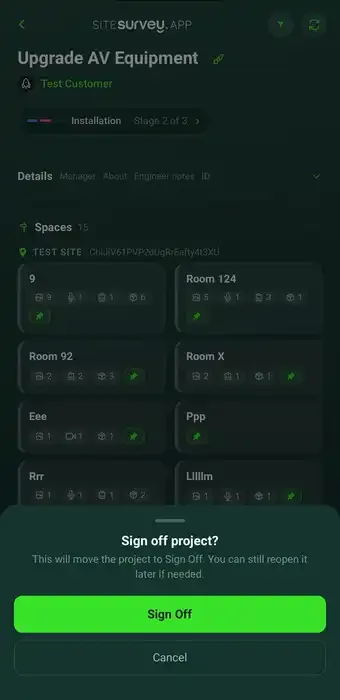
Each project mirrors the real site. Rooms and zones become spaces, and every product, form, photograph and file is assigned to the space it belongs to. The project moves through your account's stages, from the web or the phone, to a sign-off stage where the client rates the job and signs. Coordinators on the web and field teams on mobile work from the same record.
Last updated 26 October 2026.
01 · The job
Move the job on. Get it signed off.
The stage bar on the project overview shows where each job is. Click the next stage to move it on. At the sign-off stage the client rates the job, comments and signs. Try it.
Riverside Court: AV refit
Example project · click a stage to move itMove the project to Sign Off to see the client sign-off step.
Example stages. Your account's stages are set up for your type of work. Nothing is saved or sent.
02 · Spaces
The project is the site, not a task list.
Each room or zone is a space with its own products, forms, photos and files, so information is easy to capture in the field and easy to understand in the office.
- Spaces, not scattered folders. Everything captured in a room stays with that room.
- Live project overview. Spaces, products, survey completion and files together, with the stage bar on top.
- Products in context. What is installed, surveyed or commissioned, and exactly where.
- Bookings and files attached. Site visits and documents stay with the right customer and project.
- Works offline. Captured on mobile without signal and synced when back online.
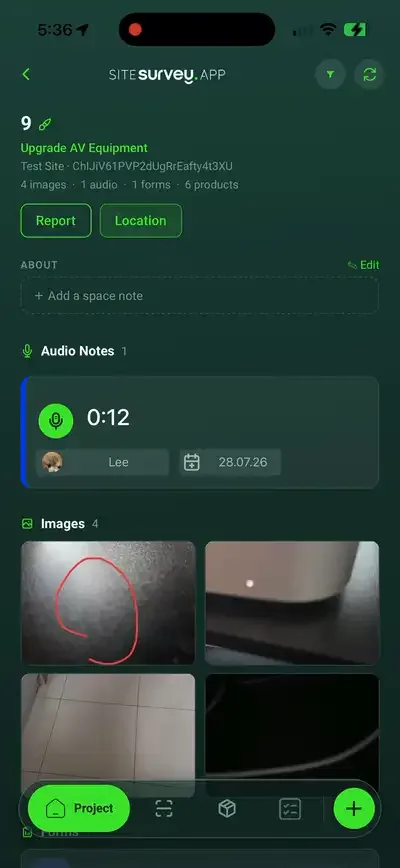
On the phoneThe same project, in your pocket
03 · Report and sign-off
From project record to signed-off job.
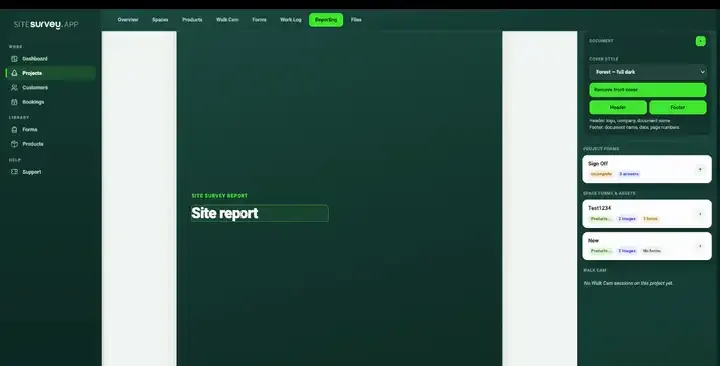
Build the site report from the project: spaces, products, photos and completed forms become sections you can brand and export. When the work is done, move the project to sign-off and hand the phone to the client.
- Report builder. Compose from project sections and export the PDF to the project's files.
- Client sign-off. Satisfaction rating, comments and a signature on the phone.
- Emailed automatically. The sign-off PDF and CSV are sent when the client signs.
04 · What it does not do
Clear stages, not an automation builder.
SiteSurvey keeps the job simple to run. If you need rules engines and boards, it is not that kind of tool.
| Automation rules | No triggers, routed approvals or automatic assignments. Stages are moved by people. |
|---|---|
| Kanban and tasks | No task boards. Progress shows on the project overview, the stage bar and the dashboard's job pipeline. |
| Notifications | Teams stay informed by working in the same project, not by rule-generated alerts. |
| Integrations | No public API, webhooks or Zapier. Export to CSV or Excel where another system needs the data. |
SiteSurvey projects and stages, at a glance
- What it is
- The project record at the centre of SiteSurvey, organised around the real site's rooms and zones, moving through your stages to sign-off.
- Who uses it
- Survey coordinators planning and reviewing on the web, and field teams capturing on mobile.
- What it captures
- Spaces, products, forms, photographs, files, bookings and survey progress, all in one project.
- Stages
- Set up for your type of work at sign-up, with one sign-off stage. Moved from the web or the phone.
- Works offline?
- Yes. Work captured on mobile without signal syncs to the project when connectivity returns.
- Plan
- Projects, spaces and reports are on Base, £13 per user per month. The Works, £25, adds the form builder, products and bookings. Trial from £1, cancel any time.
- What it does not do
- No rules-based automation, triggers, task boards, public API or webhooks.
Does SiteSurvey offer workflow automation?
No. SiteSurvey does not use rules-based automation, triggers or Kanban boards. Work is organised through projects, spaces, forms, bookings, project stages and visible survey progress instead, which covers what most field survey teams need.
How does a job move through SiteSurvey?
Each project moves through your account's stages, for example from prospect to survey, installation and sign-off. Move it on from the stage bar on the project overview in the web dashboard, or from the phone. When it reaches the sign-off stage, the client gives a satisfaction rating, adds comments and signs on the phone, and the sign-off PDF and CSV are emailed.
Can I choose the stages?
Your account's stages are set up for the type of work you chose when you signed up, with one of them as the sign-off stage.
How is a survey project organised?
Each project mirrors the real site. Rooms and zones become spaces, and every product, form, photograph and file is assigned to the space it belongs to, so information stays in context instead of scattered folders.
Can the whole team work in the same project at once?
Yes. Coordinators plan and review on the web while field teams capture on mobile. Everyone works from the same project record, with progress visible as work is completed.
How do office and field teams stay in sync?
Forms, photos, notes and product data captured on mobile synchronise to the web, so the project overview reflects the latest site activity, including work captured offline once the phone is back online.
How do I set up my first project?
Create the project with its customer, add the spaces, then attach the products and forms each space needs. Field users see the same project on mobile straight away.
On your next job