Form library · Property management

Property management onboarding checklist

For letting agents and property managers taking a property into management. Pin the entrance, record each document and certificate with its reference and expiry date, and the form counts the days from the management start, flags anything expired or due within 60 days, and counts what is received and what is still only requested. Meter readings and key sets go in with photos. Try the form below, see every question or open a completed example.

Ready to use from the form library, and every question is yours to edit. Try it for a small trial fee, cancel any time.

Try it on your phone

Try it on this phone

Fill in the property management onboarding on your phone now

See how the property management onboarding looks on your phone

Scan the code with your phone camera. It opens the real form, no sign-up needed.

Open the live example and fill it in, just as your team would on site. No sign-up needed.

See it on this phone

Every question is editable. Add this form to your account, then change the wording, add or remove questions and options, and make it fit your own jobs.

Or start your trial with this form ready →

One email, and we won't add you to a mailing list.

What does a property management onboarding checklist record?

A property management onboarding checklist records a new management instruction: the agreed scope, start date, records received, access arrangements, existing issues and outstanding handover actions. It helps the incoming manager identify missing information without replacing the property condition inspection or inventory.

Last updated . Facts checked by the SiteSurvey team on 9 October 2026 against Content Snare property onboarding checklist.

How to make this record useful

Missing records and next steps

Property P-10, management start 15 October: authority reference MI-10 received. Condition report CI-10 and inventory INV-10 are referenced, but the previous maintenance file is missing. Incoming property manager to request it from the outgoing manager and confirm receipt.

Fictional example. Record the actual evidence and approved arrangements for your job.

A common recording mistake

Do not treat “requested” as “received”. Use record references rather than copying identity documents, bank details or access codes into a general handover checklist.

What happens next

Track each missing record or unresolved issue to its owner and record its receipt. Keep subsequent property inspections, inventories and key movements in their own records, linked by the property reference.

Built for taking a property into management

Pin the entrance, then record each document and certificate you were given or asked for, with its reference and expiry date. The form works out the days from the management start date to each expiry, flags anything already expired or due within 60 days, and counts what is received and what is still only requested. Meter readings and key sets go in with photos. It records references, not the contents of tenancy, identity or bank documents.

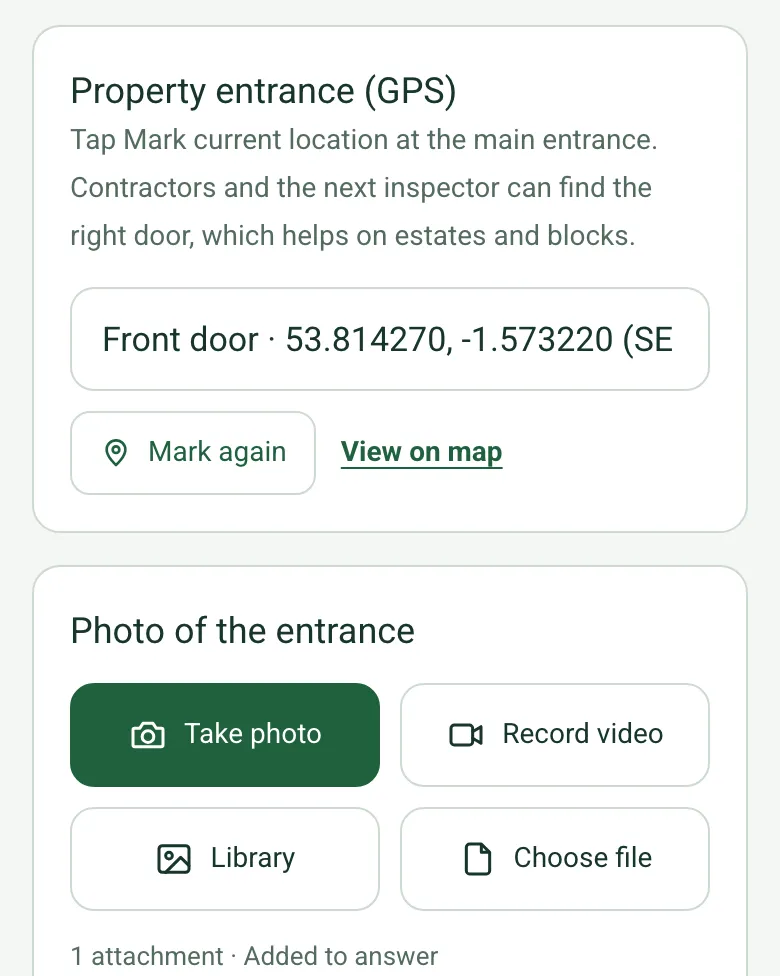
Property entrance (GPS) filled in as Front door with the coordinates, Mark again and View on map, and a photo of the entrance

The right front door

Mark the main entrance and add a photo. Contractors and the next inspector can find the right door, which helps on estates and converted houses. Mark current location works on web forms in any phone browser today, and the app version is on its way.

How GPS location works →
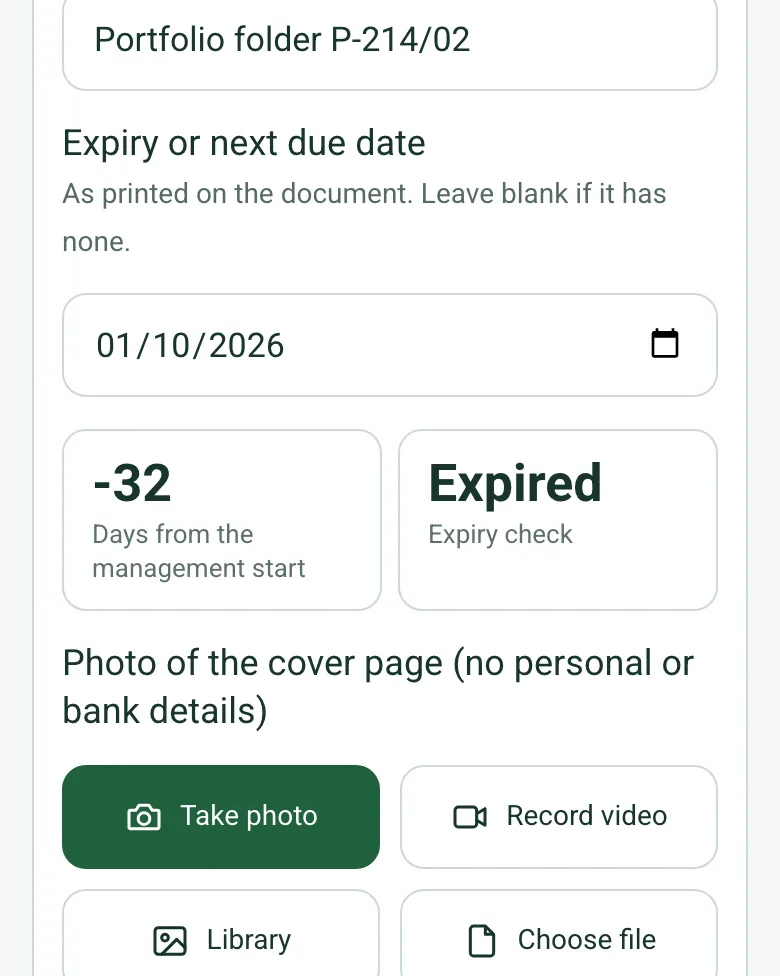
An EICR with a next due date of 1 October 2026, minus 32 days from the management start and an Expiry check of Expired

Every expiry date checked

Enter the expiry or next due date printed on each document. The form counts the days from the management start date and marks it Expired, Due within 60 days or In date.

How calculated fields work →
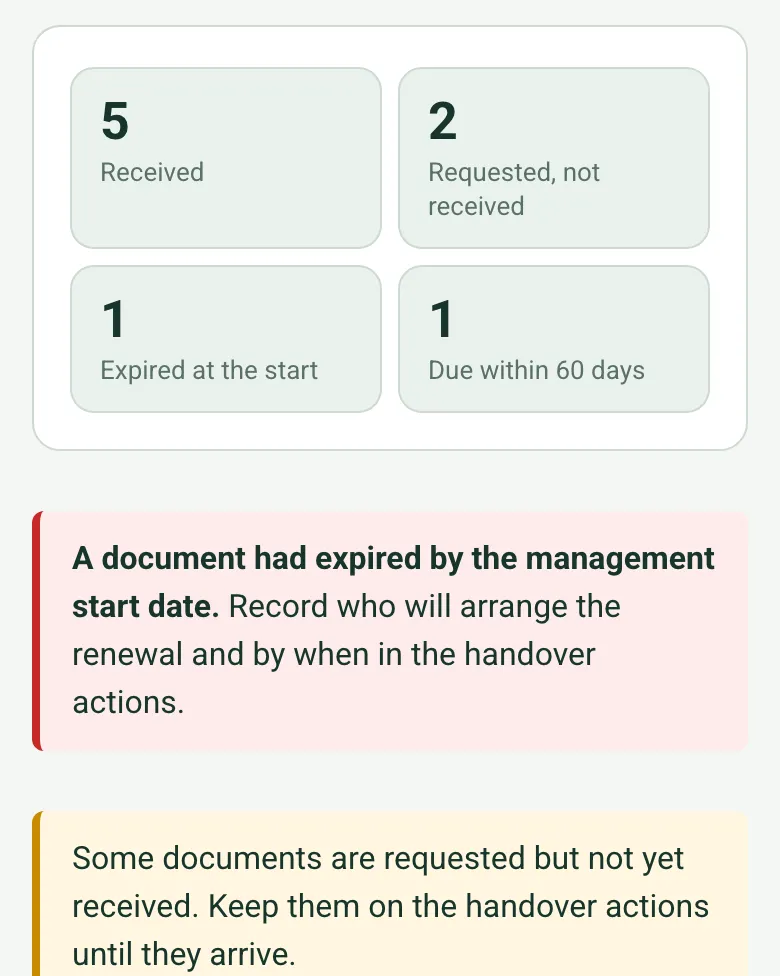
5 received, 2 requested and not received, 1 expired at the start and 1 due within 60 days, with red and amber notes

Received is not the same as requested

The totals show what was received, what is still only requested, and what was expired or due soon, with a red note for an expired document and an amber note while anything is still outstanding.

How calculated fields work →

Each room on video

If you visit at handover, film each room with a spoken note in the SiteSurvey app. The full condition record stays in the inspection and inventory.

A completed onboarding checklist

A fictional converted house of three flats in Leeds taken on by a letting agent: the EICR next due date has already passed, the gas safety record is due within 60 days, and the fire risk assessment and maintenance file are requested, not received. Open it as a filled-in form, or switch to a blank copy and try it yourself.

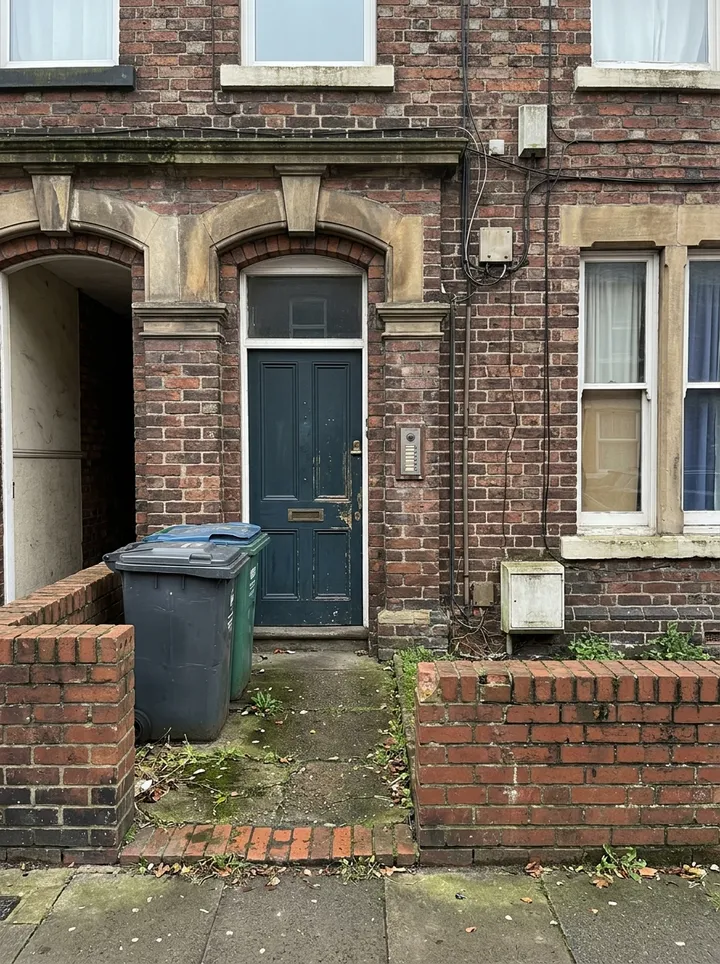
The front door of a red brick terraced house converted into flats, with a door entry panel and bins
Main entrance · location marked
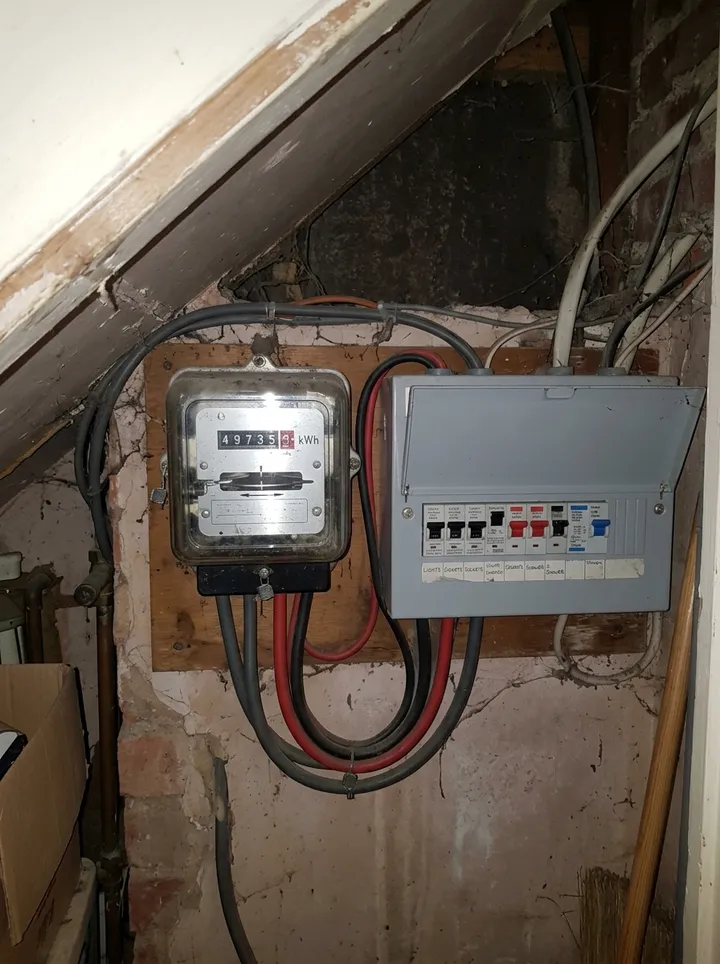
An electricity meter and consumer unit in an under-stairs cupboard
Common parts electricity meter · reading 49735
Three sets of keys with coloured plastic tags beside a brown envelope
Three key sets received · key register KR-214

Try the property management onboarding form live

Answer a few questions and watch it adapt. Your answers are not saved, and any photos you add are deleted within the hour.

Live form: Property management onboarding checklistOpen full screen ↗
Fill it in right here

This is the real form as your team would use it: questions appear as you answer, scores work themselves out and you can add photos and signatures. No sign-up needed. Or open a completed example to see every answer, photo and score filled in.

Want to see one filled in? See a completed property management onboarding report (PDF), made by SiteSurvey from a fictional site visit.

Every question in the property management onboarding template

Record the transfer of a property into management: authority, records, access, each document and certificate with its expiry, meter readings, keys and unresolved handover tasks. 3 sections and 49 questions. Follow-up questions and guidance appear only when an answer calls for them, so the person on site never sees the ones that do not apply.

Make it your own: every question is editable

This is a starting point, not a fixed form. Once it is in your SiteSurvey account you can reword any question, add or remove questions, sections and answer options, and add your own logo, so it fits the way your team works and the jobs you do.

Details you only enter once

Add this form to a project in SiteSurvey and it fills in what the project already knows, so nobody on site retypes it and every form on the job uses the same names. Anything filled in can still be changed.

  • Project or site: the project name
  • Landlord or client: the project's customer
  • Property reference and address: the site address, from the space or the project

Management instruction

  • Project or site*Short answer
    Fills in from the project name
  • Landlord or clientShort answer
    Fills in from the project's customer
  • Record reference*Short answer
  • Record date*Date
  • Prepared by*Short answer
  • Property reference and address*Short answer
    Fills in from the site address, from the space or the project
  • Property typeChoose one
    • House
    • Flat
    • Block of flats
    • House in multiple occupation (HMO)
    • Commercial unit
    • Mixed use
  • Property entrance (GPS)Short answer

    Tap Mark current location at the main entrance. Contractors and the next inspector can find the right door, which helps on estates and blocks.

  • Photo of the entrancePhotos
  • Management start date*Date
  • Management authority or agreement reference*Short answer
  • Responsible property manager*Short answer

Records and access

  • Management scope and responsibilities confirmed*Choose one
    • Confirmed
    • Exception
    • Not applicable
  • What is the exception, or why does it not apply?*Notes
    Shown only when the answers above make it relevant
  • Existing property and tenancy records referenced*Choose one
    • Confirmed
    • Exception
    • Not applicable
  • What is the exception, or why does it not apply?*Notes
    Shown only when the answers above make it relevant
  • Access arrangements and key handover referenced*Choose one
    • Confirmed
    • Exception
    • Not applicable
  • What is the exception, or why does it not apply?*Notes
    Shown only when the answers above make it relevant
  • Existing maintenance issues and suppliers reviewed*Choose one
    • Confirmed
    • Exception
    • Not applicable
  • What is the exception, or why does it not apply?*Notes
    Shown only when the answers above make it relevant
  • Documents and certificates
    Repeat for each entry. Each one asks:
    • Document*Choose one
      • Gas safety record
      • Electrical installation condition report (EICR)
      • Energy performance certificate (EPC)
      • Smoke and carbon monoxide alarm records
      • Fire risk assessment
      • Legionella risk assessment
      • Asbestos survey or register
      • Tenancy agreement
      • Deposit protection certificate
      • Inventory
      • Building insurance schedule
      • Licence (HMO or selective)
      • Maintenance and supplier file
      • Other (describe)
    • Status*Choose one
      • Received
      • Requested
      • Not held
      • Not applicable
    • Reference or where it is filedShort answer
      Shown when “Status” is “Received”
    • Expiry or next due dateDate

      As printed on the document. Leave blank if it has none.

      Shown when “Status” is “Received”
    • Days from the management startWorked out by the form
      Shown when “Expiry or next due date” is answered
    • Expiry checkWorked out by the form
      Shown when “Expiry or next due date” is answered
    • Who is chasing it, and by whenShort answer
      Shown when “Status” is “Requested”
    • Photo of the cover page (no personal or bank details)Photos
      Shown when “Status” is “Received”
  • CheckSources for the documents (England). Gas Safety (Installation and Use) Regulations 1998, regulation 36: a gas safety check every 12 months by a Gas Safe registered engineer, the record kept for 2 years and a copy given to tenants. Electrical Safety Standards in the Private Rented Sector (England) Regulations 2020: the installation inspected and tested by a qualified person at least every 5 years, with the report given to tenants. Energy Performance of Buildings (England and Wales) Regulations 2012: a valid EPC when a property is let. Smoke and Carbon Monoxide Alarm (England) Regulations 2015, as amended in 2022: a smoke alarm on every storey used as living accommodation, a carbon monoxide alarm in any room with a fixed combustion appliance (not gas cookers), and alarms checked at the start of each tenancy. HMOs and properties in selective licensing areas need a licence under the Housing Act 2004. Wales and Scotland have their own rules.
  • ReceivedWorked out by the form
  • Requested, not receivedWorked out by the form
  • Expired at the startWorked out by the form
  • Due within 60 daysWorked out by the form
  • WarningA document had expired by the management start date. Record who will arrange the renewal and by when in the handover actions.
    Shown only when the answers above make it relevant
  • CheckSome documents are requested but not yet received. Keep them on the handover actions until they arrive.
    Shown only when the answers above make it relevant
  • Condition inspection and inventory referencesShort answer
  • Utility and account handover referencesShort answer
  • Key sets receivedNumber

    Record the number and the key register reference only, never alarm or door codes.

  • Key register referenceShort answer
  • Photo of the key sets and tagsPhotos
  • Meter readings at the start
    Repeat for each meter. Each one asks:
    • Meter*Choose one
      • Electricity
      • Electricity (night rate)
      • Gas
      • Water
      • Heat
    • Meter serial numberShort answer
    • ReadingNumber
    • Where the meter isShort answer
    • Photo of the readingPhotos
  • Meters readWorked out by the form

Handover actions

  • Missing records and next steps*Notes
  • GuidanceRecord receipt and references rather than sensitive identity, banking or access details. Follow the organisation’s secure handover process.
  • Record status*Choose one
    • Open
    • Complete
  • Next action or reason none is needed*Notes
  • Responsible person*Short answer
  • Reviewed byShort answer
  • Reviewer acknowledgementSignature

See it filled in

A completed property management onboarding report, made by SiteSurvey from a fictional site visit: every answer, the photos, the guidance that applied and the sign-off, ready to send as a PDF.

See completed form (PDF) ↗

Property management onboarding FAQs

How does it check expiry dates?

Enter the expiry or next due date printed on each document. The form counts the days from the management start date and marks it Expired, Due within 60 days or In date, then counts how many are expired or due soon, with a red note if anything had already expired by the start date. It does not set legal renewal periods: it works from the dates on the documents.

What is the difference between requested and received?

Requested means you have asked for it, not that you have it. The form counts documents received and documents still only requested, and an amber note stays on until everything requested has arrived, so a missing fire risk assessment or maintenance file does not get forgotten.

Why record meter readings and keys?

Opening meter readings with a photo settle who pays for what from the start date, and recording the number of key sets with the key register reference shows what was handed over. Alarm and door codes should never go on the checklist.

How does this differ from related templates?

This checklist records a new management instruction and transfer of information. Property inspections own condition findings; inventories own contents; the key register owns detailed key custody.

Should sensitive tenant or financial information go here?

Use secure record references and receipt status. Keep bank details, identity documents, access codes and detailed tenancy information in the designated management system.

Related

Use this property management onboarding form with your team

Add it from the form library in one click, change any question, and every completed form becomes a branded PDF report.

Start your trial →