Form library · Facilities and maintenance

EV charger maintenance checklist

For engineers servicing EV chargers on a site. Add each charger with its ID, its position pinned by GPS and five pass or fail checks against the manufacturer's procedure, and the form counts the failed checks and the chargers available, restricted or out of service, with a red note for any charger out of service. Try the form below, see every question or open a completed example.

Ready to use from the form library, and every question is yours to edit. Try it for a small trial fee, cancel any time.

Try it on your phone

Try it on this phone

Fill in the EV charger maintenance on your phone now

See how the EV charger maintenance looks on your phone

Scan the code with your phone camera. It opens the real form, no sign-up needed.

Open the live example and fill it in, just as your team would on site. No sign-up needed.

See it on this phone

Every question is editable. Add this form to your account, then change the wording, add or remove questions and options, and make it fit your own jobs.

Or start your trial with this form ready →

One email, and we won't add you to a mailing list.

What does this template record?

An EV charger maintenance checklist records a service visit against each charger and the manufacturer procedure. Each charger gets its ID, serial, position, pass or fail checks, the faults found and whether it was left available, restricted or out of service. It is a service record, not instructions for electrical testing or isolation.

Last updated . Facts checked by the SiteSurvey team on 9 October 2026 against Ford Pro charging maintenance checklist.

How to make this record useful

Faults found, fault codes and what was done

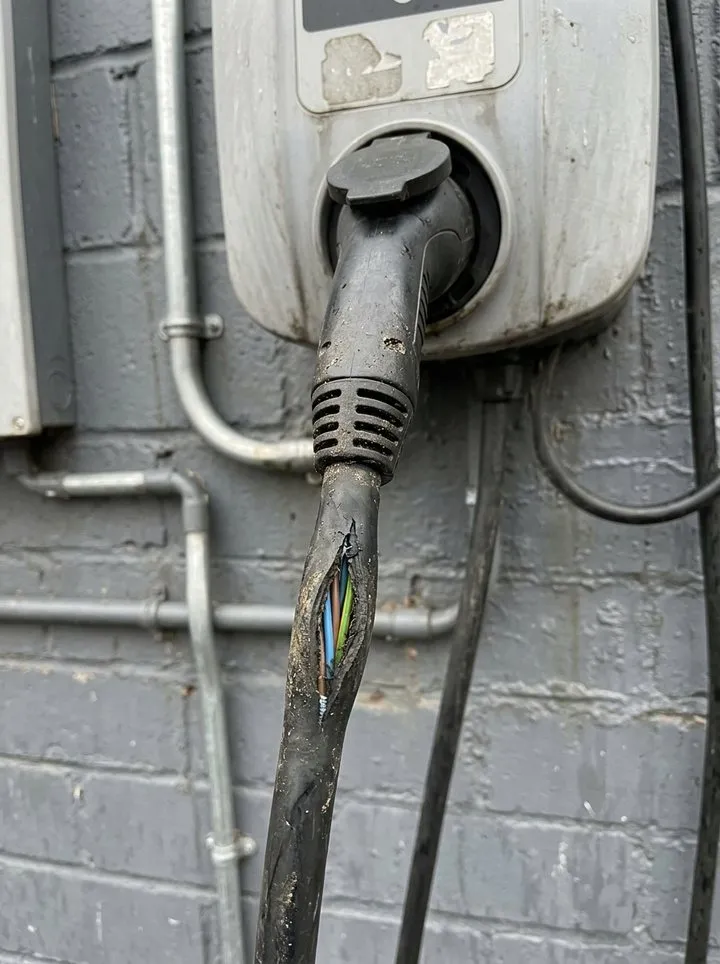
EV-02, 7 kW tethered unit, bay 42: outer sheath of the tethered cable split about 150 mm from the plug. Charger isolated and bagged under permit WC-1407; protective device test not carried out with the cable damaged. Left out of service, replacement cable assembly ordered.

Fictional example. Record the actual evidence and approved arrangements for your job.

A common recording mistake

Do not turn a visual observation into an electrical test result. Mark a check not applicable when it was not done, say why, and keep the relevant specialist report or procedure reference.

What happens next

Record the restrictions, escalation owner and authorised follow-up decision. Keep any specialist electrical test evidence separate and link it by reference; closing this checklist does not certify the installation.

Built for servicing EV chargers on site

Work along the bays with the form on a phone. Each charger gets its ID, its position pinned by GPS, five pass or fail checks and whether it is left in service. The form counts the failed checks and the chargers available, restricted or out of service, and shows a red note for any charger out of service. It records authorised work against the manufacturer's procedure; it is not a set of test instructions.

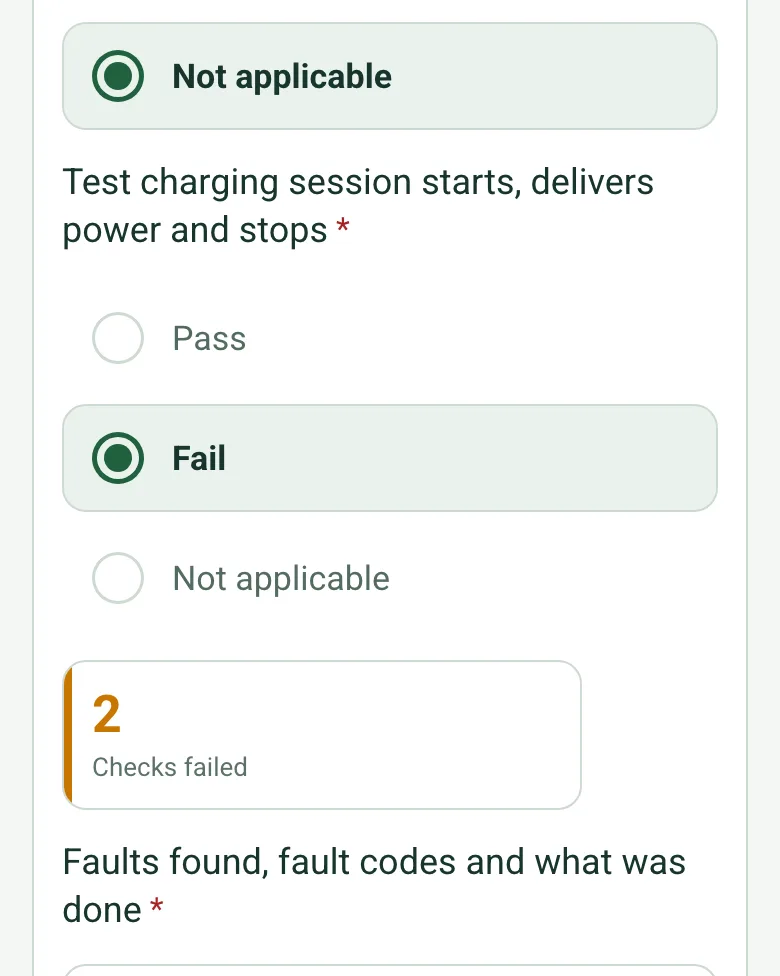
A charger with the protective device test not applicable and the test charging session failed, worked out as 2 checks failed

Pass or fail checks per charger

Record the housing, cable and connector, display and reader, protective device test and a test charging session as pass, fail or not applicable. The form counts the failed checks on each charger and asks what was found and done.

How calculated fields work →
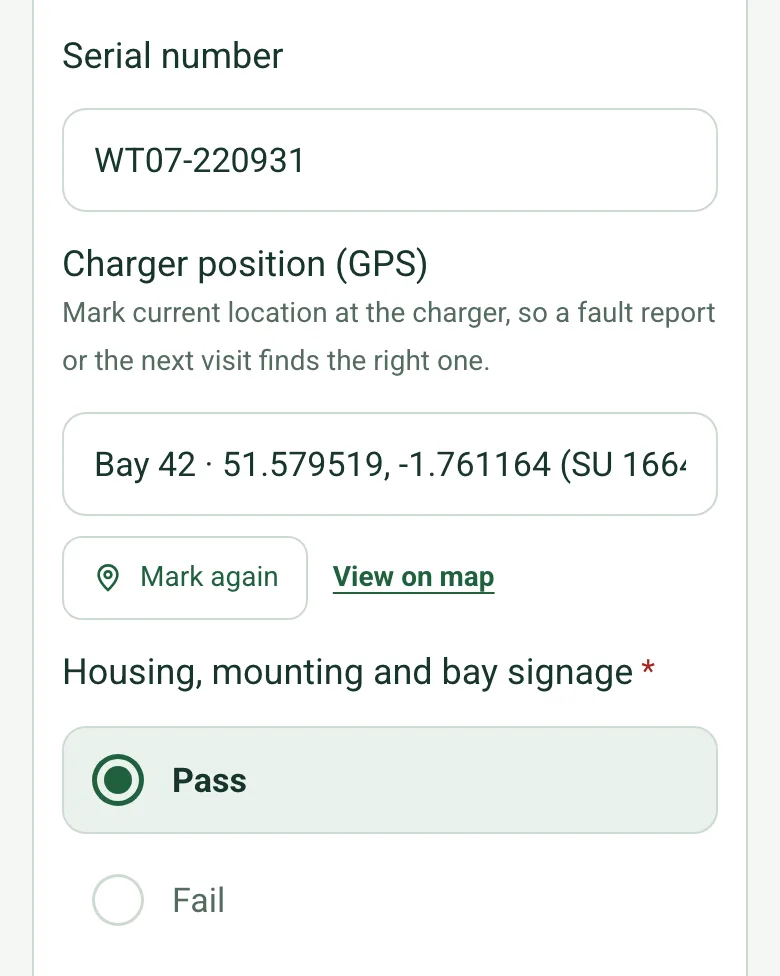
Charger position for bay 42 marked by GPS with Mark again and View on map, under the charger serial number

Pin every charger

Mark current location at each charger, so the next visit or a fault report goes to the right unit on a large car park. Mark current location works on web forms in any phone browser today, and the app version is on its way.

How GPS location works →
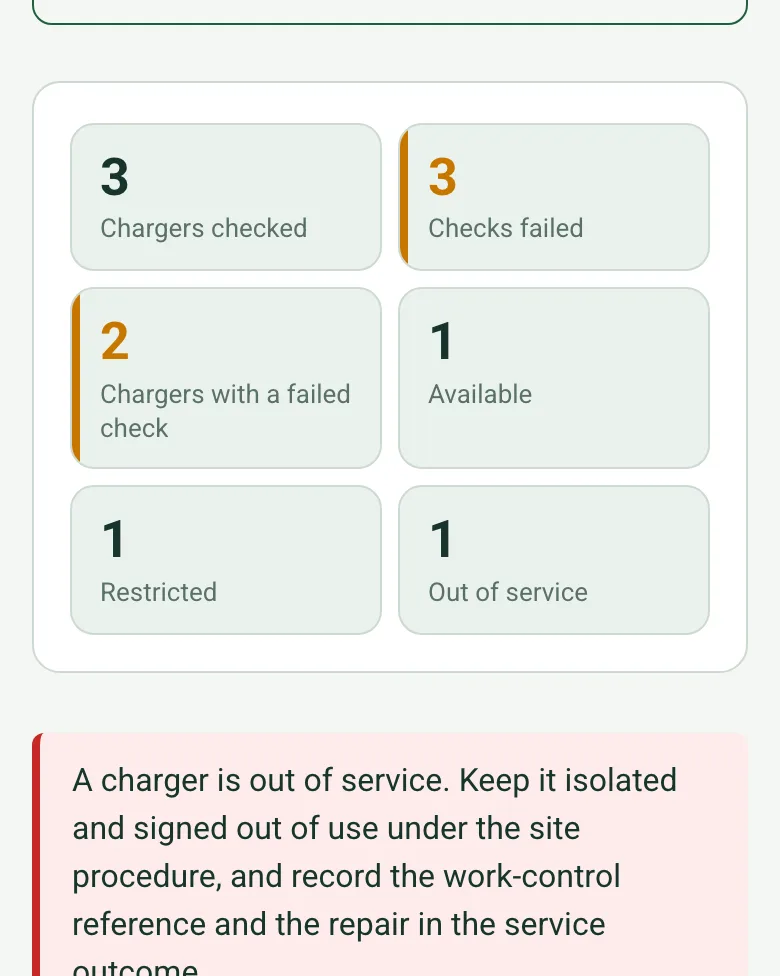
Counts worked out as 3 chargers checked, 3 checks failed, 2 chargers with a failed check, 1 available, 1 restricted and 1 out of service, with a red note to keep it isolated

Chargers left in service, counted

The form totals the chargers checked, the failed checks and the chargers available, restricted or out of service. Anything out of service shows a red note to keep it isolated and signed out of use under the site procedure.

How calculated fields work →

A completed EV charger service visit

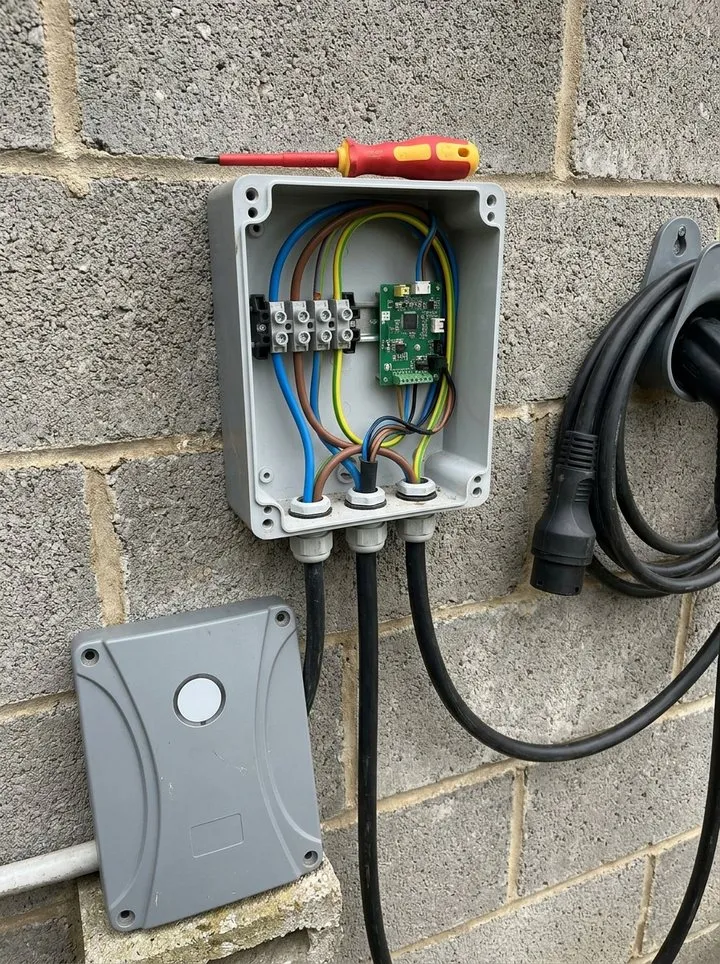
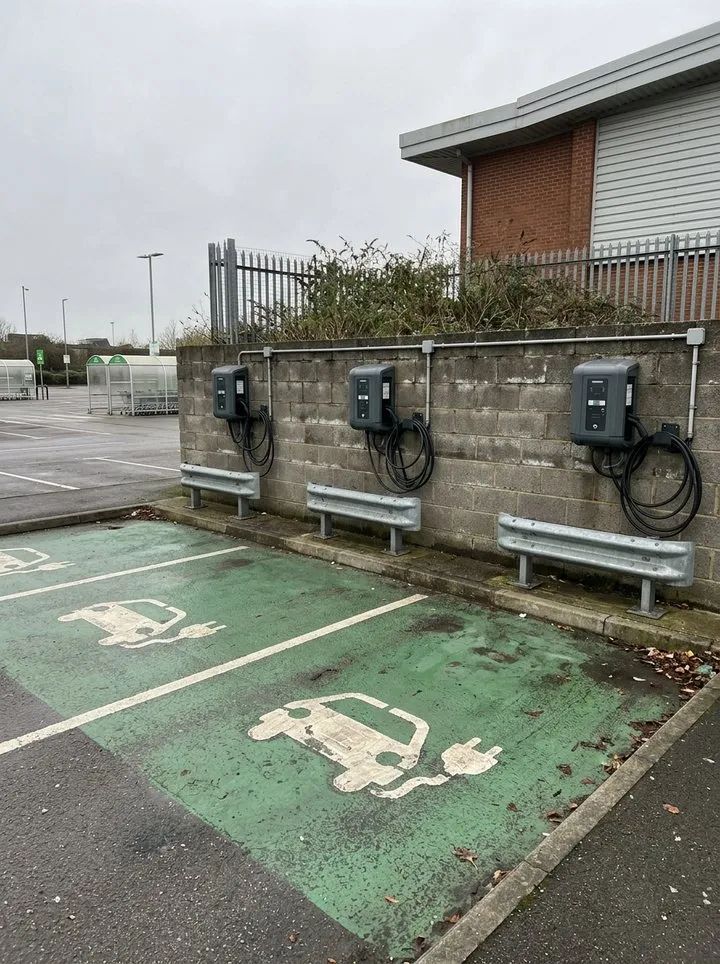
Three chargers on a fictional retail park: one passed, one restricted to app starts with a faulty card reader, and one taken out of service with a split cable sheath. Open it as a filled-in form, or switch to a blank copy and try it yourself.

A tethered charging cable with its outer sheath split near the plug, the inner cores showing
EV-02 · cable sheath split · out of service
A wall charger with its cover off, showing the terminals and circuit board
EV-01 · cover off for the service · passed
Three wall-mounted chargers above green painted bays in a car park
Bays 41 to 43
Along the chargers to the damaged cable

Try the EV charger maintenance form live

Answer a few questions and watch it adapt. Your answers are not saved, and any photos you add are deleted within the hour.

Live form: EV charger maintenance checklistOpen full screen ↗
Fill it in right here

This is the real form as your team would use it: questions appear as you answer, scores work themselves out and you can add photos and signatures. No sign-up needed. Or open a completed example to see every answer, photo and score filled in.

Want to see one filled in? See a completed EV charger maintenance report (PDF), made by SiteSurvey from a fictional site visit.

Every question in the EV charger maintenance template

Record an EV charging unit maintenance visit, visible condition, manufacturer procedure references, functional-check evidence and unresolved faults. 3 sections and 51 questions. Follow-up questions and guidance appear only when an answer calls for them, so the person on site never sees the ones that do not apply.

Make it your own: every question is editable

This is a starting point, not a fixed form. Once it is in your SiteSurvey account you can reword any question, add or remove questions, sections and answer options, and add your own logo, so it fits the way your team works and the jobs you do.

Details you only enter once

Add this form to a project in SiteSurvey and it fills in what the project already knows, so nobody on site retypes it and every form on the job uses the same names. Anything filled in can still be changed.

  • Project or site: the project name
  • Client: the project's customer
  • Site address: the site address, from the space or the project
  • Site and charger location: the site, when the form is opened for a space or a product

Charger and visit

  • Project or site*Short answer
    Fills in from the project name
  • ClientShort answer
    Fills in from the project's customer
  • Site addressShort answer
    Fills in from the site address, from the space or the project
  • Record reference*Short answer
  • Record date*Date
  • Prepared by*Short answer
  • Weather on siteAnswer
  • Site and charger location*Short answer
    Fills in from the site, when the form is opened for a space or a product
  • Manufacturer service procedure and revision*Short answer
  • CheckSources. BS 7671 (Requirements for Electrical Installations, the IET Wiring Regulations), Section 722 (Electric vehicle charging installations), and the IET Code of Practice for Electric Vehicle Charging Equipment Installation. Follow the manufacturer service procedure for the charger itself. Electrical testing must be done by a competent person.
  • Work-control or isolation reference*Short answer

Chargers checked

  • Chargers by car park or area
    Repeat for each entry. Each one asks:
    • Car park or area*Short answer

      For example Staff car park, Level 1

    • Chargers in this area
      Repeat for each charger. Each one asks:
      • Charger ID, make and model*Short answer
      • Serial numberShort answer
      • Charger position (GPS)Short answer

        Mark current location at the charger, so a fault report or the next visit finds the right one.

      • Housing, mounting and bay signage*Choose one
        • Pass
        • Fail
        • Not applicable
      • Cable, connector and holster*Choose one
        • Pass
        • Fail
        • Not applicable
      • Display, RFID reader and network connection*Choose one
        • Pass
        • Fail
        • Not applicable
      • Protective device test as the manufacturer's procedure requires (RCD or built-in DC fault protection)*Choose one
        • Pass
        • Fail
        • Not applicable
      • Test charging session starts, delivers power and stops*Choose one
        • Pass
        • Fail
        • Not applicable
      • Checks failedWorked out by the form
      • Faults found, fault codes and what was done*Notes
        Shown only when the answers above make it relevant
      • Left in service?*Choose one
        • Available
        • Restricted
        • Out of service
      • Condition and defect photosPhotos
    • This car park or area: chargers checkedWorked out by the form
    • This car park or area: checks failedWorked out by the form
    • This car park or area: chargers with a failed checkWorked out by the form
    • This car park or area: availableWorked out by the form
    • This car park or area: restrictedWorked out by the form
    • This car park or area: out of serviceWorked out by the form
  • Chargers checkedWorked out by the form
  • Checks failedWorked out by the form
  • Chargers with a failed checkWorked out by the form
  • AvailableWorked out by the form
  • RestrictedWorked out by the form
  • Out of serviceWorked out by the form
  • WarningA charger is out of service. Keep it isolated and signed out of use under the site procedure, and record the work-control reference and the repair in the service outcome.
    Shown only when the answers above make it relevant
  • Specialist test and service evidence references*Short answer
  • Other photosPhotos
  • GuidanceRecord results of authorised work only. Do not use this checklist as instructions for electrical testing, opening enclosures or isolating equipment.

Service outcome

  • Overall availability after the visit*Choose one
    • Available
    • Restricted
    • Out of service
  • Restrictions and escalation or none*Notes
  • Record status*Choose one
    • Open
    • Complete
  • Next action or reason none is needed*Notes
  • Actions
    Repeat for each action. Each one asks:
    • Action*Notes
    • PriorityChoose one
      • Urgent
      • High
      • Medium
      • Low
    • OwnerShort answer
    • DueDate
    • StatusChoose one
      • Open
      • In progress
      • Completed
  • Responsible person*Short answer
  • Next service dueDate

    Set by the manufacturer service schedule.

  • Days until the next serviceWorked out by the form
    Shown when “Record date” is answered and “Next service due” is answered
  • CheckCheck the date. The next date is before the date of this visit.
    Shown only when the answers above make it relevant
  • Reviewed byShort answer
  • Reviewer acknowledgementSignature

See it filled in

A completed EV charger maintenance report, made by SiteSurvey from a fictional site visit: every answer, the photos, the guidance that applied and the sign-off, ready to send as a PDF.

See completed form (PDF) ↗

EV charger maintenance FAQs

How does this differ from related templates?

This is an asset-specific charger service record. General equipment inspections retain broader asset checks; electrical installation condition reports remain separate.

Does this replace electrical testing or certification?

No. Record specialist test references and the responsible person’s decision. Work must follow the manufacturer’s instructions and applicable site procedures.

Related

Use this EV charger maintenance form with your team

Add it from the form library in one click, change any question, and every completed form becomes a branded PDF report.

Start your trial →